74
INTERACTIVE FUNCTION
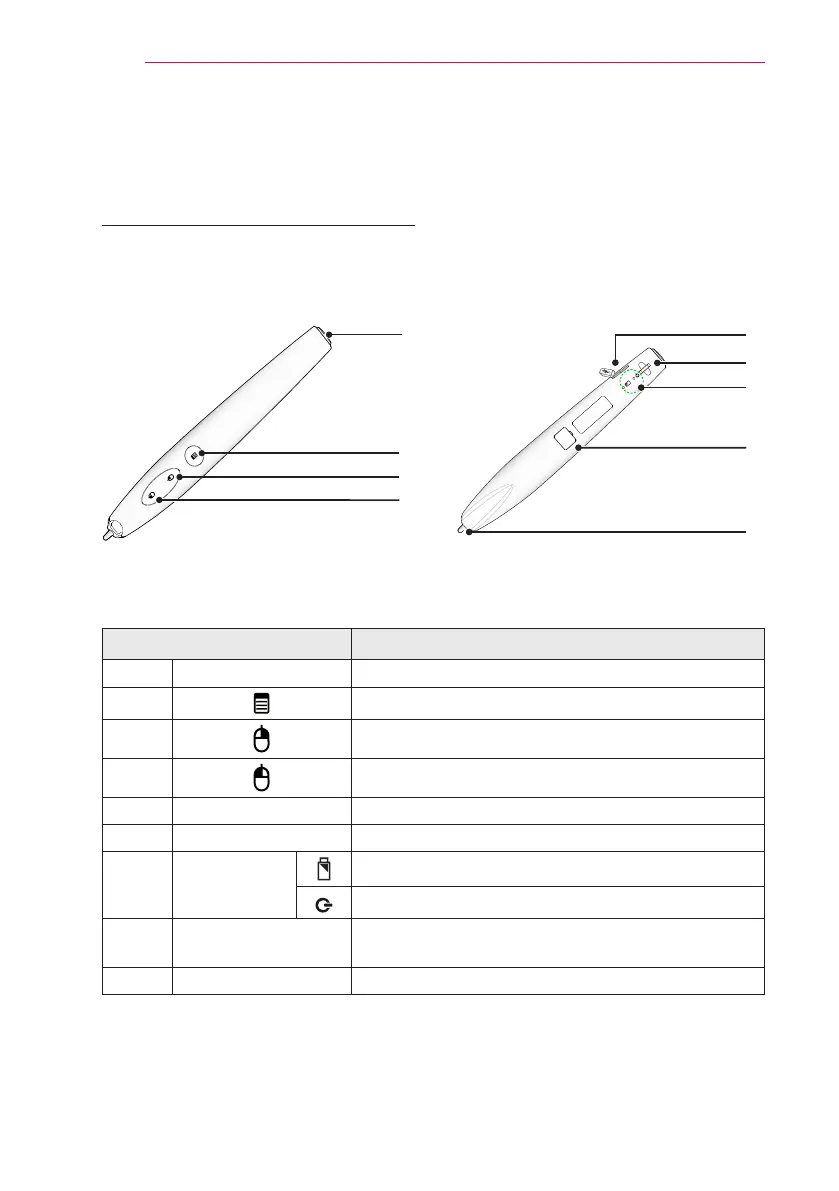
Function/ Button Description
❶
Power Button Turns the interactive pen on/off.
❷
Used for pairing.
❸
Functions the same as a right mouse button.
❹
Functions the same as a left mouse button.
❺
USB charging port Charges the product using the charging cable.
❻
Eyelet for strap Connects the strap to the interactive pen.
❼
LED
Indicators
Shows the battery status.
Shows the pen status.
❽
Firmware upgrade
port
Used to upgrade the interactive pen rmware for
maintenance.
❾
Pen tip
You can write text or draw gures using the Pen tip.
❺
❻
❽
❾
❼
Back
❶
❷
❸
❹
Front
Using The Interactive Pen
Interactive Pen and Button
(For SA565 only)


 To Next Page