4 Operation
Special equipment
Lighting
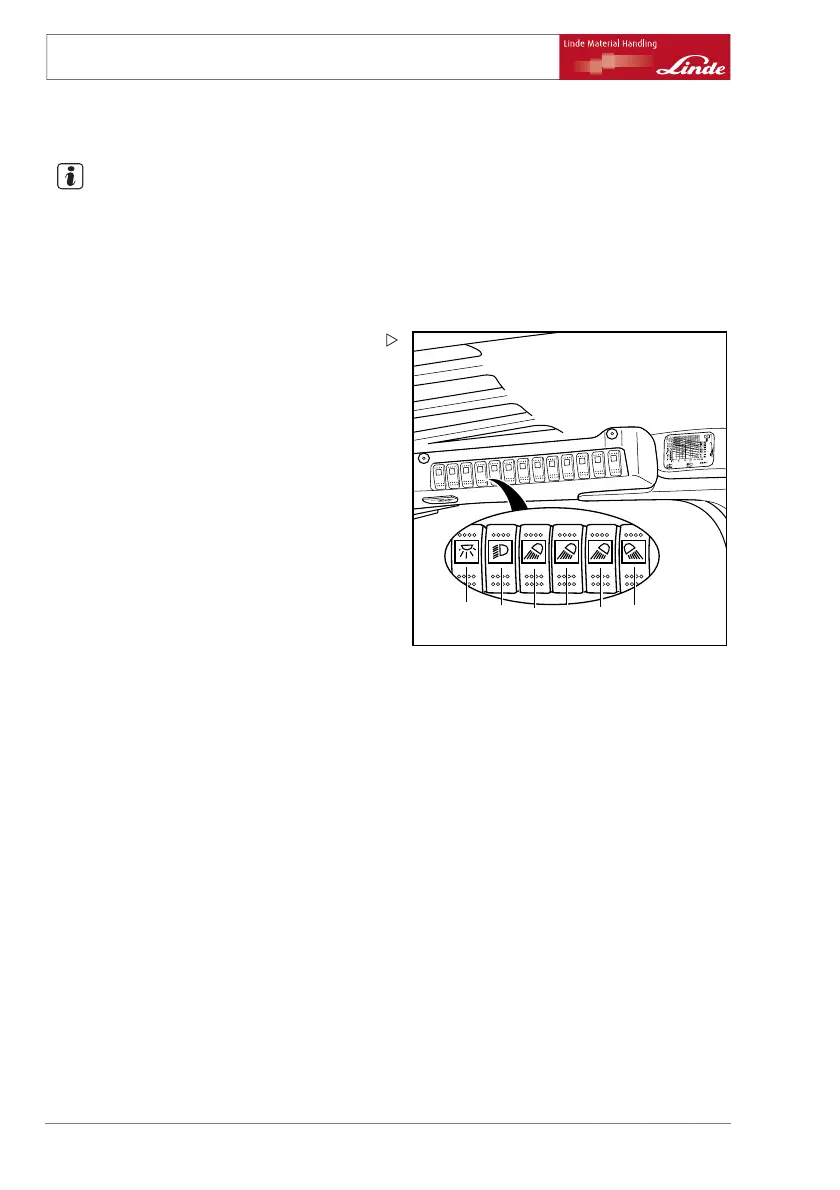
NOTE
The arrangement of the individual switches on
the overhead console may vary depending on
the version. Please take note of the symbols
for the switches.
Switch on interior lighting
e3861337
12 34 5
6
¾ Press toggle switch (1).
Switch on lighting.
¾ Move toggle switch (2) to cen
tre position.
Side lights and licence plat
e light are
switched on.
¾ Switch toggle switch (2) as far as it will go.
Dipped beam, side lights and licence plate
lights are switched on.
Switch on working headlights at front
¾ Press toggle switch (3).
Toggle switch (3) is used to swi
tch the working
headlights at the front at the b
ottom on and off.
¾ Press toggle switch (4).
Toggle switch (4) is used to switch the working
headlights at the front at the top on and off.
¾ Press toggle switch (5).
Toggle switch (5) is used to switch the working
headlights at the front at the top on the cross
traverse on and off.
Switch on working headlights at rear
¾ Press toggle switch (6).
Toggle switch (6) is used to swit
ch the working
headlights at the rear at the top
on and off.
52 Operating Instructions – 386 807 1001 EN – 03/2006



 To Next Page