www.linearcorp.com 19 eMerge Essential Installation Manual
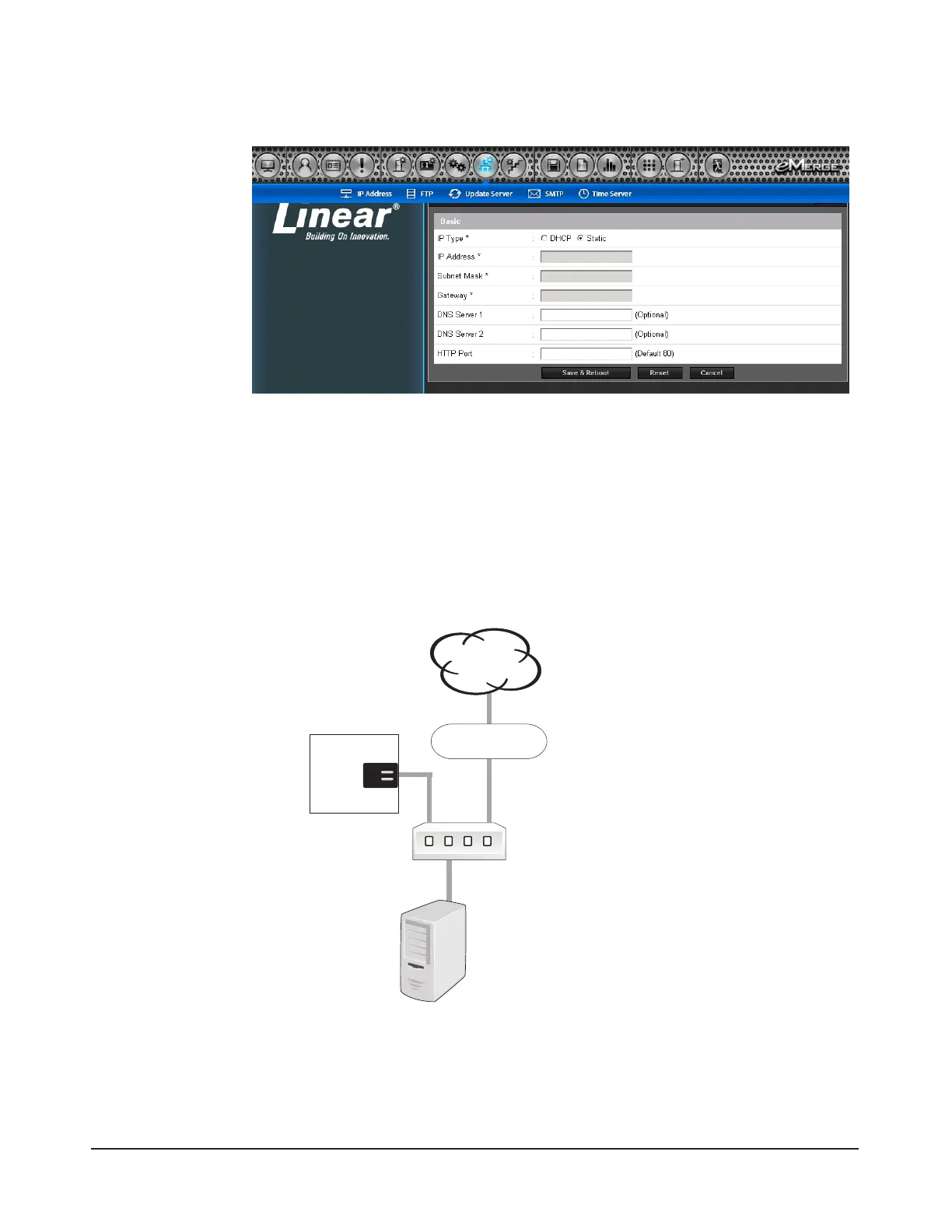
3. Browse to the Network Conguration page as shown in Figure 7.3. Enter the static IP ad-
dress, Subnet Mask, Gateway and DNS server so that it matches the requirements of the
local network. (Refer to the User Manual for complete programming information.)
Figure 7.3. Network Settings Page
4. Click Save & Reboot and the system will reboot.
5. Disconnect the programming computer from the control panel. e eMerge Essential is now
ready for the local network.
Connecting to the Network
1. Pull an Ethernet cable through the opening in the enclosure nearest the Ethernet port.
2. Plug the RJ-45 connector into the Ethernet port on the controller.
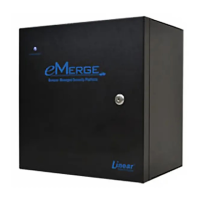
3. Connect to the local area network (LAN) as shown in Figure 7.4.
Figure 7.4. Connecting the eMerge to a LAN
4. If the network connection is functioning properly, the LAN LEDs on the control panel will
illuminate as shown in Figure 7.5. e local computers will then be able to access the system
by entering the IP address of the controller.
Cable specication:
CAT 5 or better with an
RJ-45 connector wired
straight through to a
network hub, switch or
router.
EMERGE
LAN
Client Computer
Router
Internet


 To Next Page