Rev: 03.02.2017
Page 8
Ground Control 3.0 with OneControl
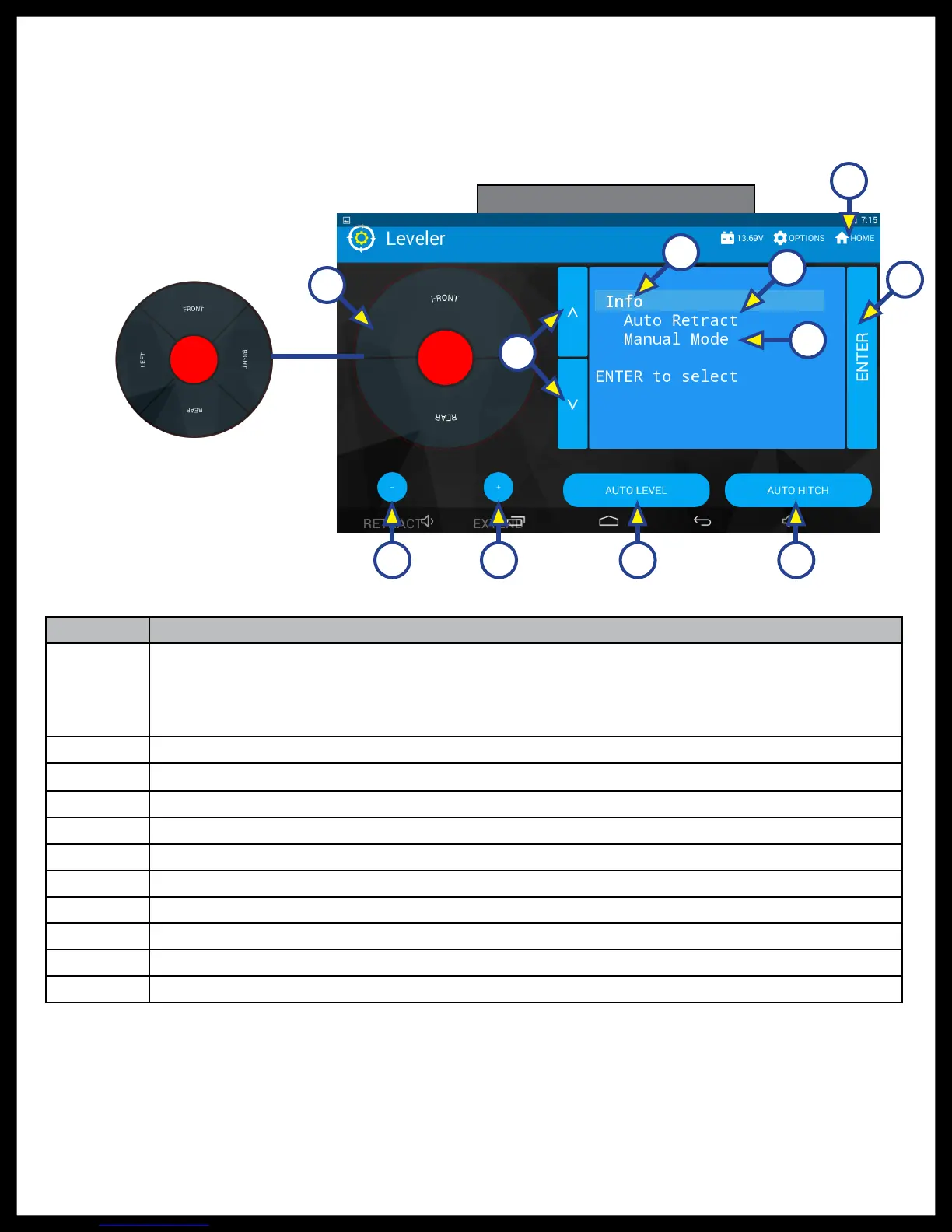
Touch Panel Diagram - OneControl App From MyRV
NOTE: The OneControl Leveling App is available on iTunes® for iPhone® and iPad® and also on Google
Play™ for Android™ users.
Callout Description
A
Jack Buttons - Select front, rear, right and left jacks to be operated depending on mode.
Jacks available to be operated will be highlighted in blue. The front jacks can be extended/
retracted in Standard Mode. Rear jacks can only be retracted from this mode. In Manual
Mode (Fig. 6), all jacks are available to be operated.
B Enter - Push to activate various modes.
C Info - Displays system information, e.g., angle, jack stroke, software version.
D Auto Retract - Enters Auto Retract mode. Choose to retract "All Jacks" or "Rear Jacks."
E Manual Mode - Enters Manual Mode to manually operate jacks.
F Home Icon - Returns screen to home page.
G Up and Down Arrows - Scroll through options on screen.
H Retract - Retracts jacks in several modes. Jacks available will be highlighted in blue.
I Extend - Extends jacks in several modes. Jacks available will be highlighted in blue.
J Auto Level - Starts the Auto Level sequence.
K Auto Hitch - Returns trailer to previous hitch height for reconnecting to tow vehicle.
Fig. 4 - Leveling Standard Mode
Jack buttons
in Manual Mode
(See Fig. 6)
B
C
D
E
F
G
H I J K
A






 To Next Page