To Next Page

M
Michele FrancisSep 23, 2025
What to do if Lippert Components ground control TT Lifting Systems touch panel is active?
- JjordancherylSep 23, 2025
If the touch panel on your Lippert Components Lifting Systems is active, no action is required.

What to do if Lippert Components ground control TT Lifting Systems touch panel is active?
If the touch panel on your Lippert Components Lifting Systems is active, no action is required.
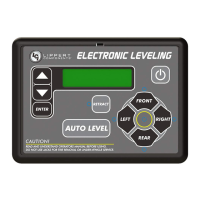
What to do if my Lippert Components Automobile Accessories touch panel displays “AUTO LEVEL FAILURE”?
The “AUTO LEVEL FAILURE” message on your Lippert Components Automobile Accessories touch panel can be triggered by a couple of things. First, check that the sensor is securely placed. If the sensor is secure, test the battery voltage under load, and charge or replace the battery if necessary, as a voltage drop can also cause this error.
Why does my Lippert Components Automobile Accessories touch panel show “EXCESS ANGLE”?
The “EXCESS ANGLE” message on your Lippert Components Automobile Accessories touch panel suggests that your trailer is not level. This can happen if the sensor is unsecured, so check and secure the sensor placement. It can also occur if you're on an uneven or sloped site, in which case you should relocate the trailer.
What does “OUT OF STROKE” mean on my Lippert Components Automobile Accessories touch panel?
The “OUT OF STROKE” message on your Lippert Components Automobile Accessories touch panel means that the trailer is not level. This can happen if the sensor is unsecured, so check and secure the sensor placement. It can also occur if you're on an uneven or sloped site, in which case you should relocate the trailer.
What does it mean if my Lippert Components Automobile Accessories touch panel says “CAN’T COMPLETE LEVEL IN THIS LOCATION. PLEASE RELOCATE RV TO FLATTER TERRAIN”?
This message on your Lippert Components Automobile Accessories touch panel indicates that the trailer is parked on a steep incline during auto level. The front cannot be leveled because the front jacks are already fully retracted. You will need to relocate the trailer to flatter terrain.
What to do if Lippert Components ground control TT Lifting Systems displays 'FEATURE DISABLED'?
If your Lippert Components Lifting Systems displays 'FEATURE DISABLED', it could be due to: 1. Hitch recognition requested but no hitch height set: Perform “AUTO LEVEL” sequence to establish hitch height. 2. Zero point not set: Set zero point.
What to do if Lippert Components ground control TT Lifting Systems displays 'FUNCTION ABORTED'?
If your Lippert Components Lifting Systems displays 'FUNCTION ABORTED', it means that user has aborted an automatic leveling sequence. To resolve this, restart the sequence.
What to do if my Lippert Components ground control TT shows 'JACK TIME OUT'?
If your Lippert Components Lifting Systems displays 'JACK TIME OUT', it indicates that the system could not level in the expected time. Check the disposition of jacks.
What to do if Lippert Components Lifting Systems shows 'LOW VOLTAGE'?
If your Lippert Components Lifting Systems displays a 'LOW VOLTAGE' error, the cause may be a bad connection or wiring, or a discharged or bad battery. You should check the wiring, repairing or replacing as necessary. Also, test the battery voltage under load and either charge or replace the battery if needed.
What to do for the “EXCESSIVE ANGLE” message on my Lippert Components Automobile Accessories touch panel?
If your Lippert Components Automobile Accessories touch panel displays the “EXCESSIVE ANGLE” message, stop the manual operation and reset the jacks to a more level state. The code will self-clear.
Read and understand all instructions before installing or operating this product. Adhere to all safety labels.
Detailed instructions for mounting the system's brackets and jacks.
Guides the installation of front spacer kits and C-jacks onto the trailer frame.
Guides the installation of rear mounting brackets and 5K short jacks.
Procedure for installing the primary power tongue jack.
Instructions for locating and mounting the leveling sensors for optimal performance.
Steps for installing the main system controller.
Detailed steps for the automatic leveling sequence of the trailer.
Guides to interpreting LED status and handling system error displays.
Troubleshooting specific error messages shown on the OneControl touch panel.
Steps to clear special jack error codes by homing the jacks.
Procedure to set the system's zero point for accurate auto leveling.
Schematic illustrating the electrical connections of the leveling system components.
 General
| Brand | Lippert Components |
|---|---|
| Model | ground control TT |
| Category | Lifting Systems |
| Language | English |