EasyManua.ls Logo

Lippert Components ground control 3.0 - User Manual

Lippert Components ground control 3.0
24 pages
Print Icon
To Next Page IconTo Next Page
Loading...
Rev: 03.02.2017
Page 1
Ground Control 3.0 with OneControl
Ground Control 3.0
(5th Wheel)
4 Point and 6 Point
OneControl
Touch Panel
OWNER'S MANUAL

Other manuals for Lippert Components ground control 3.0

Questions and Answers

  • K
    kristenbarrettAug 19, 2025
    Why does my Lippert Components ground control 3.0 touch panel say 'LOW VOLTAGE'?
    • C
      Calvin SimmonsSep 12, 2025
      If the Lippert Components Lifting Systems touch panel displays 'LOW VOLTAGE', this could be due to a bad connection or wiring, or a discharged or bad battery. Check the wiring for issues and repair or replace as needed. Also, test the battery voltage under load and charge or replace the battery if necessary.
  • K
    Kathleen ThomasAug 21, 2025
    What to do if Lippert Components ground control 3.0 touch panel shows 'AUTO LEVEL FAIL'?
    • R
      Renee PughAug 21, 2025
      If the Lippert Components Lifting Systems touch panel displays 'AUTO LEVEL FAIL', the controller might be unsecured or there could be a voltage drop. Check and secure the controller placement. Also, test the battery voltage under load and charge or replace the battery if needed.
  • J
    Jennifer PhillipsAug 23, 2025
    What does 'EXCESSIVE ANGLE' mean on my Lippert Components ground control 3.0 touch panel?
    • J
      joshua39Aug 23, 2025
      If the Lippert Components Lifting Systems touch panel displays 'EXCESSIVE ANGLE', it could be due to the controller not being properly secured or an excessive angle reached during manual operation. Check and secure the controller placement. If that doesn't solve the problem, relocate the coach.
  • W
    Wendy AllenAug 26, 2025
    What does 'OUT OF STROKE' mean on Lippert Components ground control 3.0 Lifting Systems touch panel?
    • B
      brownveronicaAug 26, 2025
      If the Lippert Components Lifting Systems touch panel displays 'OUT OF STROKE', this can be caused by an unsecured controller or an uneven or sloped site. Check and secure the controller placement, and relocate the trailer.
  • S
    Stephanie LarsonAug 27, 2025
    Why does my Lippert Components Lifting Systems touch panel say 'EXCESS ANGLE'?
    • A
      Ashley WashingtonAug 28, 2025
      If the Lippert Components Lifting Systems touch panel displays 'EXCESS ANGLE', this could be due to an unsecured controller or an uneven or sloped site. Check and secure the controller placement. You may also need to relocate the trailer.
  • T
    Theresa ShawAug 30, 2025
    How to fix 'FEATURE DISABLED' message on Lippert Components ground control 3.0 Lifting Systems?
    • T
      Thomas JoyceAug 30, 2025
      If the Lippert Components Lifting Systems touch panel displays 'FEATURE DISABLED', this may be because hitch recognition was requested but no hitch height has been set or the zero point has not been set. Perform the "AUTO LEVEL" sequence to establish hitch height or set the zero point.
  • Y
    ykellySep 1, 2025
    What to do if Lippert Components Lifting Systems shows 'BAD CALIBRATION'?
    • L
      Lori MaloneSep 1, 2025
      If the Lippert Components Lifting Systems touch panel displays 'BAD CALIBRATION', it means that the trailer zero point was not set correctly. Reset the zero point to resolve this issue.
  • R
    rwilliamsSep 3, 2025
    Why is the Lippert Components Lifting Systems LED indicator solid red?
    • C
      Cheyenne ClarkSep 3, 2025
      If the Lippert Components Lifting Systems Red/Green LED indicator is solid red, it indicates a low battery. Charge or replace the battery.
  • M
    meghan45Sep 5, 2025
    What does 'JACK TIME OUT' mean on Lippert Components Lifting Systems?
    • R
      rsimpsonSep 5, 2025
      If the Lippert Components Lifting Systems touch panel displays 'JACK TIME OUT', it means the system could not level in the expected time. Check the disposition of the jacks.
  • K
    Katherine WatersSep 7, 2025
    Why is the Lippert Components ground control 3.0 LED indicator off?
    • J
      John NavarroSep 7, 2025
      If the Lippert Components Lifting Systems Red/Green LED indicator is off, it means the touch panel is locked. Unlock the touch panel.

Summary

Safety Information

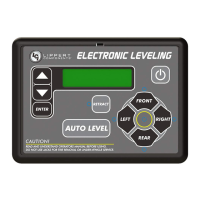
Auto Leveling Control Touch Panel

Touch Panel Diagram - Auto Leveling Control Touch Panel

Diagram showing callouts for the Auto Leveling Control Touch Panel.

Operation - Auto Leveling Control Touch Panel

Instructions for operating the Auto Leveling Control Touch Panel.

OneControl Touch Panel

Touch Panel Diagram - OneControl Touch Panel

Diagram illustrating the OneControl Touch Panel interface and its functions.

Operation - OneControl Touch Panel

Detailed steps for operating the OneControl Touch Panel for leveling.

OneControl App From MyRV

Touch Panel Diagram - OneControl App From MyRV

Visual guide to the OneControl App interface for trailer leveling.

Operation - OneControl App

Instructions on accessing and using the OneControl App for trailer leveling.

Linc Remote Control - Optional

Touch Panel Diagram - Linc Remote Control - Optional

Illustration of the Linc Remote Control and its buttons.

Operation - Linc Remote Control

Procedures for operating the Linc Remote Control for trailer leveling.

Troubleshooting

Troubleshooting Indicators and Errors

Covers LED indicators, touch panel errors, and special jack error codes.

Manual Override

Jack Motor Override Procedures

Steps for manually overriding jack motors from top and bottom.

Zero Point Calibration

To Set the Zero Point

Procedure to program the Zero Point for the leveling system.

Preventive Maintenance

Ground Control 3.0 4 Point Assembly Components

Leveling and Stabilization Parts

Diagram and list of parts for the 4-point leveling system.

Ground Control 3.0 6 Point Assembly Components

Leveling and Stabilization Parts

Diagram and list of parts for the 6-point leveling system.

Ground Control 3.0 Component Details

Hall Effect Jacks and Motors

Details on Hall Effect landing gear, jacks, and motors with part numbers.

Jack Mounting Brackets and Pins

Details on jack mounting brackets and pull pins with part numbers.

Ground Control 3.0 Hardware Components

Mounting Hardware and Sensors

Details on nuts, bolts, sensors, and mounting plates with part numbers.

Wiring Harnesses and Resistors

Details on CANbus harnesses and resistors with part numbers.

Ground Control 3.0 Electronic Components

Control Panels and Remotes

Details on OneControl Touch Panel, Auto Leveling Control Touch Panel, and Linc Remote.

Controllers and Harnesses

Details on 4-point and 6-point controllers and related harnesses.

Lippert Components ground control 3.0 Specifications

General IconGeneral
BrandLippert Components
Modelground control 3.0
CategoryLifting Systems
LanguageEnglish

Related product manuals