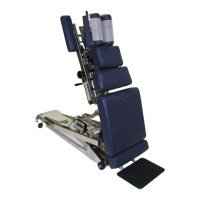
Optional - Total Dimension Flexion Head
TM
Page 8
Lateral Side Bending
1. To unlock the Lateral Side Bending Feature rotate the Lateral Side Bending Release Knob
(No. 3) clockwise (from left side of table).
2. Turn the Lateral Side Bending Release Knob (No. 3) counterclockwise to lock headpiece in
desired position (from left side of table).
CAUTION: MAKE SURE THE HEADPIECE IS LOCKED BEFORE ALLOWING A PATIENT
ON OR OFF THE TABLE.
Manual Traction
1. To unlock the manual traction feature simply pull and twist the Traction Release Knob (No. 4)
1/4 of a turn clockwise or counterclockwise.
2. When unlocked the headpiece will glide forward and backward.
3. To lock the manual traction twist the Traction Release Knob (No. 4) 1/4 turn counterclockwise or clockwise.
Manual Flexion Distraction
1. To unlock the manual flexion distraction locate the Flexion / Tilt Knob (No. 5) pull forward and twist 1/4 turn
counterclockwise.
2. Gently apply pressure down using the Flexion Assist Handle (No. 8).
3. To lock the manual flexion distraction twist the Flexion / Tilt Knob (No. 5) 1/4 turn clockwise and release to
engage lock.
Tilting Feature
1. To unlock the Tilting feature locate the Flexion / Tilt Knob (No. 5) while supporting the head cushion pull
forward and twist counterclockwise.
2. Once the desired angle is obtained, lock the headpiece simply by twisting the Flexion / Tilt Knob (No. 5)
clockwise and release.
Rotation Feature
1. To unlock the Rotation feature locate the Rotation Release Knob (No. 6) Pull toward the head of the table and
twist 1/4 turn clockwise.
2. Gently move the headpiece with the Flexion Assist Handle (No. 8)
3. To lock the Rotation feature locate the Rotation Release Knob (No. 6) twist 1/4 turn counter clockwise and
release.
Face Opening Adjustment
1. The Head Cushion’s Face Opening can be opened or closed to adjust for the comfort with the Face Opening
Lever (No. 7). By pushing slightly down on the Face Opening Lever, slide side to side adjusting the face
opening. The Face Opening Lever must be released in one of the eight positions to lock cushions in place.
Flexion Assist Handle
1. The Flexion Assist Handle (No. 8) has many functions including aiding with manual Cervical Flexion
Distraction, rotation, lateral side bending, and tilting the headpiece.
2. To adjust the Flexion Assist Handle to desired comfort twist the Flexion Assist Handle locking Knobs on both
sides of table. This will unlock the handle for adjustment. Twist in opposite direction to lock.
WARNING: THE FOLLOWING CERVICAL OPERATIONS ARE ONLY TO BE
OPERATED BY A PROFESSIONAL PRACTITIONER, EDUCATED IN THE
PROCEDURE OF FLEXION-DISTRACTION AND TRACTION, ON THE SPINE.



 To Next Page