Page 21
Optional - Electronic Height Adjustment (EHA)
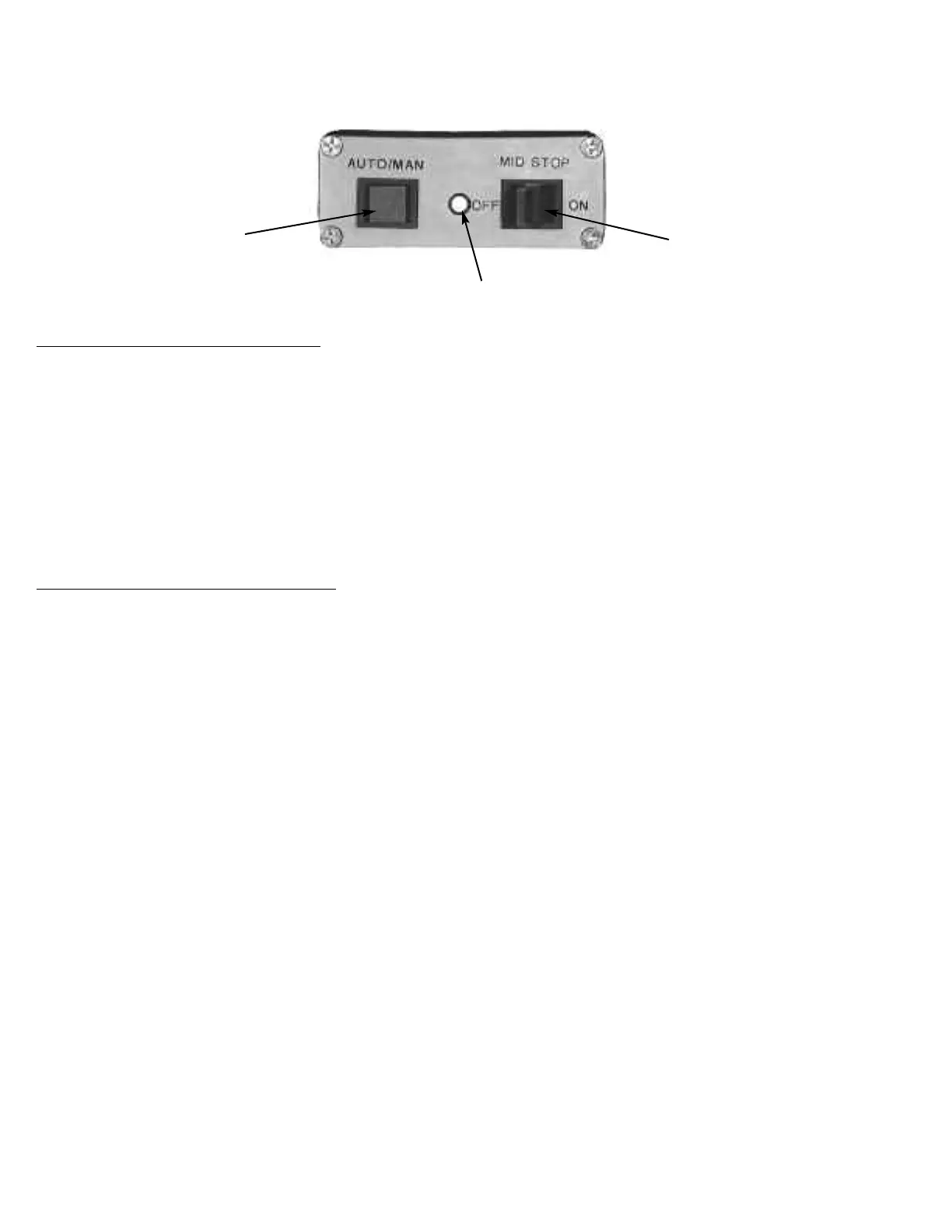
#1 Auto / Manual Button
# 2 Green Indicator Light
#3 Mid - Level
On/Off Switch
To Activate Electronic Height Adjustment:
1. Push the Auto / Manual Button(No. 1) Button to activate EHA. Once the Auto / Manual Button (No. 1) has been pressed
note that the Green Indicator Light (No. 2) is now illuminated.
2. Toggle the Mid - Level On/Off Switch(No. 3). Toggle the switch toward the foot end of the table to activate the Mid-Level Stop.
(If the Mid-Level Switch is “on” the table will stop at the programmed middle setting)
Toggle the switch towards the head end of the table to turn off the Mid-Level Stop. (If the Mid-Level Switch is “off” the table
will elevate or lower without stopping at the programmed middle setting)
3. Depress foot pedal once until the programmed height is achieved.
To Turn “Off” Electronic Height Adjustment
1. Push the Auto / Manual Button(No. 1) Button to activate EHA. Once the Auto / Manual Button (No. 1) has been pressed
note that the Green Indicator Light (No. 2) is now off.
2. When the EHA is off the table is in manual mode, press the foot pedal until desired height is obtained and release pedal.



 To Next Page