Connecting up
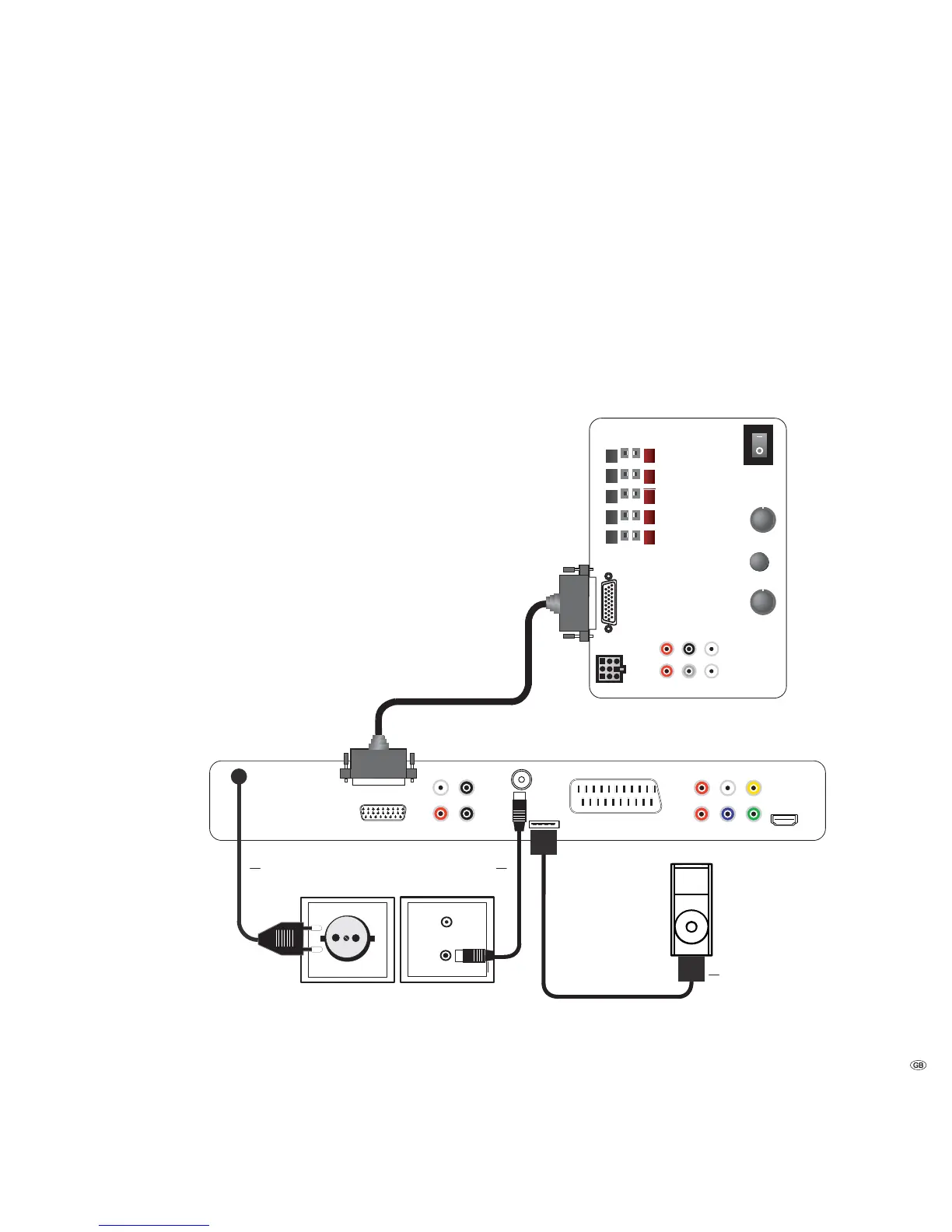
AudioVision as a Stand-Alone Solution
Use the antenna cable to connect the socket ANTENNA FM to an antenna socket.
If you want to connect an analogue audio source, connect it with the sockets
INPUT AUX L/R of the AudioVision.
The analogue audio signal of the AudioVision is available on the sockets OUTPUT
AUX L/R.
If you want to connect a digital audio source, connect it with the socket COAXIAL
IN of the AudioVision.
The digital audio signal of the AudioVision is available on the socket COAXIAL
OUT.
Connect the cable from the iPod Dock to the socket iPod (24pin).
Connect the socket AUDIO-LINK of your AudioVision with the socket of the
SubWoofer using the Audio Link cable.
Plug the mains cable into a 220-240V 50/60 Hz wall socket.
Line IN
Front
Right
Surr.
Front
Subw.
Left
Right
Center
Left
R
R
L
C
L
Bass Intensity
Phase
Min. Max.
0 180
Crossover Frequency
Audio Link
System connector
50 250.
Audio link cable
Loewe SubWoofer
AudioVision
Mains cable
FM Antenna
iPod cable
13 -



 To Next Page