Start-up
Setting up the Assist Remote Control
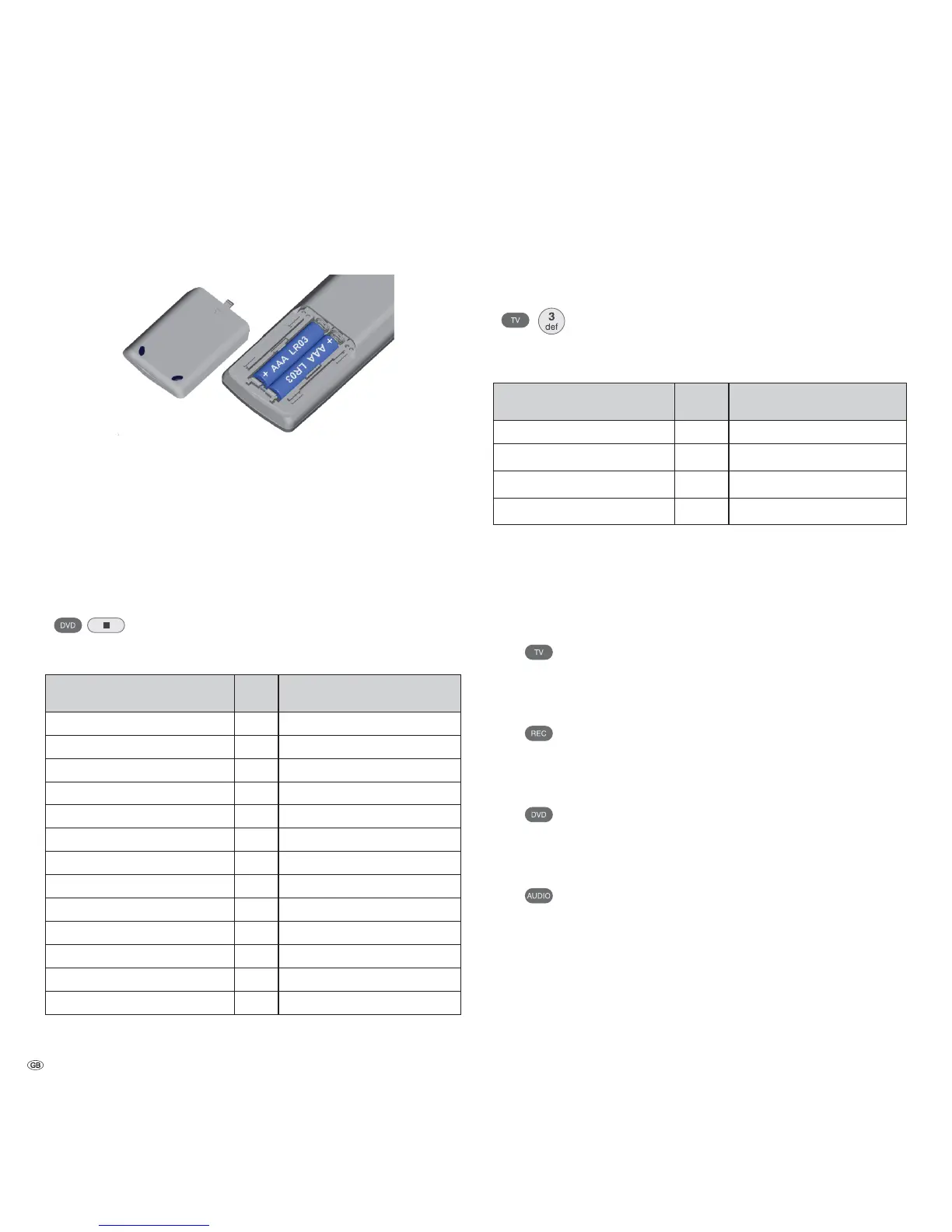
To insert or change the batteries, press on the arrow. While doing so, simply slide
the battery compartment lid down and remove it. Insert alkali manganese bat-
teries LR 03 (AAA) and ensure the correct position of + and –. Slide the cover on
again from the bottom.
Setting up the Assist Remote Control
Other Devices
You can operate various Loewe devices using the Assist Remote Control. The device
buttons REC - DVD - AUDIO can be set up for this.
Press the required device buttons and the Stop button
simultaneously for 5 sec. until the corresponding LED display
flashes twice.
Then enter the two-digit device code from the list:
Unit Code Factory setting
Loewe ViewVision 8106 H 10
Loewe Viewvision, Centros 21x2 12
Loewe ViewVision DR+ DVB-T 13 REC
Loewe Auro 2216 PS/8116 DT 14
Loewe BlutechVision 15
Loewe Soundprojector 17
Loewe TV Radio digital 19
Loewe Mediacenter 20
Loewe BlutechVision Interactive 21 DVD
HDMI CEC Mode¾¾
22
Loewe AudioVision 24 AUDIO
Loewe Sound Projector SL 25
Reset to factory settings 99
The corresponding LED Display flashes twice.
Sound functions
It can be set on which devices the buttons with the sound functions (V+/-, sound
off and sound mode) should work.
Press the device button TV and at the same time the button
with the single digit function code from the list for 5 sec. until
the LED Display flashes twice.
Function Code Figure
Loewe AudioVision 3 page 12, page 13
Loewe Mediacenter 4
Loewe TV ¾
5 page 11
Loewe Soundprojector 6
¾ Factory setting
¾¾ from mainframe L271x, Software V9.5)
Operating Loewe Equipment
Using the remote control for a Loewe TV set
Press TV button; the LED Display above it
lights up for approx. 5 seconds
Using the remote control for a Loewe recorder
Press the REC button; the LED Display above
it lights up for approx. 5 seconds
Using the remote control for a Loewe DVD Player
Press the DVD button; the LED Display above
it lights up for approx. 5 seconds
Using the remote control for AudioVision
Press the AUDIO button; the LED Display
above it lights up for approx. 5 seconds
Every time a button is pressed, the LED display lights up for the selected operating
mode for checking purposes (TV – REC – DVD – AUDIO).
Please refer to the respective operating conditions on how to operate the indi-
vidual devices.
- 14



 To Next Page