Playback of Media Files
Audio Files
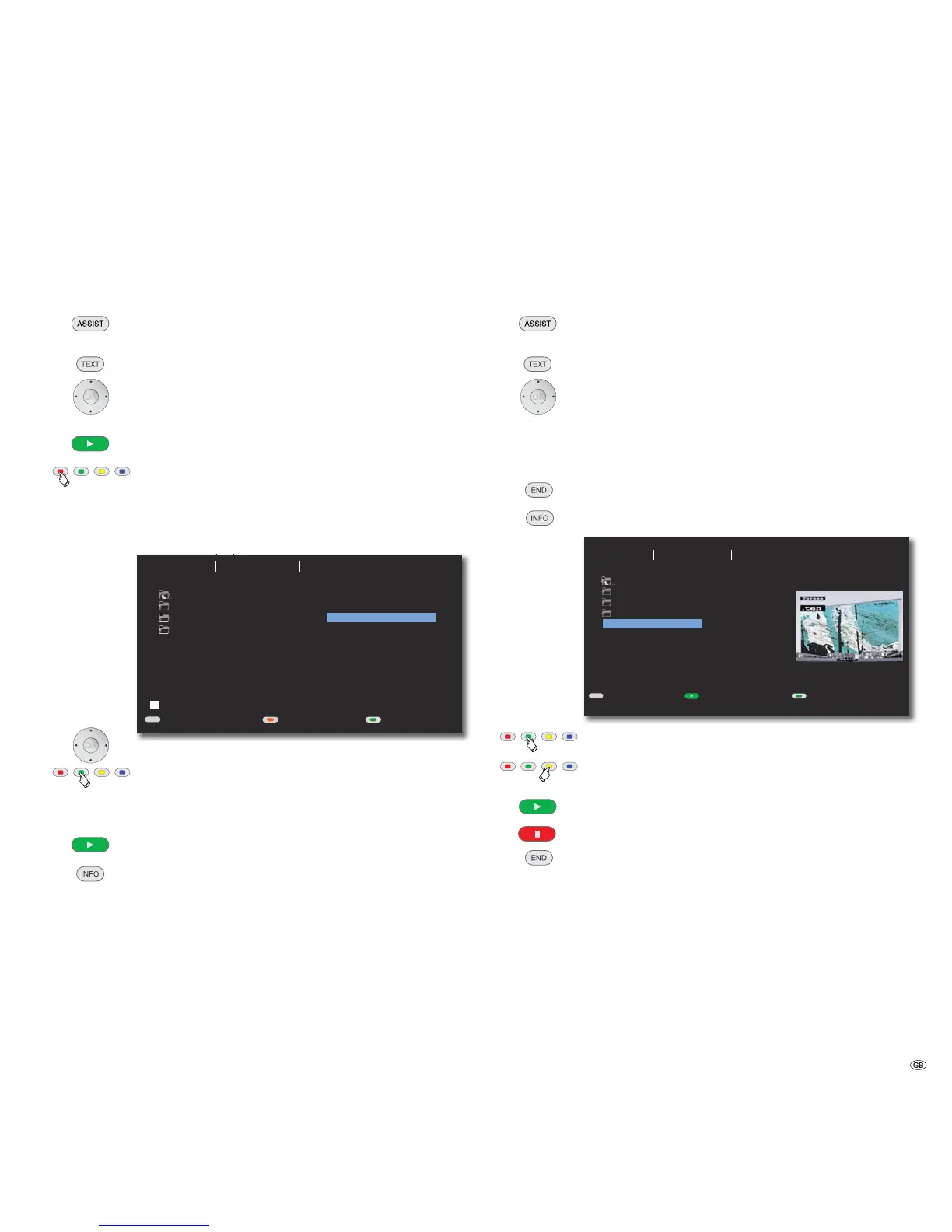
Playback of Audio Files
Press several times until the display of the AudioVision shows
DVD / CD or USB.
Press several times to select Music.
Select file or folder.
OK Start playback or change to folder.
Play Start / continue playback.
Red button Switch screen on/off
Playlist
CD MP3 WMA
You can play back up to 30 Titles/Track on one disc or a storage medium in a
sequence you have chosen. The playlist is not saved.
TEXT
USB
Folder 1
Folder 2
Folder 3
0:00:00 1/8
01-Title1.mp3
03-Title3.mp3
05-Title5.mp3
01-Title1.mp3
02-Title2.mp3
03-Title3.mp3
04-Title4.mp3
05-Title5.mp3
Play List
Music Photo Movie
DeleteScreen off/onPhoto/Movie
Select Title/Track in the left column List.
Green button Add selected title/track to the Playlist.
Move selection bar in the right column Playlist to
the first entry.
Play Start / continue playback.
Press several times to display the file information saved in the
MP3 file (Metadata/Tags).
Conditions for Audio files
• Sampling Frequency: 32 - 48 kHz (MP3), 32 - 48 kHz (WMA).
• Bit rate: 32 - 320kbps (MP3), 40 - 192kbps (WMA).
• Number of Files: Maximum 999.
• File extensions: ”.mp3” / ”.wma”.
Photo Files
Display of photo files
Press several times until the display of the AudioVision shows
DVD / CD or USB.
Press several times to select Photo.
Select file or folder. Press and hold to scroll through.
OK Start photo display or change to folder.
Move to previous / next picture.
Rotate picture left / right by 90°.
End photo display.
Hide/Show operating options.
TEXT
S
Folder 1
Folder 2
Folder 3
Picture1.jpg
1024X768 1/54
USB
Picture1.jpg
Picture2.jpg
Picture3.jpg
Picture4.jpg
Picture5.jpg
Preview
Music Photo Movie
Time: 3secMovie/Music
X Slide Show
Green button Set up the speed of the slide show 3/5/8 sec.
Yellow button Zoom mode setup. Move with the
image section.
Play Start the slide show.
Pause Stop/Continue the slide show.
End the slide show.
Conditions for photo files
• Max. pixel width: 2760 x 2048 pixels
• Number of Files: Maximum 999.
• File extensions: ”.jpg”
25 -



 To Next Page