51 -
english
Audio playback from external devices
You can play the sound of external AV devices (e.g. MP3 players, DVD
players) in radio mode.
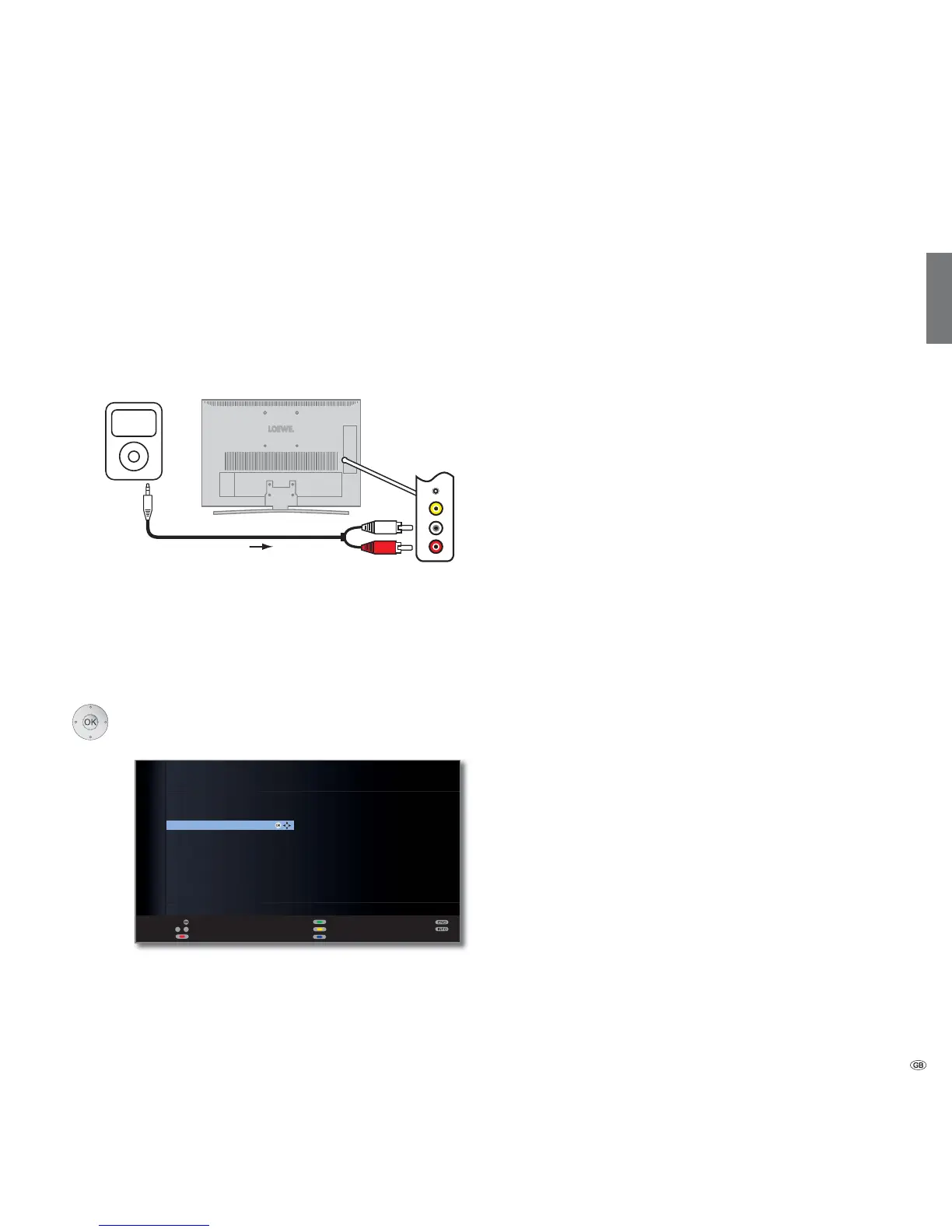
Connecting an external appliance (e.g. MP3 player)
Connect the output (jack) of the MP3 player to the cinch audio in sockets
L/R (white/red) of the TV set.
Select AV input
➠ Radio mode switched on,
if not, see page 48.
OK Open station list.
The AV inputs are listed before the first radio station in
a numerically sorted list.
➠ The selection of the AV inputs is the same as in TV
mode (see page 32).
Start playback on the external device after selecting the
AV input.
OK
OK
a
z
-
AUDIO IN
HDMI 2
HDMI 1
AV-VIDEO
AV
%D\HUQ ۽
%D\HUQ ۽
%D\HUQ ۽
'.8/785 ۽
%DNWXHOO ۽
KU۽
KU۽
KU۽
KU۽
%59HUNHKU ۽
%SOXV ۽
0'56SXWQLN ۽
-803۽
1'5۽
1RUGZHVWUDGLR ۽
RQUDGLR۽
'/)۽
<28)0۽
STATION LIST
Scan stations
Change stations
Sort alphabetically
Switch to ...
Select station
Favourites
TV setMP3 player
R - AUDIO - L
Connection example of an MP3 player
Digital radio



 To Next Page
 Loading...