19 -
english
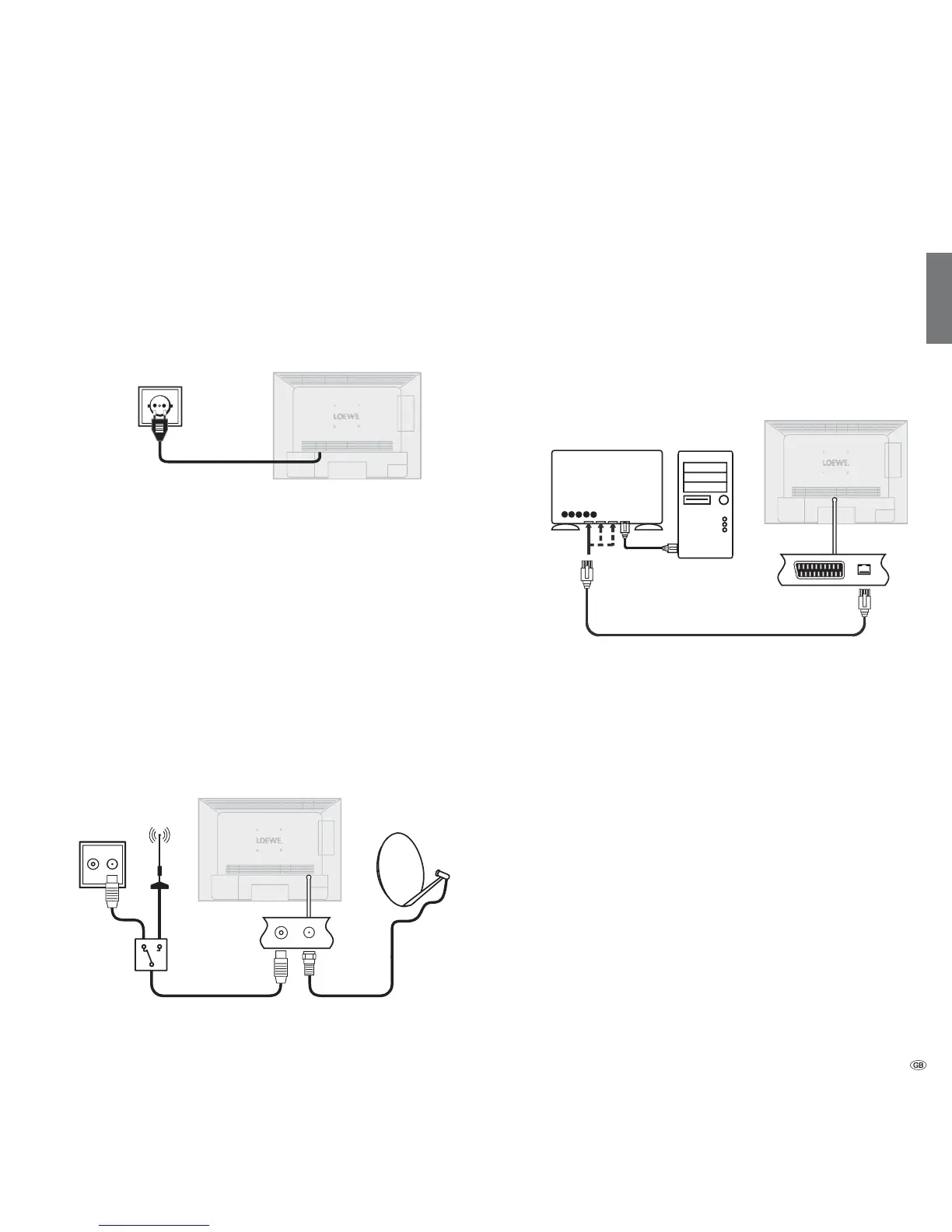
Connecting the TV set to the Home network
You can connect your TV set to the home network by a wired connection
(Ethernet, Powerline). Please contact your specialist dealer for more
information on Powerline.
Example for a wired connection
Connect the LAN socket of your TV set to the LAN switch/router of your
home network with a network cable (available from your dealer).
Connecting the TV Set
Connecting to the mains
Remove the cover for the connections.
Connect the TV set to a 220-240V mains socket:
Plug the mains plug into a mains socket.
Connecting antennas
Cable (analogue) / DVB-C / DVB-T antenna:
Plug the antenna cable of antenna, cable system or room antenna into
the ANT TV socket.
If you want to use analogue cables / DVB-C connection and a DVB-T
antenna together, use an external antenna switch (available from your
dealer).
Satellite antenna DVB-S:
If the TV set is equipped with a satellite tuner (retrofit kit), the ANT-SAT
socket is available.
Depending on the used satellite system, connect a connecting cable from
the multi-switch or directly from the LNC to the ANT-SAT socket of the TV.
When connecting the TV set to a single cable community antenna, con-
nect the ANT-SAT socket directly to the appropriate SAT antenna socket.
Ask your dealer if required.
R TV
DVB-T
DVB-S
an. cable /
DVB-C
Initial installation
LAN switch/router
Homeserver,
e.g. PC
TV set










 To Next Page