- 42
english
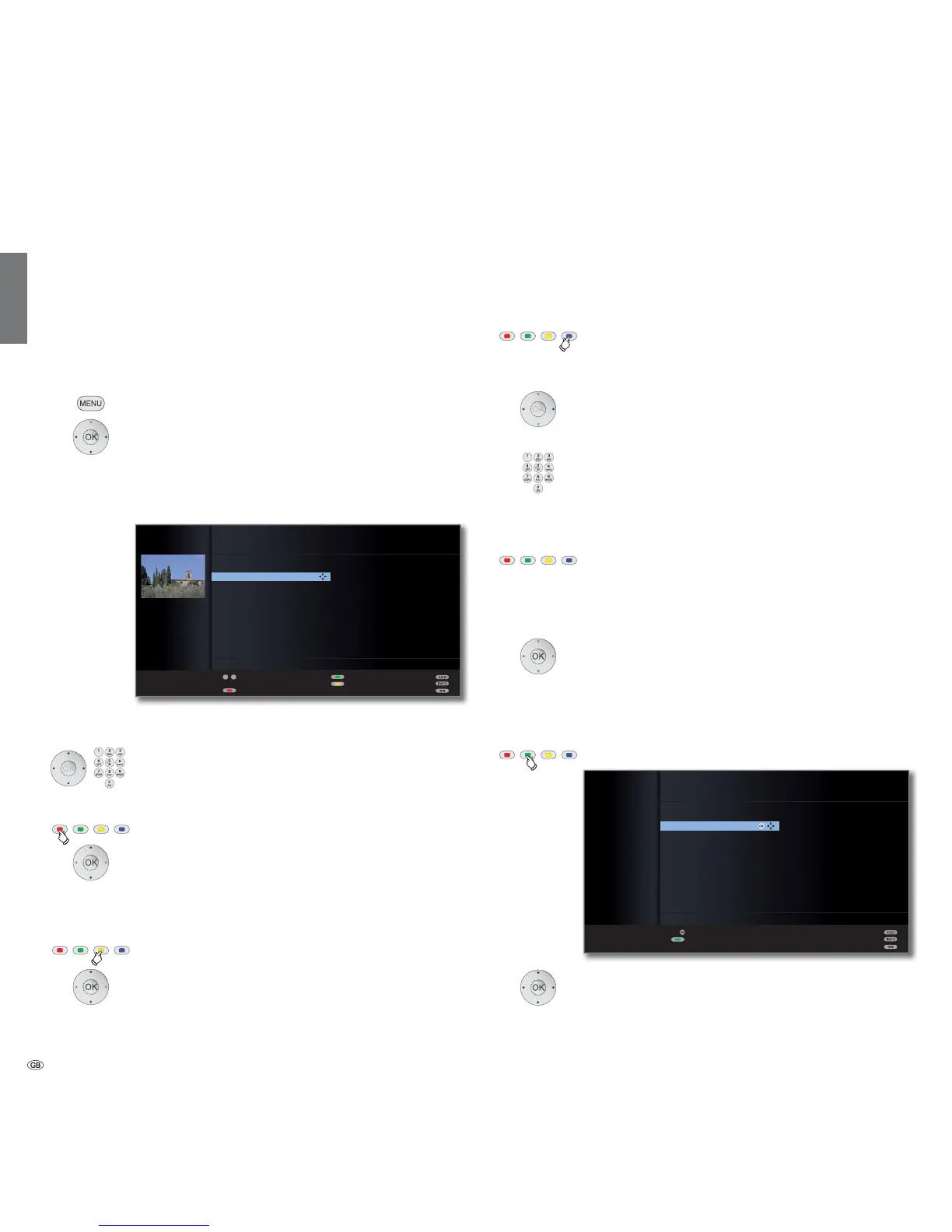
Change, delete, move, rename, restore station
➠ Change station can also be called via the station list (page 30).
➠ If at least one station is locked the access code must
be entered before changing stations start-up (see
Parental lock on page 52).
➠ In some TV broadcasting networks (e.g. FreeView) you
are not allowed to move or rename stations. Use
Favourites instead.
Call TV menu.
Select Settings,
go to the menu line below.
Select Stations,
go to the menu line below.
Select Change stations,
OKcall list of stations.
In this menu you can delete, move, rename or restore
stations.
or numeric buttons:
Select the appropriate station.
Scroll with P+/P– if necessary.
Delete station
Red button: Starts Delete station.
Select several stations to be deleted if necessary,
OK to execute the delete.
Move station / Change order
➠ Stations can only be resorted within the signal source block.
Yellow button: Starts Move station.
Mark several stations if needed,
OK selection ended,
Select insertion position from which the selected
stations are to be inserted,
OK to execute the move.
Rename station
➠ DVB stations for which the station name is also broadcast
cannot be renamed. In this case, the Rename function
is hidden.
Blue button: Starts Rename station.
Under the 1st letter of the name you will see a line indi-
cating the current input position.
Input position one character to the right (also for
blanks).
Input position one character to the left.
Enter the letters one after another with the numeric
buttons on the remote control. Like using a mobile phone
keypad, press a numeric button until the desired character
appears. The available letters are printed respectively on
the buttons. See page 101 for a detailed overview of the
available characters.
Green button: Switch upper/lower case letters.
Yellow button: Deletes the character before the input
position.
Blue button: Cancel rename.
OK to save new name.
Restore stations
Stations which have been deleted from the station list can be restored.
Green button: Starts Restore stations.
Select station,
OK
station is restored.
The restored station is sorted in according to its signal
source at the end of the respective signal block
.
OK
P+
P–
OK
CHANGE STATIONS
Restore deleted stations
3sat
KIKA
ZDF
RTL
Phoenix
BRalpha
NDR FS HH
Restore
Cancel restore
9Live
VOX
n-tv
DSF
RTL2
KABEL1
09
-
P+
P–
CHANGE STATIONS
21:00 - 21:45 Urlaubsparadies - Toskana
1 ARD
2 ZDF
3 SAT.1
4 D Vierte
5 RTL
6 VOX
7 S-RTL
8 N-TV
9 DSF
10 EinsPlus
11 9Live
12 RTL2
13 WDR 3
14 BR
15 HR
16 MDR 3
17 KIKA
18 PHOENIX
19 BR-ALPHA
20 3SAT
21 KABEL 1
Restore stations
Move
Select station
Delete
Managing stations










 To Next Page