- 66
english
Internet
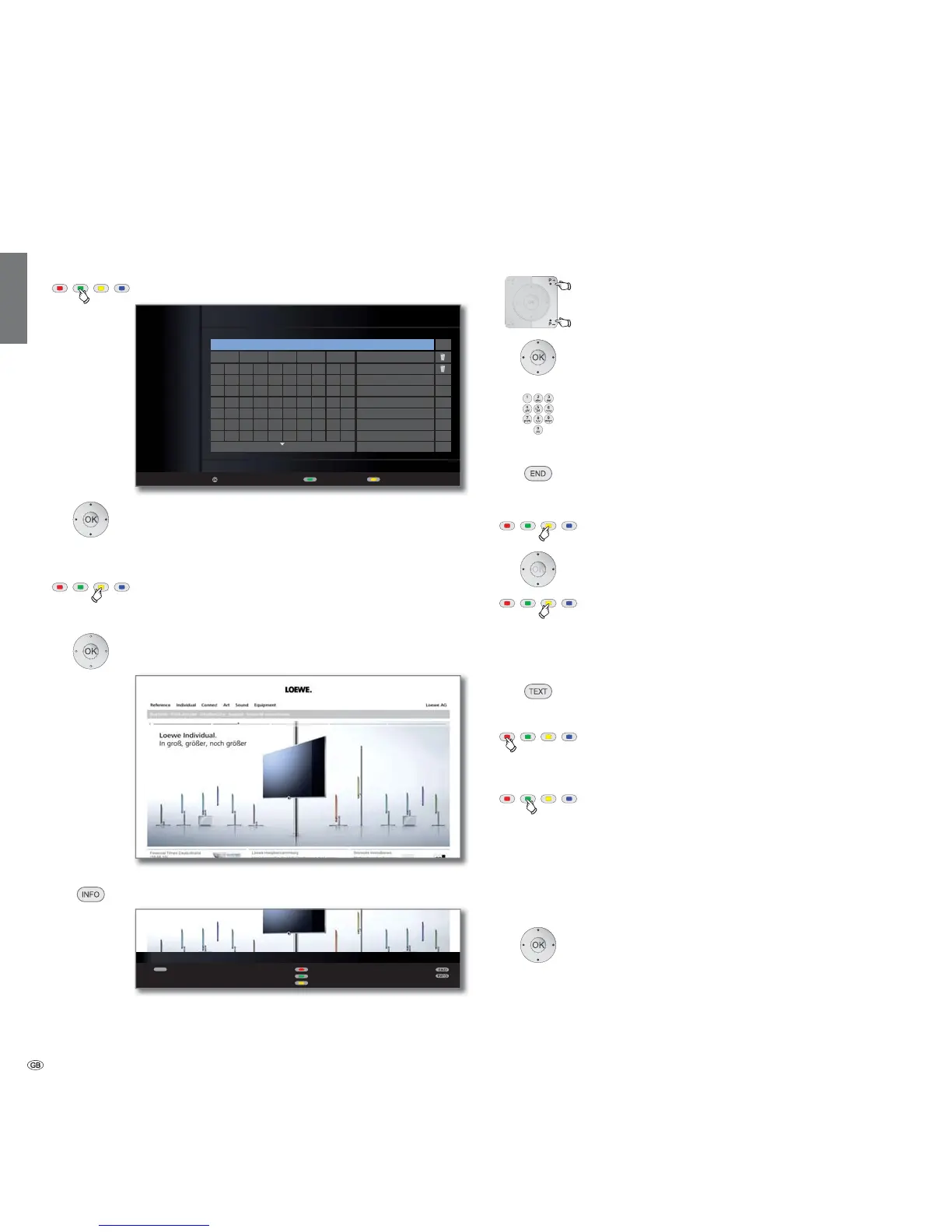
Green button: Call Internet.
Select the desired symbols/terms,
OK adopt to input line.
Go to the input line.
If necessary:
Yellow button: Delete characters to the left of the cursor.
When the Internet address (URL) is completely entered:
OK View the website.
INFO: Display MediaNet info line.
➠ The functions of the coloured buttons are enabled
even without the status line being shown.
Navigation in websites
P+/P– Scroll the page vertically.
Select link or text input field,
OK open link or confirm text input.
➠ When entering information in the input fields on
websites, the letters/numbers are entered directly using
the numeric buttons.
Same procedure as for Rename station, see page 42.
END: Cancel text input and exit input field.
Yellow button: Zoom website.
Move picture section.
Yellow button: Re-display website at the original size.
Select other website / Quit Internet
TEXT: Return to URL input window.
Or:
Red button: Call History (previously visited websites).
Delete history: see below.
Or:
Green button: Exit Internet and go back to the MediaNet
base dialogue.
Delete history
➠ The address input window is open (see left column).
Select the trash symbol next to the History
entry to be deleted.
OK Delete an entry or the entire history.
Media
+
OK
URL
View Back Delete one character
Legal details
www. .de .org .com .net HISTORY
a
j
s
1
.
,
b
k
t
2
!
:
c
l
u
3
#
;
d
m
v
4
$
=
e
n
w
5
%
?
f
o
x
6
(
@
g
p
y
7
)
-
h
q
z
8
*
_
i
r
/
9
+
~
<
>
0
&
‘
OK
www.loewe.de|
www.loewe.de
MEDIA NET - INTERNET
TEXT
History
Back
Zoom in
Edit internet address










 To Next Page