85 -
english
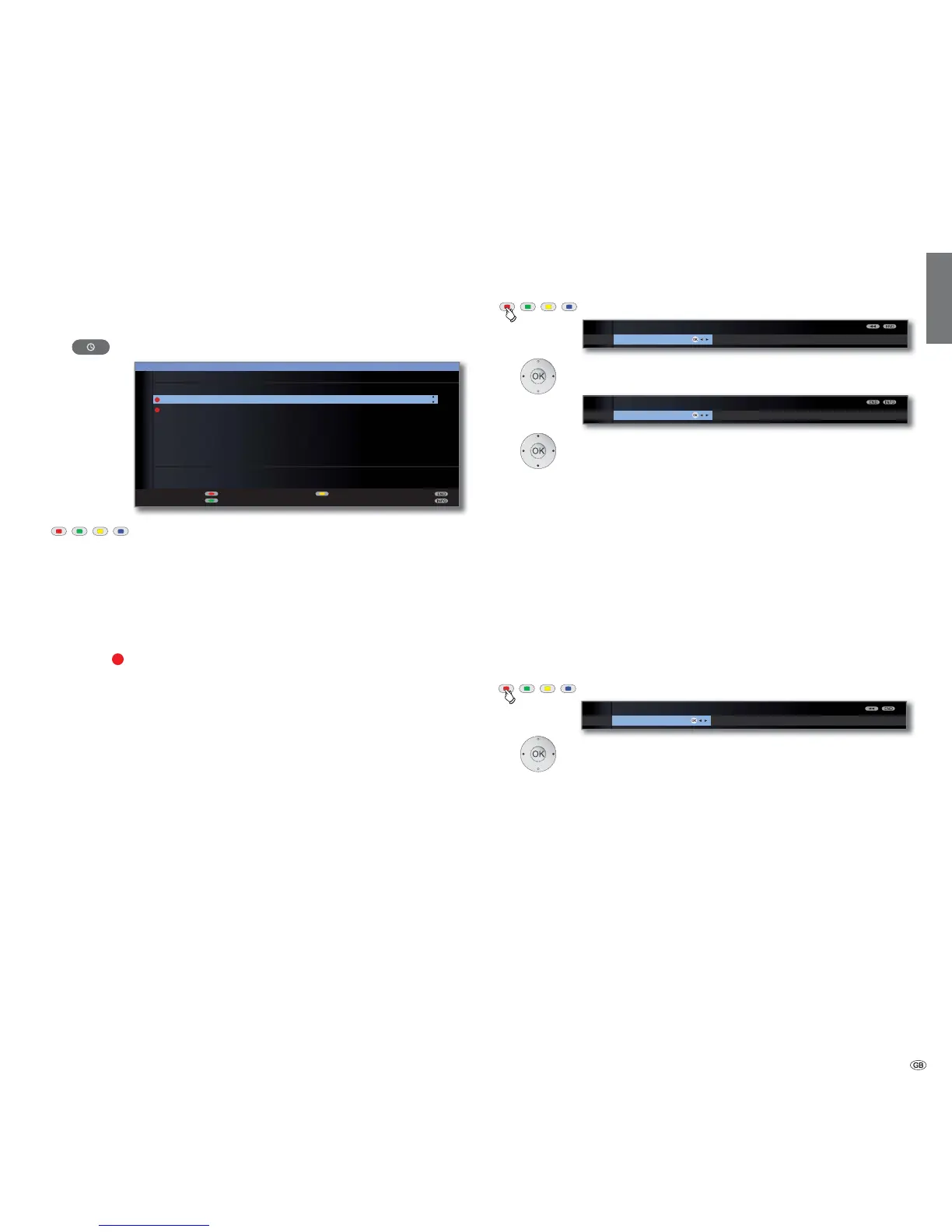
Programming the timer with the timer overview
All programmed recordings, marked programmes and copy orders
(1
are
listed in the timer overview. You can also programme new recordings and
mark other programmes with the timer overview.
Call Timer list.
Red button: New entry (see right hand column).
Green button: Change recording.
Yellow button: Delete recording.
Blue button: Delete memo.
Explanation of the symbols in the timer list:
Record
Repeated recording (daily, weekly or Mon-Fri)
Marked programme (see page 46)
New entry: Programme timer recording manually
➠ Timer list is opened.
Red button: Call New timer entry.
Select Recording,
OK call.
Select Manual.
For programming a timer recording Via EPG or Via
Teletext see page 84.
OK Call Station selection.
Select station.
OK Call Timer data.
Entry of the timer data see page 84.
After confirming the timer data the new recording is
transferred to the timer overview.
New entry: Memorize programme using the timer overview
➠ Timer list is opened.
Red button: Call New timer entry.
Select Memo.
OK EPG is opened.
Note desired programme as described in Switching and
memorizing with the programme list (page 46).
Memo
NEW TIMER ENTRY
Recording
OK
Via teletext Manual
RECORDING WIZARD
Via EPG
OK
NEW TIMER ENTRY
Memo
OK
Rec












 To Next Page