6.1 Measurement reset
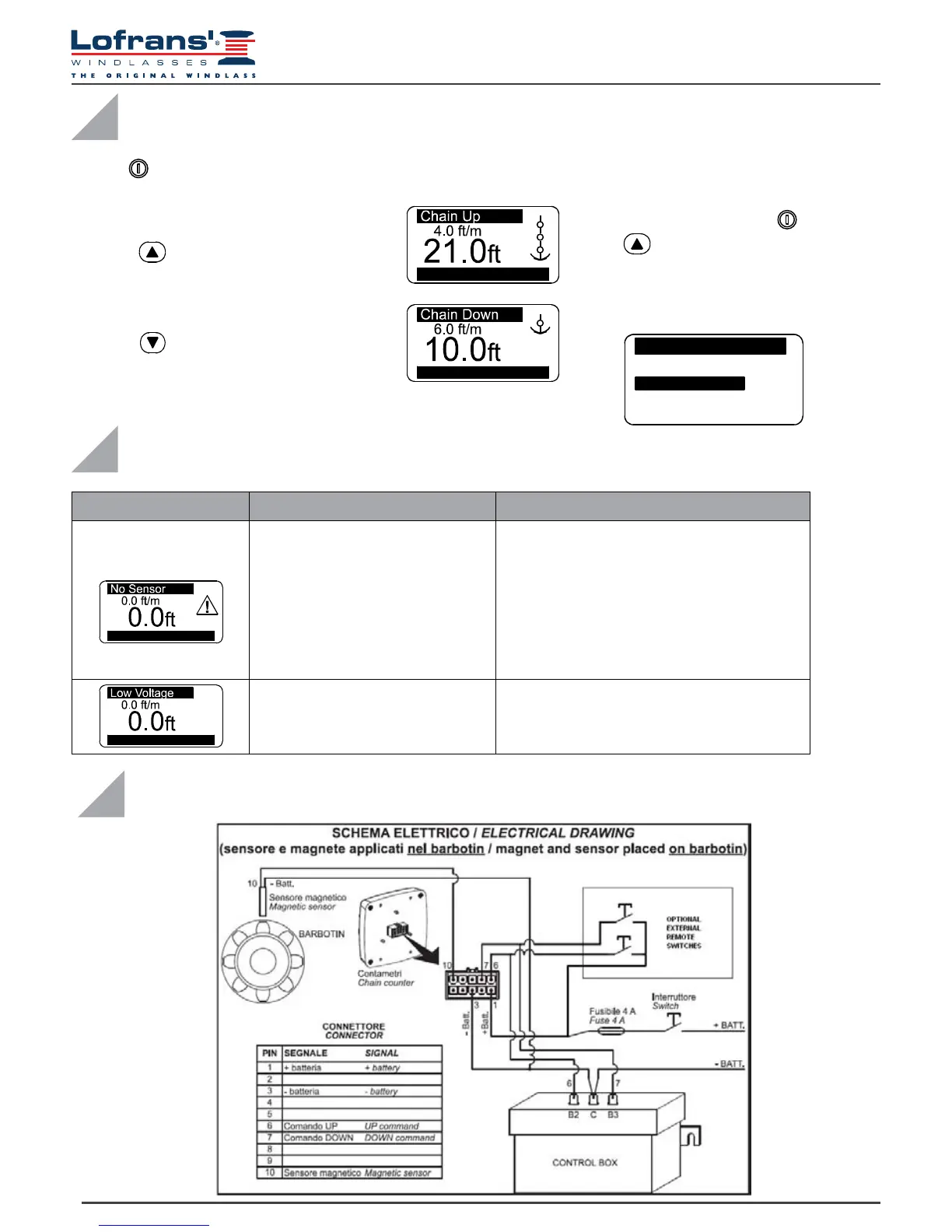
Press the (ON) key to activate controls and to switch on the display lighting. The
display lighting switches off 60 seconds after the last command given (adjustable
default time – see “BkLight Time”).
To reset the measurement count
simultaneously press the (ON) and the
(UP) keys for at least three seconds.
Measurement reset may also be performed
in the Measurement menu by selecting
“Yes” in the Reset Measure row.
When any key is released (UP or DOWN) the corresponding action is stopped.
Press key (UP) to control the anchor ascending
Press key (DOWN) to cast anchor
V=11.6 Vdc
V=11.6 Vdc
6 USE
Measure
ResetMeasure No
Unit
eet
Off
Exit
7 TROUBLESHOOTING
FAULT CAUSE CORRECTIVE ACTION
Though UP or DOWN keys
are pressed, the instrument
doesn’t receive any signal from
the magnetic sensor for more
than 5 seconds.
Check the sensor electric connections.
Check if sensor operates properly.
If not, replace it.
Check the position of sensor and magnet on
gipsy and their distance (3 mm).
Check the operation of electric
installation or anchor windlass.
The instrument’s power
supply voltage is lower than10Vdc.
Verify the battery charge or
operation of the electrics system.
V=11.6 Vdc
V= 7.9 Vdc
8 WIRING DIAGRAM


 To Next Page