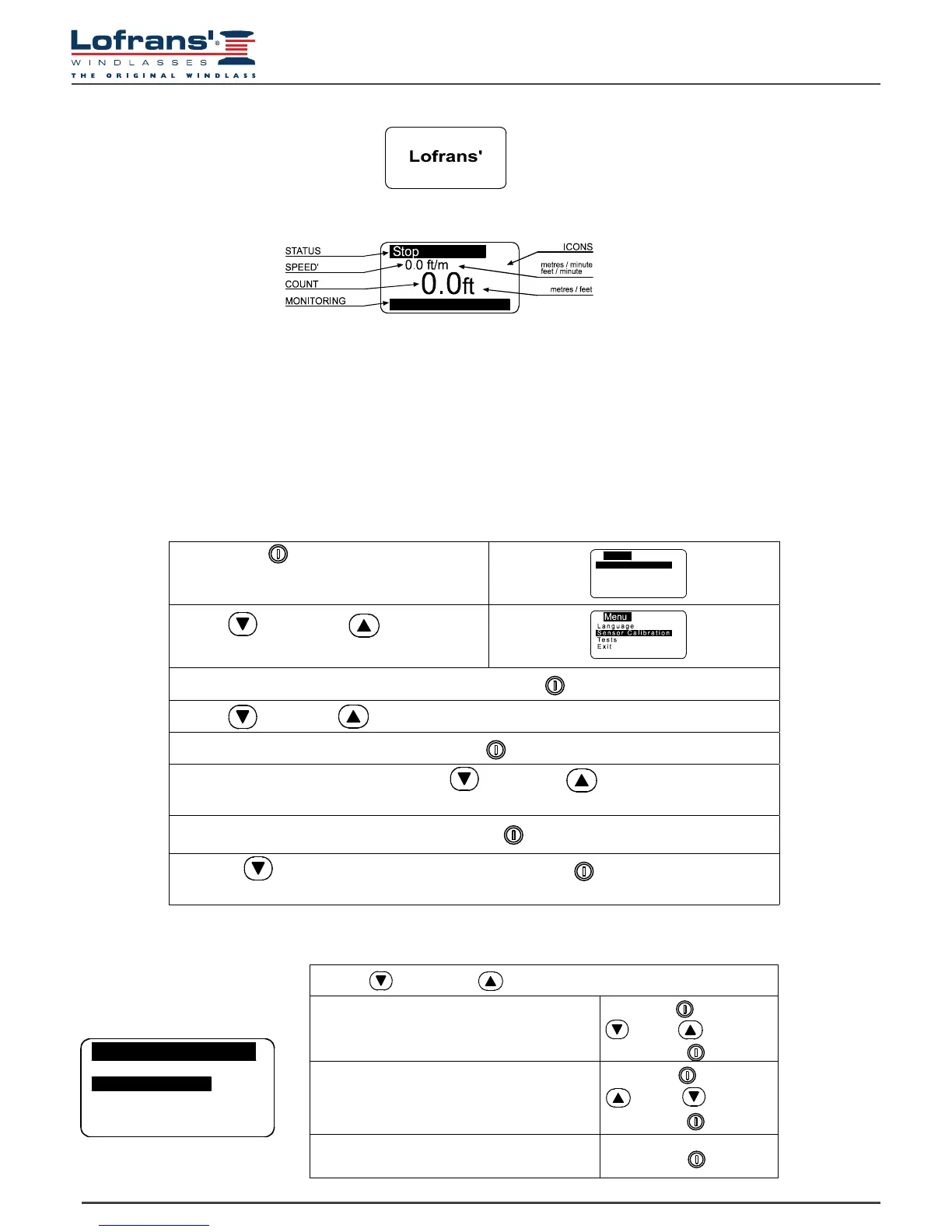
When switched on, the instrument will make a beep and the following page will appear for a few seconds:
Once the initialisation procedure is complete, the main page will appear.
Where:
STATUS: indicates the status of the instrument and any failure.
SPEED’: indicates the chain speed during hoisting or lowering in meters per minute or feet per minute.
COUNT: indicates the measurement of the chain lowered (in metres or feet).
MONITORING: indicates the power supply voltage of the instrument and the power supply voltage of the boat.
ICONS: this is the part of the display bearing the icons that indicate the hoisting or casting of the anchor and any failure.
When the instrument is turned on for the rst time, it will set up as programmed in the factory (see table).
V=11.6 Vdc
Hold down the (ON) key for six seconds to
access the instrument setting menu. The following
page will appear on the display:
Use the (DOWN) and (UP) keys to
move around the menu options.
Once you are positioned on the item to be modied press the (ON) key to conrm your choice.
Use the (DOWN) or (UP) keys to move from one parameter to another.
Once one is positioned on the parameter press the (ON) key to enable modication.
According to the type of parameter, using the (DOWN) and (UP) keys it is possible to
reduce/increase the value of the same or disable/enable the function.
Once the modication has been performed, press the (ON) key to conrm.
Using the (DOWN) key go to the Exit option and press the (ON) key again to return to
the setting menu. The same procedure must be used to return to the main page.
5.2 Chain counter setting menu
Menu
Measure
Alarms &Function
Settings
Language
S ensor Calibration
5.3 Measurement menu
Use the (DOWN) or (UP) key to move around the parameters
Reset Measurement
Resets the chain measurement value (0.0).
Select with
= Yes = No
Conrm with
Units
Selects the unit of measurement:
Feet/ inches
Metres / centimetres
Select with
= Feet = Metres
Conrm with
Exit
To return to the settings menu.
Conrm with
Measure
ResetMeasure No
Unit


 To Next Page