21
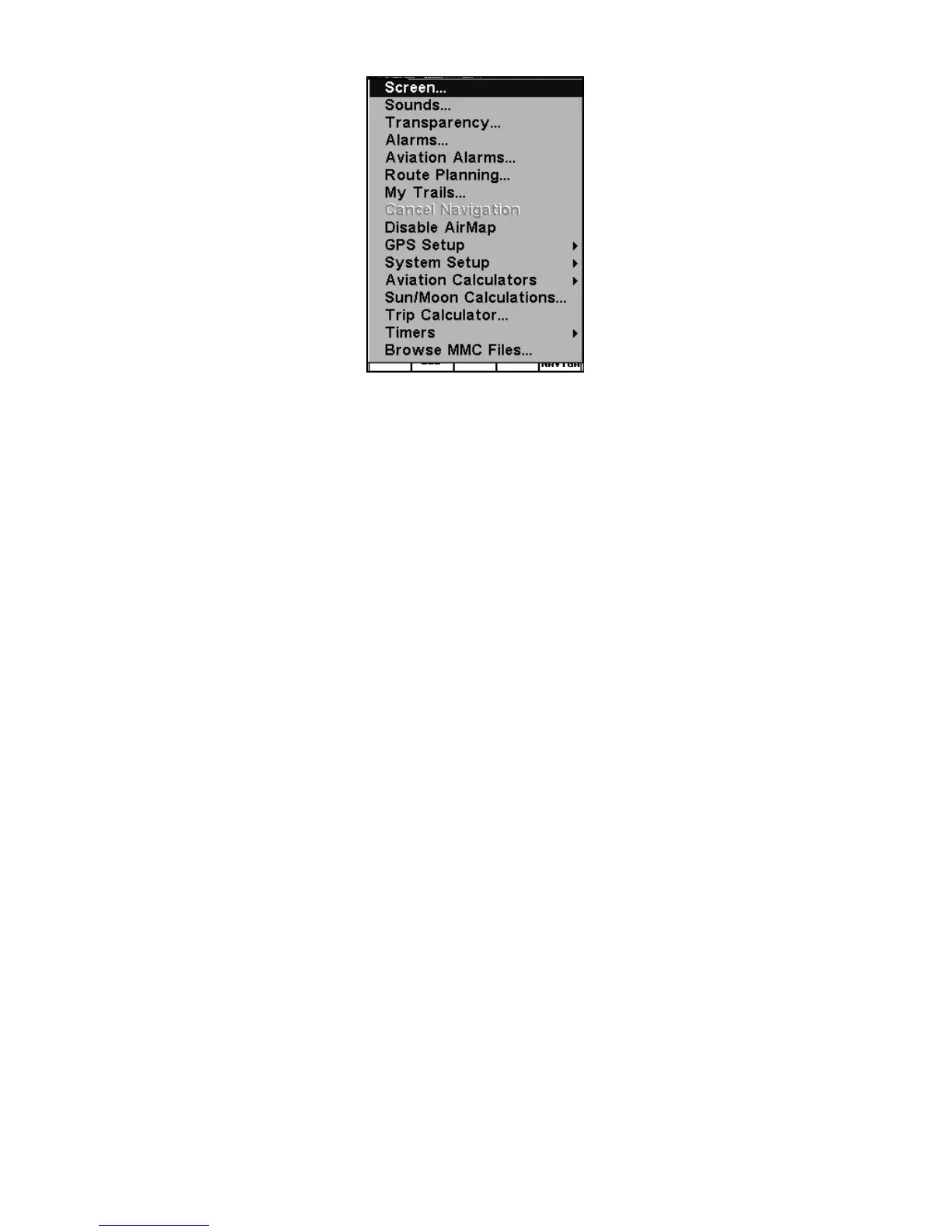
Main Menu, Aviation Mode.
The Main Menu commands and their functions are:
Screen command: changes the contrast or brightness of the display
screen.
Sounds command: enables or disables the sounds for key strokes and
alarms and sets the alarm style.
Alarms command: turns arrival, off course and anchor GPS alarms on
or off and changes alarm thresholds.
Aviation Alarms command: turns distance, time, near and inside air-
space alarms on or off and changes alarm thresholds.
Route Planning command: used to plan, view or navigate a route.
My Trails command: shows, hides, creates and deletes plot trails. Also
used to navigate or backtrack a trail.
Cancel Navigation command: turns off the various navigation com-
mands. Used to stop navigating after you have reached your destina-
tion navaid, waypoint, Point of Interest or map cursor location; or after
you reach the end of a route or trail.
GPS Setup command: sets various GPS receiver options and runs the
GPS Simulator.
System Setup command: sets general configuration options.
Aviation Calculators command: controls several aeronautical calcula-
tors. These include: E6B flight computer functions (altitude and air
speed calculator, wind speed and direction calculator.) and a vertical
navigation calculator. alarm clock, up timer and down timer.












 To Next Page