79
Section 5:
System & GPS Setup Options
Alarms
This unit has several GPS alarms. You can set an arrival alarm to flash
a warning message and sound a tone when you cross a preset distance
from a waypoint. For example, if you have the arrival alarm set to 0.1
mile, then the alarm will flash a message when you come within 0.1
mile of the recalled waypoint.
The off course alarm warns you when your track drifts too far to the
right or left of the course line to the waypoint. For example, if the
alarm is set to 0.1 mile, then the alarm flashes a message if you drift
0.1 of a mile or more to the right or left of the line to the waypoint.
The anchor alarm is triggered when you drift outside of a preset radius.
Again, using the 0.1 mile as an example, if you're anchored and your
boat moves more than 0.1 of a mile, the alarm will flash a message and
sound a tone.
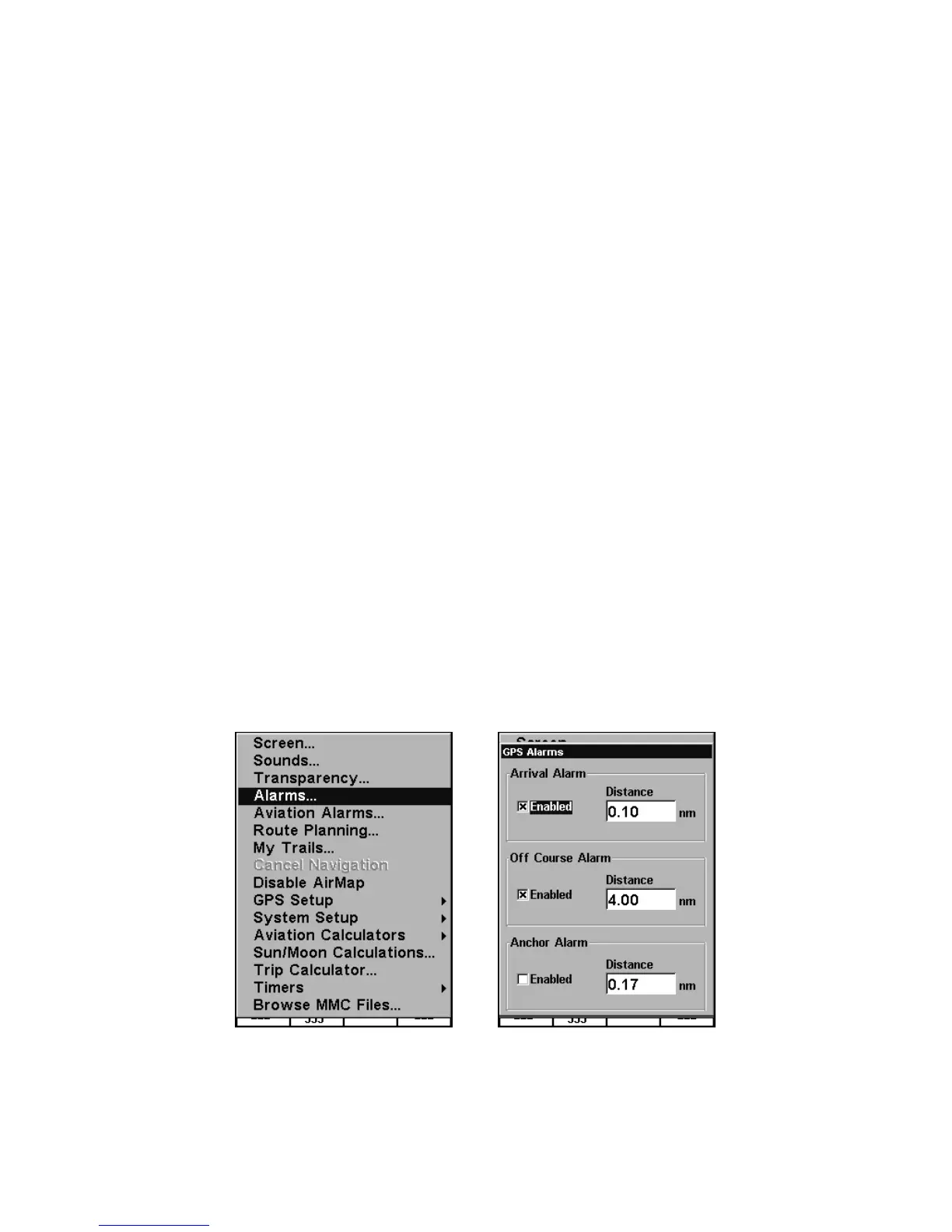
You can use the Alarm Menu to adjust distance settings or to turn
alarms off or on.
NOTE:
The AirMap also includes several Aviation Alarms, which are only
available when the unit is in Air Mode. For detailed descriptions of
the Aviation Alarms, see the following entry.
Alarms command, left; Alarm menu, right.
To change alarm settings:
1. Press
MENU|MENU|↓ to ALARMS|ENT.










 To Next Page