66
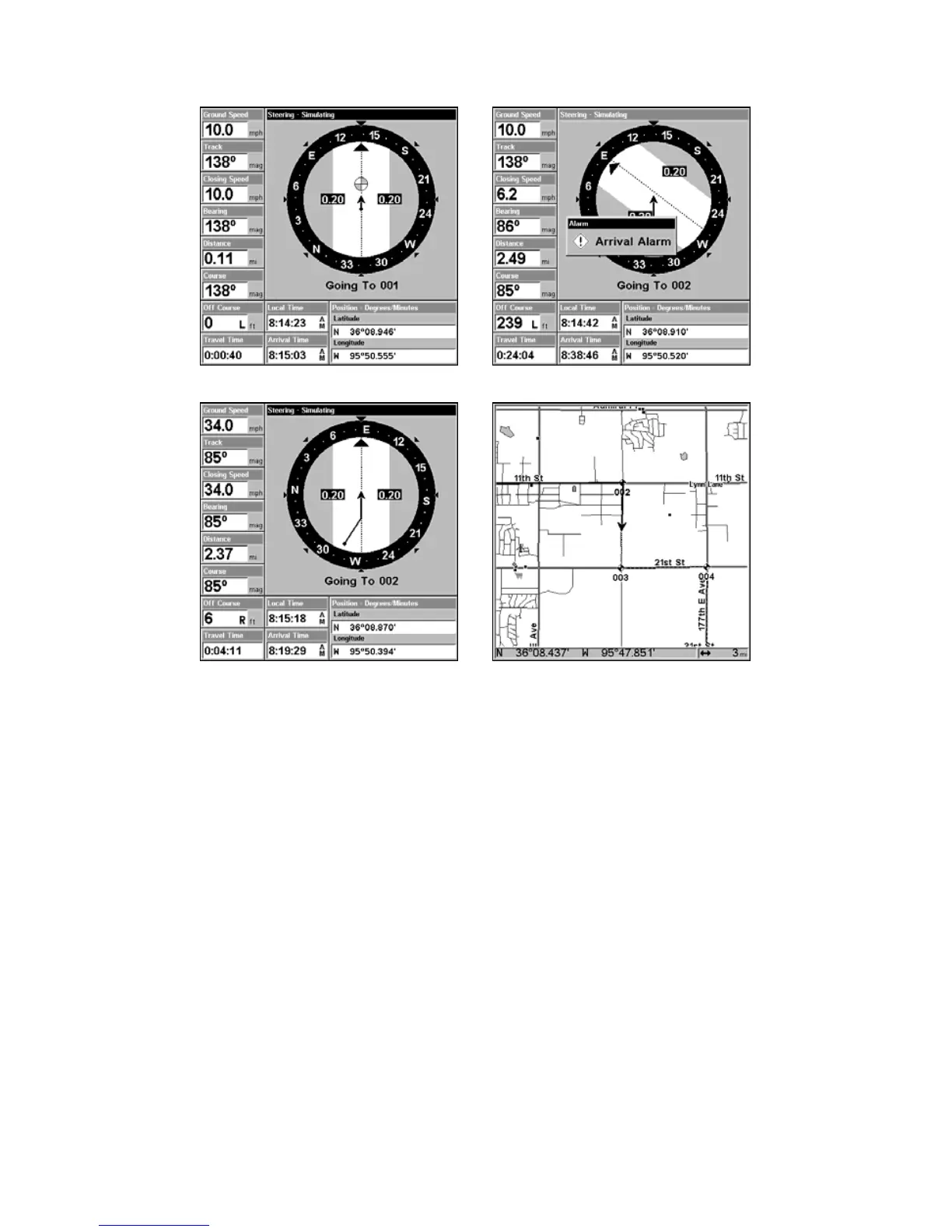
Navigating along a route: Fig. 1 shows the Navigation Page at the start
of a route, heading straight for the first waypoint (Wpt 1). In Fig. 2, the
traveler has arrived at Wpt 1; the arrival alarm has been triggered and
the bearing arrow on the compass rose has turned to point toward
Wpt 2, off to the east. In Fig. 3 the traveler has turned east on his new
course and is heading straight for Wpt 2, which is 2.37 miles away. Fig.
4 shows route navigation on the Map Page. In this figure, the traveler
has reached Wpt 2 and is half-way along the leg between Wpts 2 and 3.
Trails
Delete a Trail
This is the command used to erase or delete a trail:
Press
MENU|MENU|↓ to MY TRAILS|ENT|↓ to trail name|ENT|→ to DE-
LETE
TRAIL|ENT|← to YES|ENT.
Tip:
You can also delete all trails at once:
1. Press
MENU|MENU|↓ to MY TRAILS|ENT.
2. Press → to
DELETE ALL|ENT|← to YES|ENT.
Figure 2.
Figure 1.
Figure 4.
Figure 3.
www.Busse-Yachtshop.de email: info@busse-yachtshop.de


 To Next Page
 Loading...