L-STAT User Manual 15 LOYTEC
Version 1.0 LOYTEC electronics GmbH
2.2.2 Operating Modes
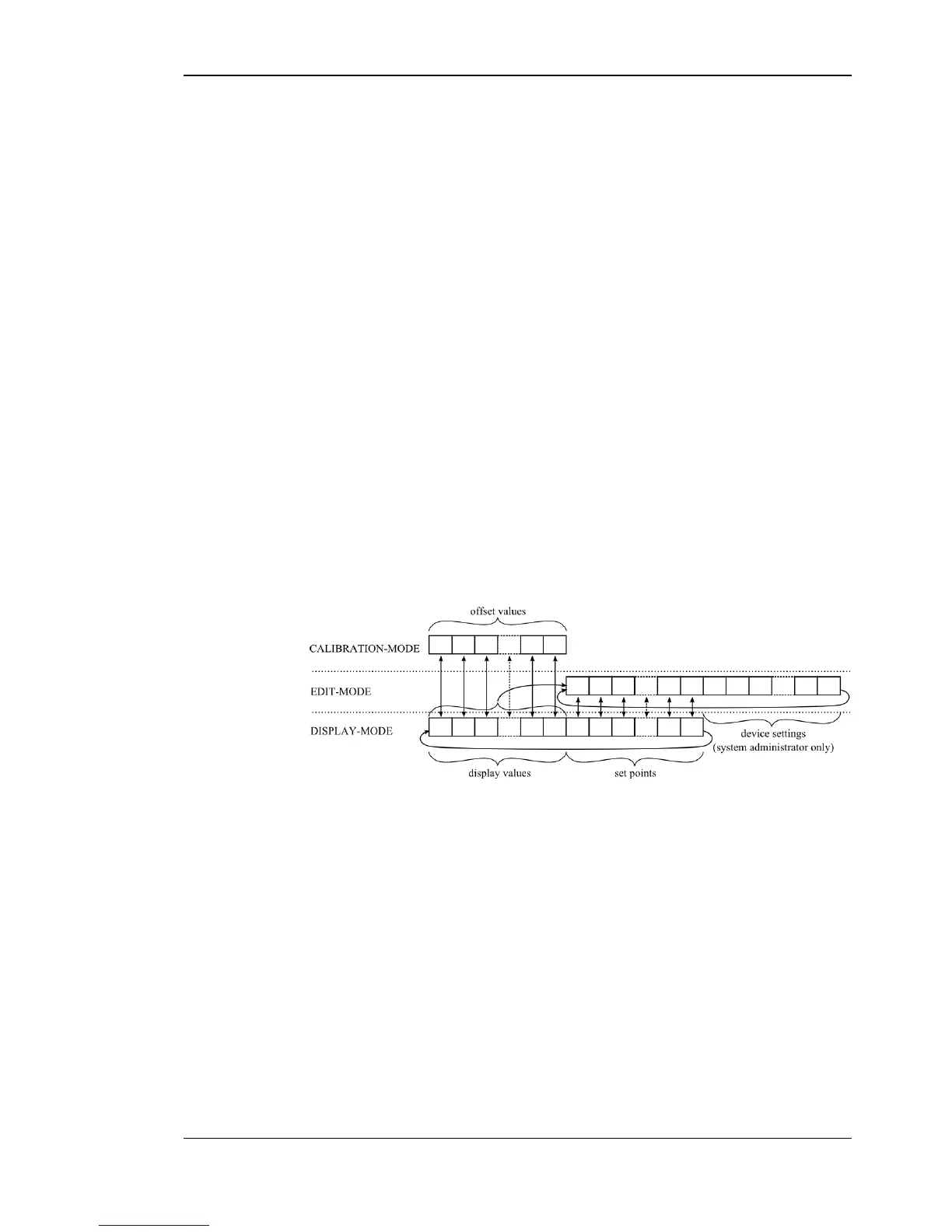
In Figure 4 the operating modes of L-STAT are depicted. Each operating mode gives access
to certain Modbus registers that can either be viewed or edited depending on the mode. The
following data is available on L-STAT:
Are used to visualize data provided by the Modbus master or values
of internal sensors. It is viewed in DISPLAY-mode. For the display
value registers see Table 11 on Page 25 and Table 28 on Page 39 for
the corresponding display value configuration.
Are used to visualize data that is provided by the Modbus master and
that can be edited by the user. It is shown in DISPLAY-mode and it
can be edited in EDIT-mode. For the set point registers see Table 32
on Page 44 and Table 29 on Page 41 for set point configuration.
The range in which a set point can be altered is defined by minimum
and maximum values that have to be written by the Modbus master.
Please refer to Table 33 on Page 45 and Table 34 on Page 46.
These values define some basic settings of the device itself. Please
refer to Table 5 on Page 17 for a listing of all device settings and to
Table 18, Table 19 and Table 20 on Page 30 f. for the corresponding
Modbus registers. Device Settings can only be edited by the system
administrator in EDIT-mode.
Are used to add a certain offset to a display value. This functionality
can be used to calibrate sensor values. Offset values can be editet by
the system administrator in CALIBRATION-mode directly at the
device or over Modbus. Please see Table 35 on Page 47 for the
offset value register.
Figure 4: Operating Modes of L-STAT
When the device powers up, it enters DISPLAY-mode and it will display the first display
value. When pressing the MENU-button the next value will be shown. First all active
display values and then all active set points are displayed. After the last set point, the
display will show the first display value again.
EDIT-mode is entered by pressing the MENU-button for more than 3 seconds. To enter
EDIT-mode as system administrator two additionally defined buttons (TB0 and TB4) need
to be pressed along with the MENU-button for more than 3 seconds. The system
administrator will also be able to view and edit the device settings. In EDIT-mode any
button that has no specific function can be used to cycle the values in the opposite direction.
CALIBRATION-mode will be entered for any display value when pressing one UP- and
one DOWN-button simultaneously for more than 3 seconds to adjust the offset. This mode
is secured by the system administrator password. CALIBRATION-mode is left when
pressing the MENU-button for more than 3 second or after a timeout of 1 minute.


 To Next Page