
 Need help?
Do you have a question about the LOYTEC L-STAT and is the answer not in the manual?
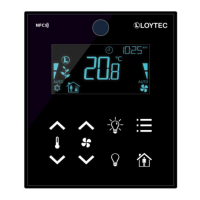
Overview of the L-STAT room control device and its capabilities.
Highlights the main functionalities and model variations of the L-STAT.
Details the various segments and symbols displayed on the L-STAT LCD.
Information on physical installation, dimensions, and wiring terminals.
Explains the LCD, touch buttons, and external button connections.
Details the different operating modes of the L-STAT and their access to Modbus registers.
Describes the two access levels (end user, system administrator) and their security.
Lists and explains the various device settings configurable via interface or Modbus.
Outlines the default display and set point configurations for different L-STAT models.
Guidance on downloading and using the L-INX configurator for Modbus devices.
Introduction to Modbus RTU mode operation and network setup.
Illustrates the linear bus topology for connecting L-STAT slave devices to a master.
Explains how Modbus registers influence displayed values, units, and symbols.
Describes the L-STAT Modbus registers, including data and change flags.
Details Modbus registers for frequently changing data like button states and flags.
Covers registers for Modbus port configuration, baudrate, parity, and pincodes.
Explains registers for configuring device functions, display, and set points.
Provides production-time information like product code and button layout.
Contains device-specific data such as firmware version and build dates.
Registers for providing an URL accessible by NFC-enabled devices.
Details how raw Modbus values are scaled and defines set point stepwidths.
Describes the NFC interface's role as a tag for room automation data.
Step-by-step guide to associate an L-WEB project URL with the NFC tag.
Explains the IR receiver location and protocol used.
Procedure for pairing an Apple remote control with an L-STAT device.
Step-by-step process for updating firmware using the web interface.
Contact details for LOYTEC technical support across different regions.
Details physical attributes like voltage, dimensions, and environmental protection.
Describes the specifications for temperature, humidity, CO2, and occupancy sensors.
 General
| Brand | LOYTEC |
|---|---|
| Model | L-STAT |
| Category | Remote Control |
| Language | English |

 To Next Page