L-STAT User Manual 53 LOYTEC
Version 1.0 LOYTEC electronics GmbH
4.2 Copy the L-WEB Project URL to the NFC Tag Memory
To show an L-WEB project on your mobile device by NFC, simply copy and paste the URL
of the L-Web project to the url_string of Table 38. Note that the mobile device needs
network or internet access to open the URL. Please follow the instructions below.
To Copy a L-WEB Project URL to the NFC Tag Memory
1. Open the web interface of your device
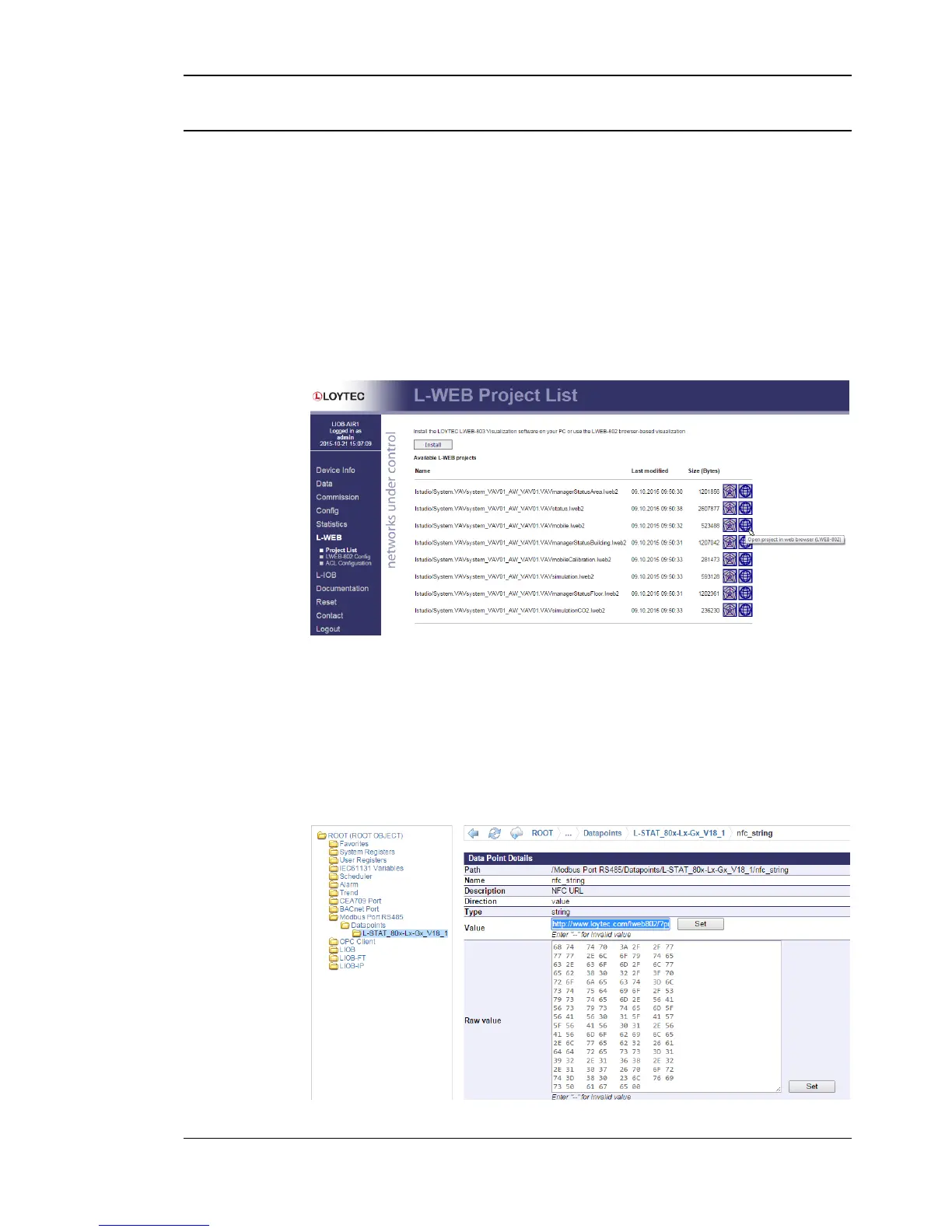
2. Select Project List from the L-WEB menu.
3. Open the desired project in the web browser as shown in Figure 9.
Figure 9: L-WEB Project List
4. Simply copy the URL of the desired project from the browsers address bar and go to
the Modbus Datapoints of the L-STAT device.
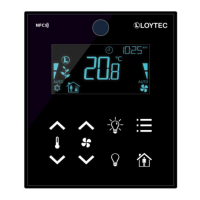
5. Open the nfc_string datapoint in the web interface of your device and paste the
L-WEB project URL at the Value field as shown in Figure 10.
6. Click on the Set button to save the string.
Figure 10: L-STAT NFC String


 To Next Page