42
Timer Setting and Display Operation
The trailer timer is equipped with a 7-segment digital display. This display indicates power,
operation and errors. It is also used to facilitate timer setting.
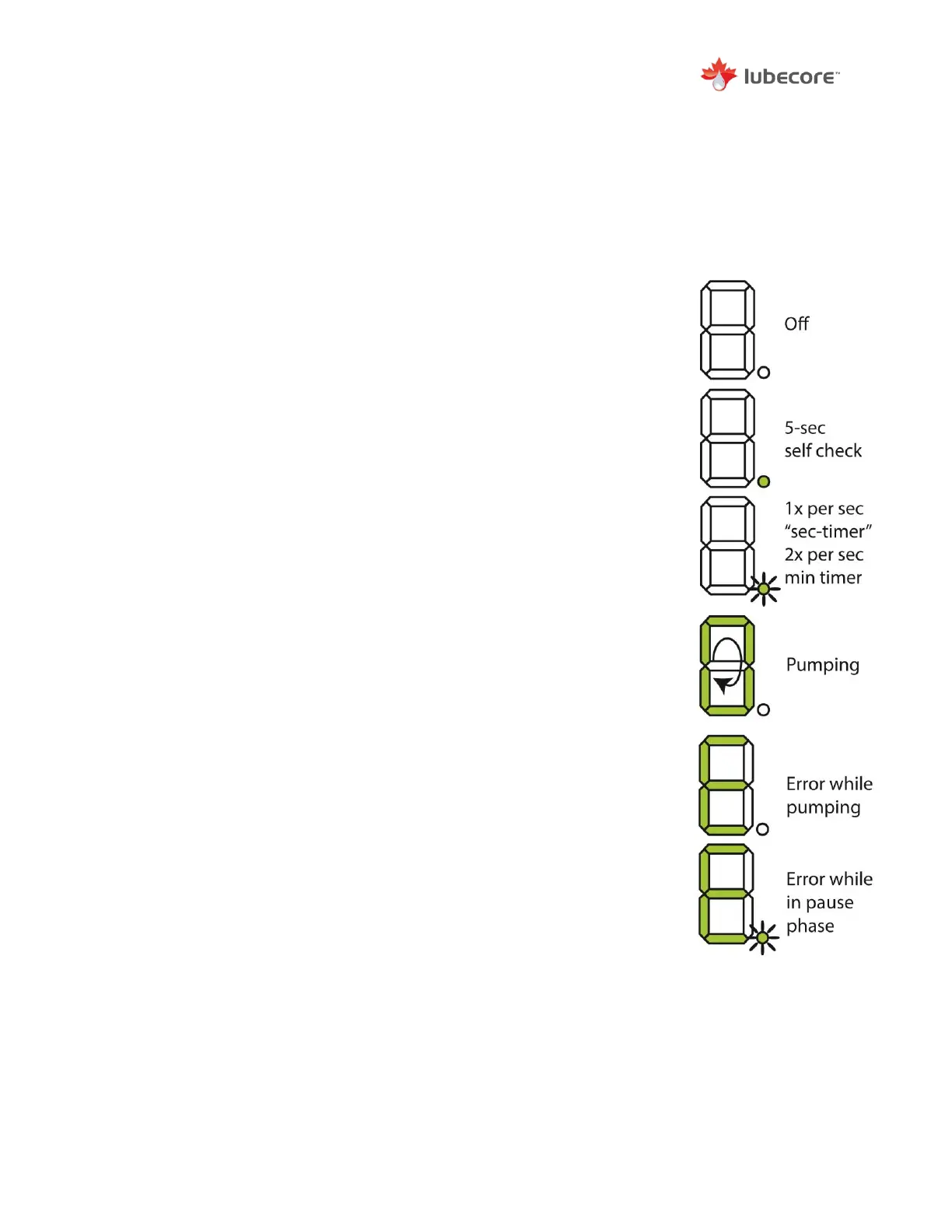
Following is an overview of possible display codes:
- No segments lit. Power is “Off”.
- Solitary LED (Bottom right corner of the Segmented display) momentarily
stays on (5 Seconds) performing a self-check.
- Solitary LED starts blinking,
1 x per second: seconds timer active
2 x per second: minute timer active
Pump ON (T2) is started and a segment rotates. The bar rotates
clockwise for the entire lubrication cycle.
- If during a pump cycle (T2) an error occurs, the display shows an “E”.
The error can be low level or over-current draw. The error status is
displayed throughout the entire T2 pump cycle time.
- After the pump cycle (T2) the display will show “E” and a blinking solitary
LED during the T1, pause time. The “E” status will return to normal after
the error is resolved (example: pump filled) and a new cycle is started.


 To Next Page