43
Testing and Programming
For correct operation of the pump (T1) the “Pause”, and (T2) “Work” times must be set using the
magnet. Follow enclosed instructions to program the timer.
With power on (ignition) hold the magnet against the Lubecore logo on the timer enclosure near
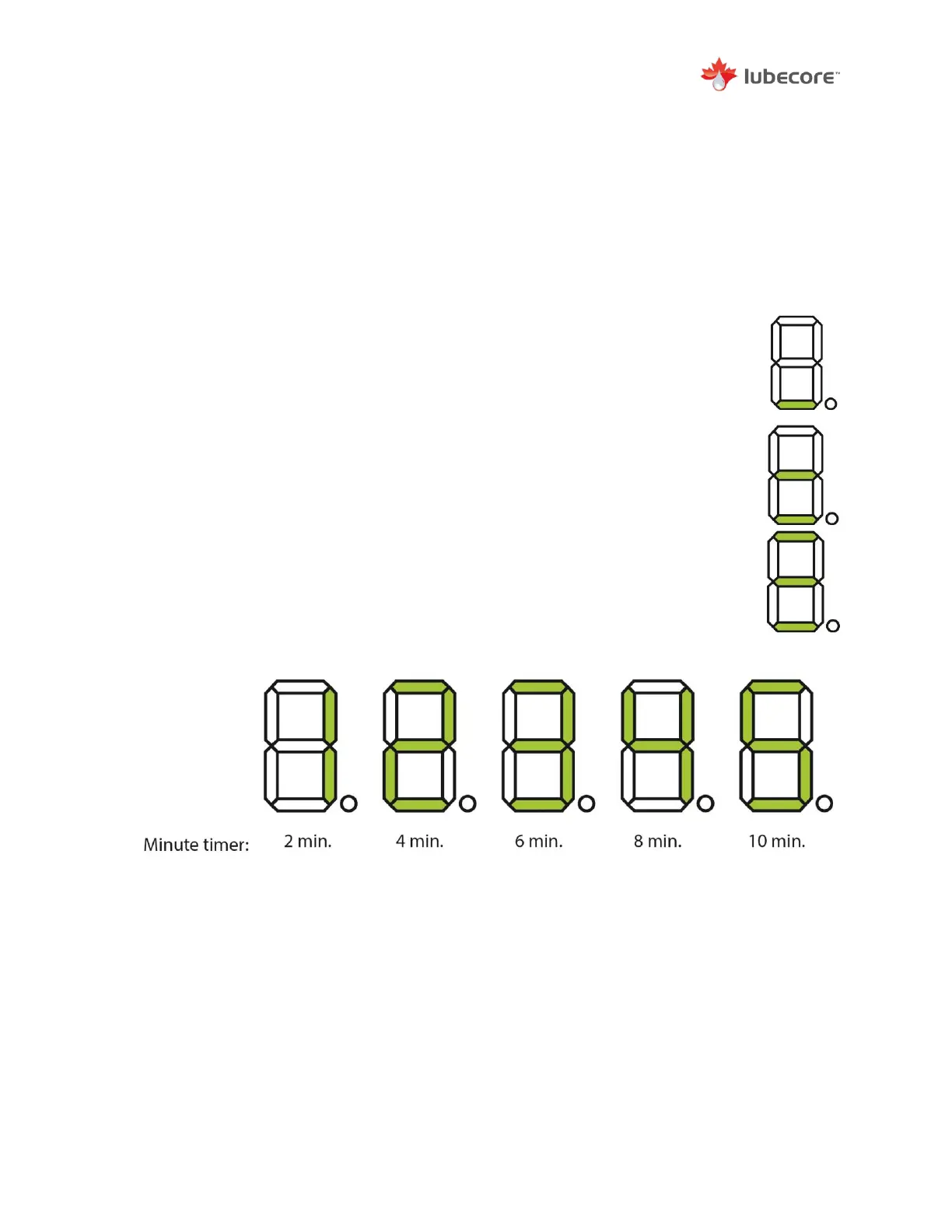
the segment display. After 3 seconds and with about 3 second steps thereafter, the segment
display will change as follows:
1) To start a single test cycle, place the magnet on the Lubecore logo.
When the bottom horizontal bar lights up, remove the magnet from the
logo to initiate a single test cycle. The pump will run for the programmed
period of “on time”.
2) To start a continuous cycle, place the magnet on the Lubecore logo.
When the bottom and center horizontal bars lights up, remove the
magnet from the logo and a continuous cycle will start. Swipe the
magnet over the Lubecore logo or remove power t0 stop the cycle.
3) To change the pump running/working time (T2), place the magnet on
the Lubecore logo until 3 horizontal bars light up. When the display
shows 3 horizontal bars, remove the magnet to go into time selection
mode. A one second touch or slow swipe with the magnet, at the
Lubecore logo, will change the selection
- When the sensor is not operated and no changes are made after 20 seconds it will
return to the start.
- If a change is made the display will show an “A” for accept after 20 seconds have
passed. Or place the magnet on the logo for 5 seconds to accept changes.


 To Next Page