Introduction
1.4 In the box
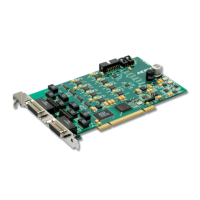
The following items are included in your AES16
carton:
AES16 PCI card in cushioned antistatic bag
Two AES16 cables (CBL-AES1604 six-foot
cable with 8 XLR connectors. Included with
models AES-16XLR and AES16-SRC
only.)
Lynx Installation CD containing current
drivers and this manual
Warranty registration card
Quick Start Guide
If any items are missing or damaged, please
contact your dealer or Lynx at
http://www.lynxstudio.com.
1.5 System requirements
Below are listed the minimum hardware and operating system requirements for compatibility with the
AES16. It is important to note that most professional audio applications place significant demands on your
computer’s resources, and it is therefore recommended that you meet or exceed the recommended system
requirements for your Digital Audio Workstation software, which will likely be greater than those listed for
the AES16. Please refer to your audio software’s documentation for more information.
1.5.1 Windows
Pentium II class computer or better
32 MB RAM
One empty PCI slot
PCI or AGP Graphics card
Video display with 1024 x 768 minimum
resolution
Windows 2000 or Windows XP
NOTE: The AES16 is not supported under
Windows 95, 98 or ME.
1.5.2 Macintosh
Apple Macintosh G4 or later
32 MB RAM
One empty PCI slot
PCI or AGP Graphics card
Video display with 1024 x 768 minimum
resolution
Macintosh OS 9.2.2 or OS X (10.2.8 or
higher)
1.6 Nomenclature used in this manual
The following typographic conventions are used in this manual:
Underlined text indicates characters that are to be typed using the computer keyboard.
ALL UPPER CASE TEXT indicates the names of specific cable connectors.
First Character Upper Case Text indicates Lynx mixer control names or menu options.
Phrases, such as: Start > Programs > Lynx Studio Technology use the greater than symbol (“>”) to
indicate multiple menu options or mouse selections.
AES16 User Manual 7


 To Next Page