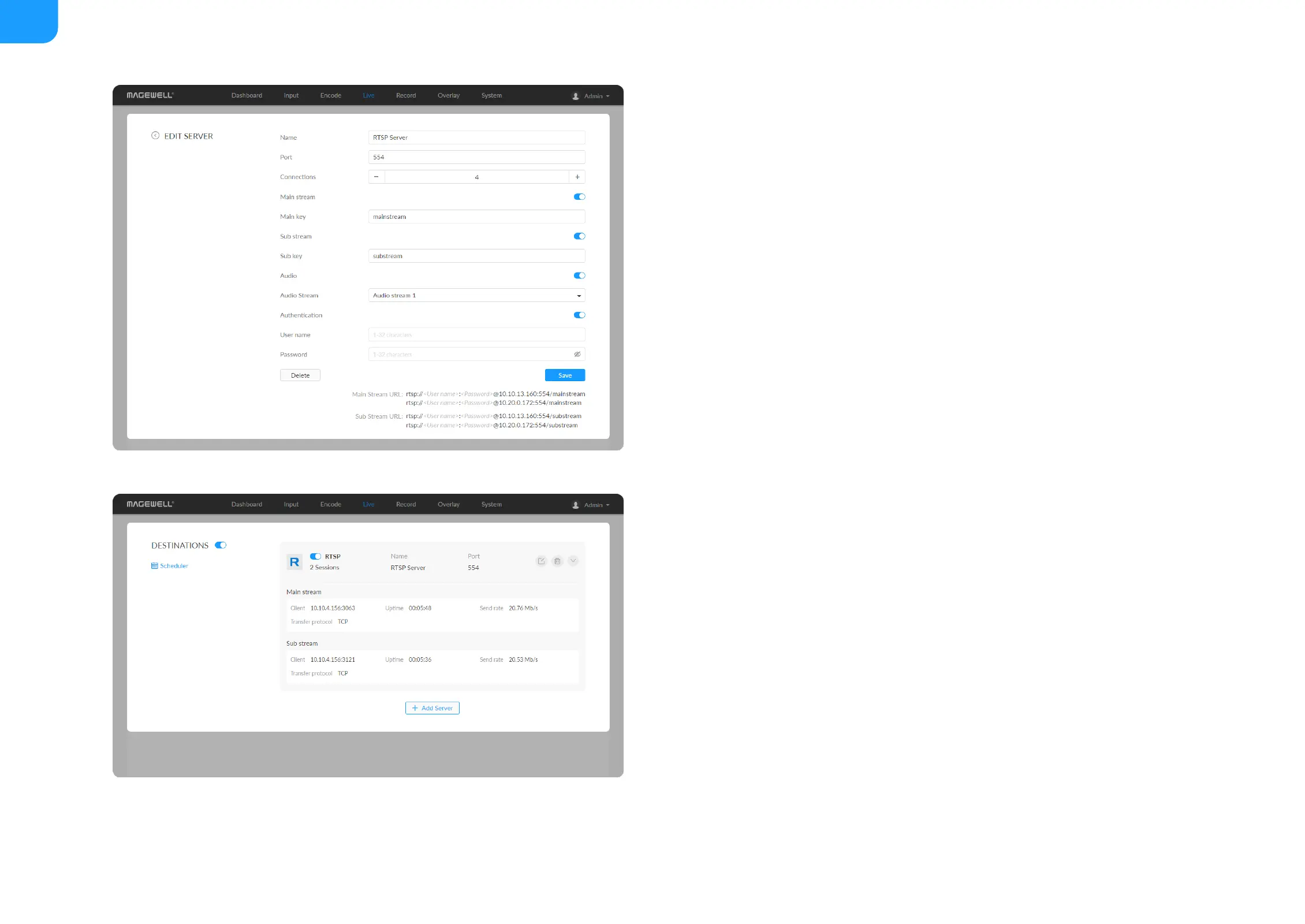
RTSP
Name: specify a name for current task to facilitate server management,
which will be displayed in server list. The name can be 1~30 character.
■
Port: specify RTSP stream port, the value range is 554 (default), 10000-
65535.
■
Connections: set number of clients for each RTSP stream, 8 clients are
supported at most. And you can check the client (session) number at the
server list.
■
Main stream: turn on to push main stream. Specify parameters in Encode
tab. By default, it is on.
■
Main key: specify stream key for main stream. The main key should be
different from sub key.
■
Sub stream: turn on to push sub stream. Specify parameters in Encode tab.
By default, it is off.
■
Sub key: specify stream key for sub stream. The sub key should be different
from main key.
■
Audio: turn on to stream audio signal, otherwise audio will not be delivered.
The audio signal consists of audio embedded in input signal and LINE IN. By
default, it is on.
■
Audio Stream: options are Audio stream 1 ~ 4, and the default is Audio
stream 1. Audio stream parameters can be set in "Encode > AUDIO
STREAM".
■
Authentication: turn on if your live streaming service provider requires.
Type your user name and password for the streaming service.
■
Save: save current configuration.
■



 To Next Page