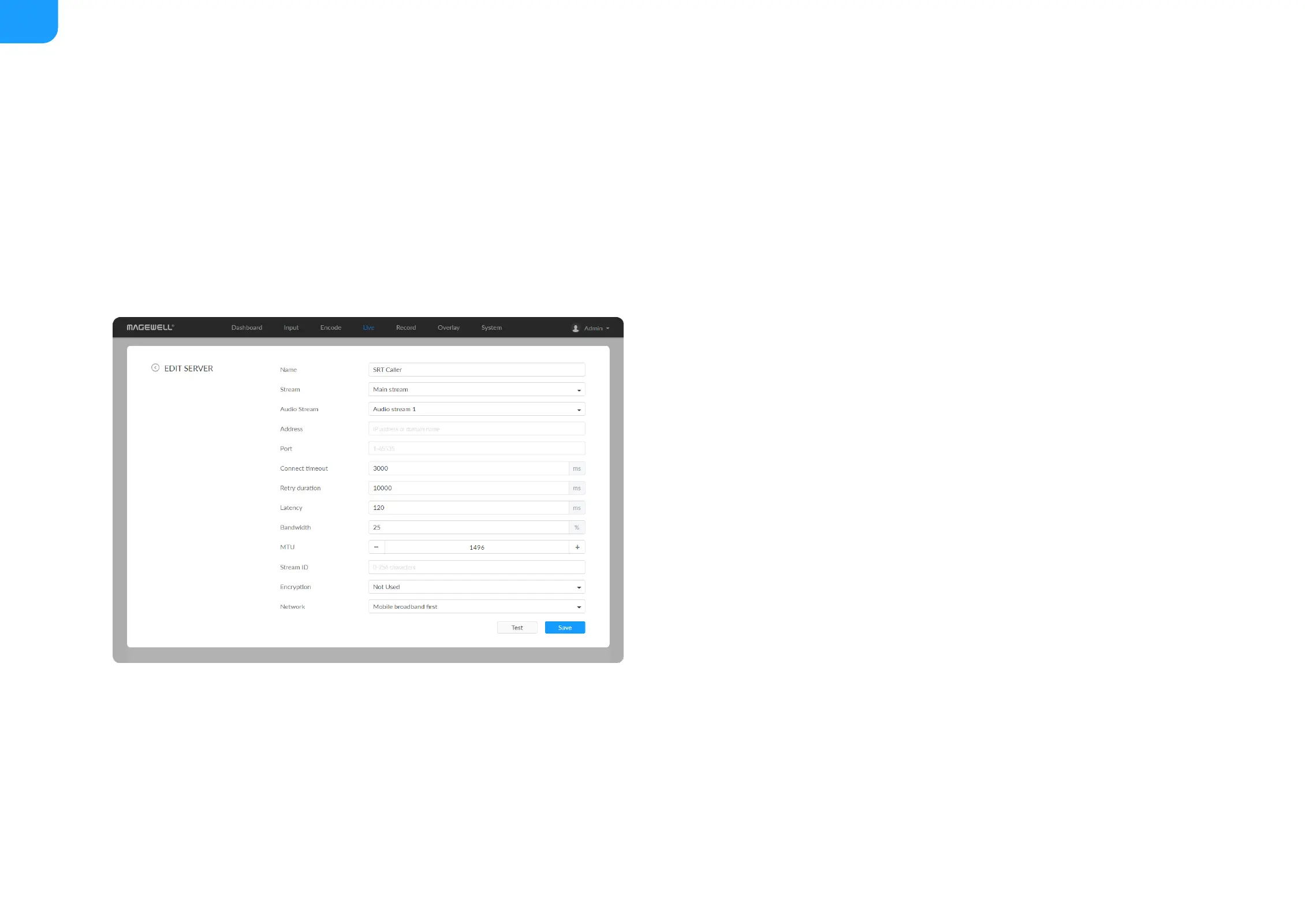
The encoder can stream 1 RTSP session with other protocol streams.
■
After configuration, the stream URLs display at the end of the page. If you
have multiple network connections, there would be multiple stream URLs.
■
Go back to Live tab, you can check the RTSP stream sending information by
clicking the right arrow at the end of the session in the DESTINATIONS
list.
■
Name: specify a name for current task to facilitate server management,
which will be displayed in server list. The name can be 1~30 character.
■
Stream: choose to stream main or sub stream, which can be customized in
Encode tab.
■
Audio Stream: options are Audio stream 1 ~ 4, and the default is Audio
stream 1. Audio stream parameters can be set in "Encode > AUDIO
STREAM".
■
Address: enter the Listener address when Mode is set to Caller. If the SRT
listener and caller are on the same LAN, enter the private IP address of the
SRT listener on the LAN. If the SRT listener and caller are in different network
environments, enter the public IP address of the SRT listener.
■
Port: enter the port number specified by the encoder, which ranges from 1
to 65535.
■
Connect timeout: specify SRT connection timeout in milliseconds, which
ranges from 1000 to 30000ms. The default value is 3000.
■
Retry duration: specify retry duration when SRT SRT connection timeout in
■



 To Next Page