Flex Pro Transmitter Instruction Manual
April 2019
Page 19 of 25
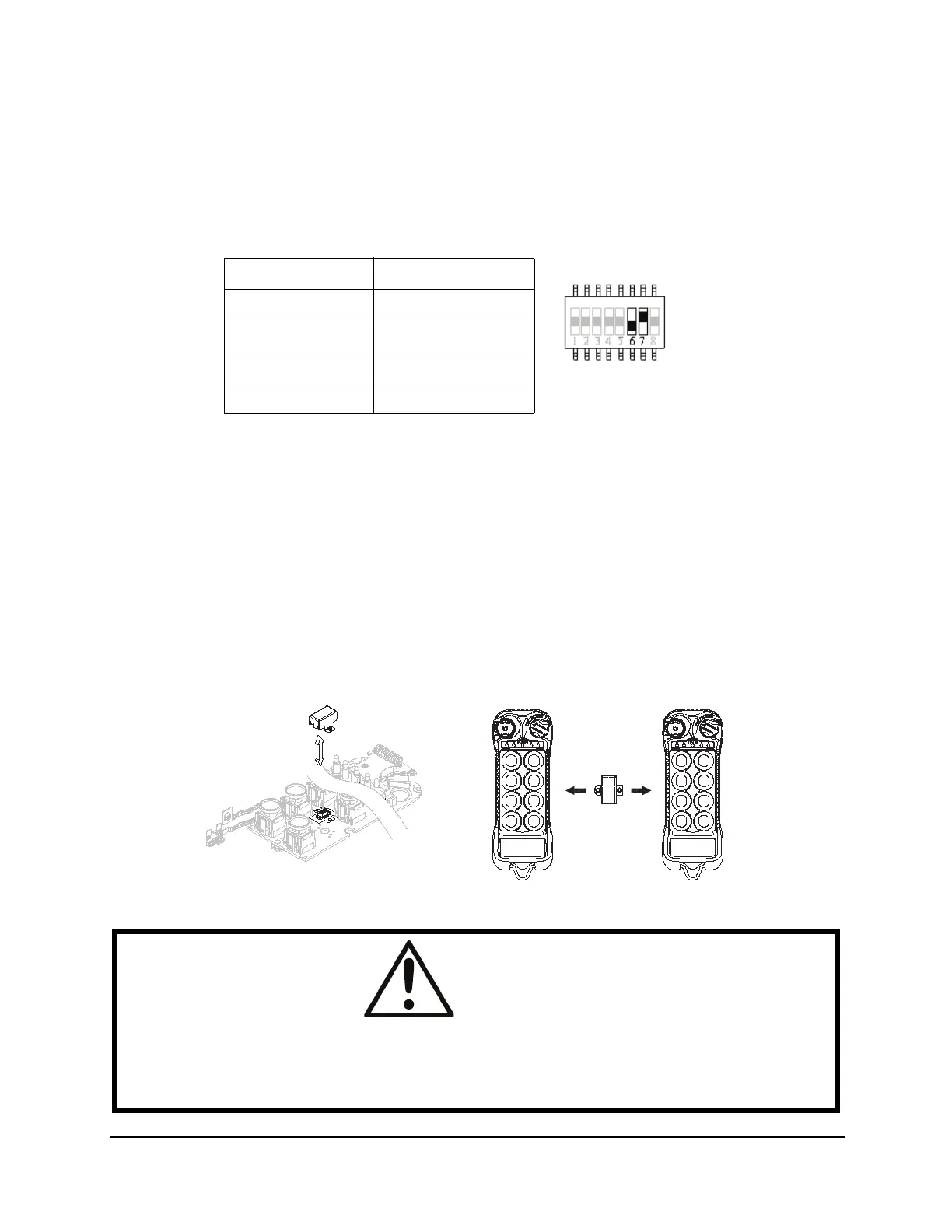
4.2 Inactivity Time-Out Timer
Bits 6 and 7 on the dip-switch allow the user to define a time after which, if no buttons on the transmitter
are pressed, the Flex Pro will send an OFF command to the receiver and power down. To restart the unit,
the user must turn the ON/OFF/START switch to the OFF position and then back to ON again to resume
operation.
4.3 I-CHIP
The I-CHIP functions in a way that is very similar to a SIM card inside a mobile phone, which stores system
information such as your telephone number, account number, phone book and other settings. The I-CHIP
works exactly the same way, as it stores information such as system access code and CAN source
address.
When replacing a transmitter handset, take the I-CHIP out of the old transmitter and install it into the new
one (refer to Fig. 8).
For safety purposes, the system access code stored inside the I-CHIP cannot be changed directly on the
transmitter encoder board. You can change transmitter access code via an external I-CHIP programmer or
duplicator unit available from the factory. Please ask your local dealer for assistance if your system
requires access code adjustments.
Fig. 8
Time Out Dip-switch Setting
Fig. 7
5 minutes 01
10 minutes 10
15 minutes 11
Never shut off 00
WARNING
When opening and closing the unit, take special care to ensure the arms of the microswitch for the
OFF/ON/START switch are not damaged when the printed circuit board is put back into the top
housing. Ensure that the OFF/ON/START switch is in the OFF position before putting the board in the
top housing.






 To Next Page