2-52
IT
EN PL
MACHINE DISPLAY CONTROLLER
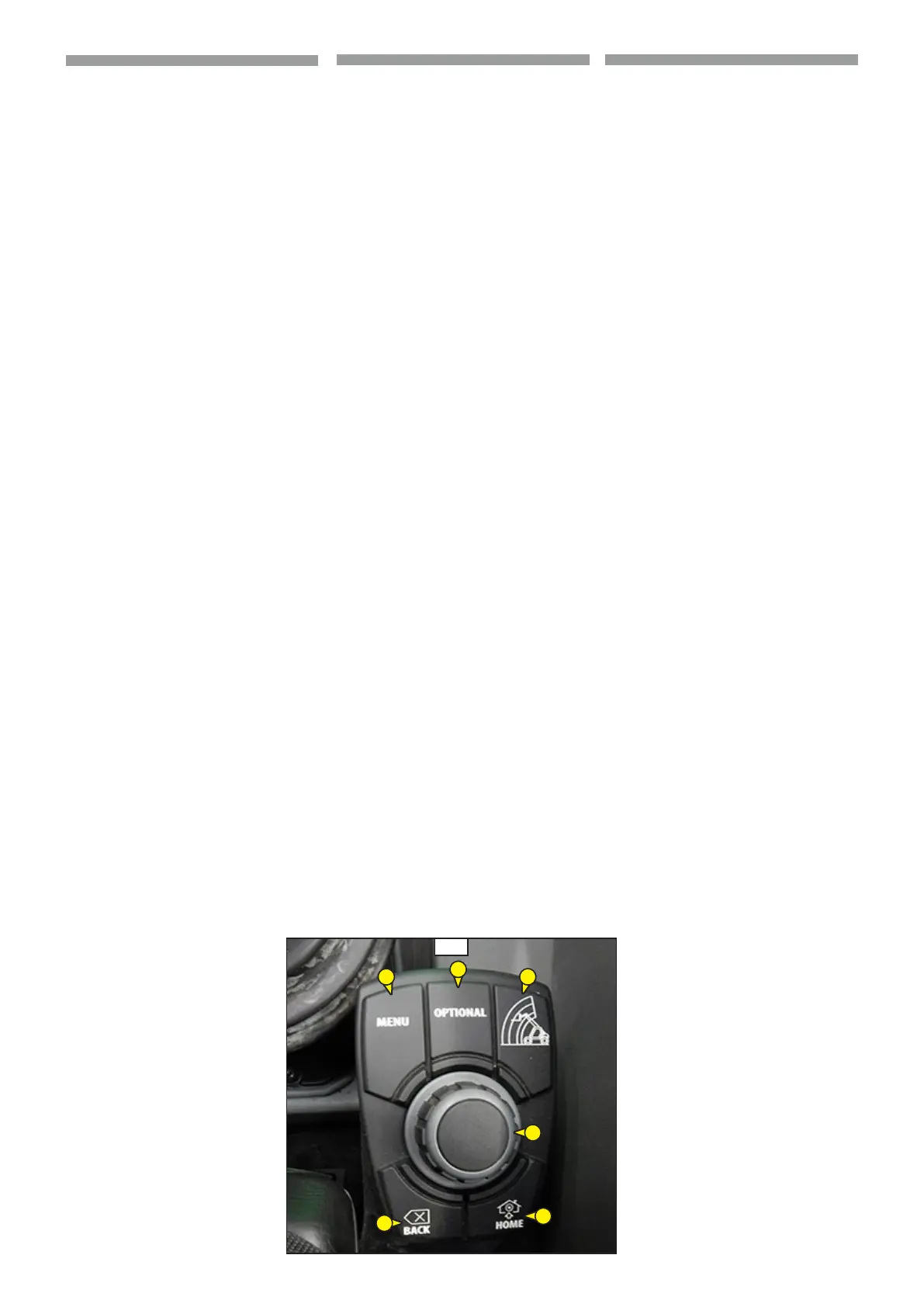
Keypad with control knob (1,
4.4)
This instrument (1,4.4) provide excel-
lent tactile feedback to the user and the
greatest advantage of keypad with control
knob is increase the functions in one con-
trol.
Put display functions within reach
- 5 hot keys for rapid navigation
- scroll with rotary knob
- Select with pushbutton
Functions:
- Rotary knob with select pushbutton
(2,
4.4): turn the knob to scroll the
pages and to navigation into pages (if
possible) after press it to select or con-
rm the choice.
- LOAD CHART key (2b,
4.4) press it to
enter in “ F2 - Load limiter page”,
- HOME key (2c,
4.4): push it to enter in
“Machine diagnostic mode control”,
- BACK key (2d,
4.4): press it to back in
the choice,
- MENU key (2e,
4.4):: press it to enter
in “Menu screen”,
- OPTIONAL key (2f,
4.4): from “F1 - Dri-
ving page” press it to enter in the “Dri-
ving setup page”.
4.4
2b
2c
2d
2e
2f
2a
CONTROLLO DISPLAY MACCHINA
Tastierino con manopola di controllo
(1,
4.4)
Questo strumento (1,4.4) fornisce al-
l’operatore un eccellente feedback tattile e
il più grande vantaggio del tastierino con
manopola è di aumentare le funzioni in un
unico comando.
Funzioni del display messe a portata di
mano
- 5 tasti per una navigazione rapida
- Manopola rotativa per lo scorrimento a
video
- Selezione con pulsante
Funzioni:
- Manopola rotativa con pulsante di con-
ferma (2,
4.4): ruotare la manopola
per scorrere le pagine e navigare al loro
interno (se possibile), quindi premere la
stessa per confermare le scelte.
- Tasto DIAGRAMMA DI CARICO (2b,
4.4)
premerlo per entrare in "F2 - Pagina limi-
tatore di carico",
- Tasto HOME (2c,
4.4): premerlo per en-
trare in "Controllo modalità di diagnosti-
ca macchina",
- Tasto BACK (2d,
4.4): premerlo per tor-
nare indietro in una scelta,
- Tasto MENU (2e,
4.4): premerlo per en-
trare in "Schermata menu",
- Tasto OPTIONAL (2f,
4.4): da "F1 - Pagi-
na di guida", premerlo per entrare nella
pagina di "Setup guida".
STEROWANIE NA WYŚWIETLACZU
MASZYNY
Klawiatura z pokrętłem sterującym
(1,
4.4)
Przyrząd ten (1,4.4) zapewnia operatoro-
wi doskonały mechanizm dotykowy, a naj-
większą zaletą klawiatury z pokrętłem jest
większa ilość funkcji obsługiwana jednym
elementem sterowania.
Funkcje wyświetlacza w zasięgu ręki
- 5 przycisków do szybkiej nawigacji
- Pokrętło obrotowe do przeglądania
obrazu na ekranie
- Wybór za pomocą przycisku
Funkcje:
- Pokrętło obrotowe z przyciskiem pot-
wierdzenia (2,
4.4): obracać pokrętło
w celu przeglądania stron (jeżeli to
możliwe), a następnie nacisnąć go w celu
potwierdzenia dokonanego wyboru.
- Przycisk WYKRES OBCIĄŻENIA (2b,
4.4)
- nacisnąć go w celu przejścia do „F2 -
Strona ogranicznika obciążenia”,
- Przycisk HOME (2c,
4.4): nacisnąć go w
celu przejścia do „Sterowanie - tryb diag-
nostyki maszyny”,
- Przycisk BACK (2d,
4.4): nacisnąć go w
celu cofnięcia wyboru,
- Przycisk MENU (2e,
4.4): nacisnąć go w
celu wejścia na „Ekran menu”,
- Przycisk OPTIONAL (2f,
4.4): na „F1 -
Strona prowadzenia” nacisnąć go, żeby
wejść na stronę „Ustawienia prowadze-
nia".
648870 IT-EN-PL (04/05/2015)






 To Next Page