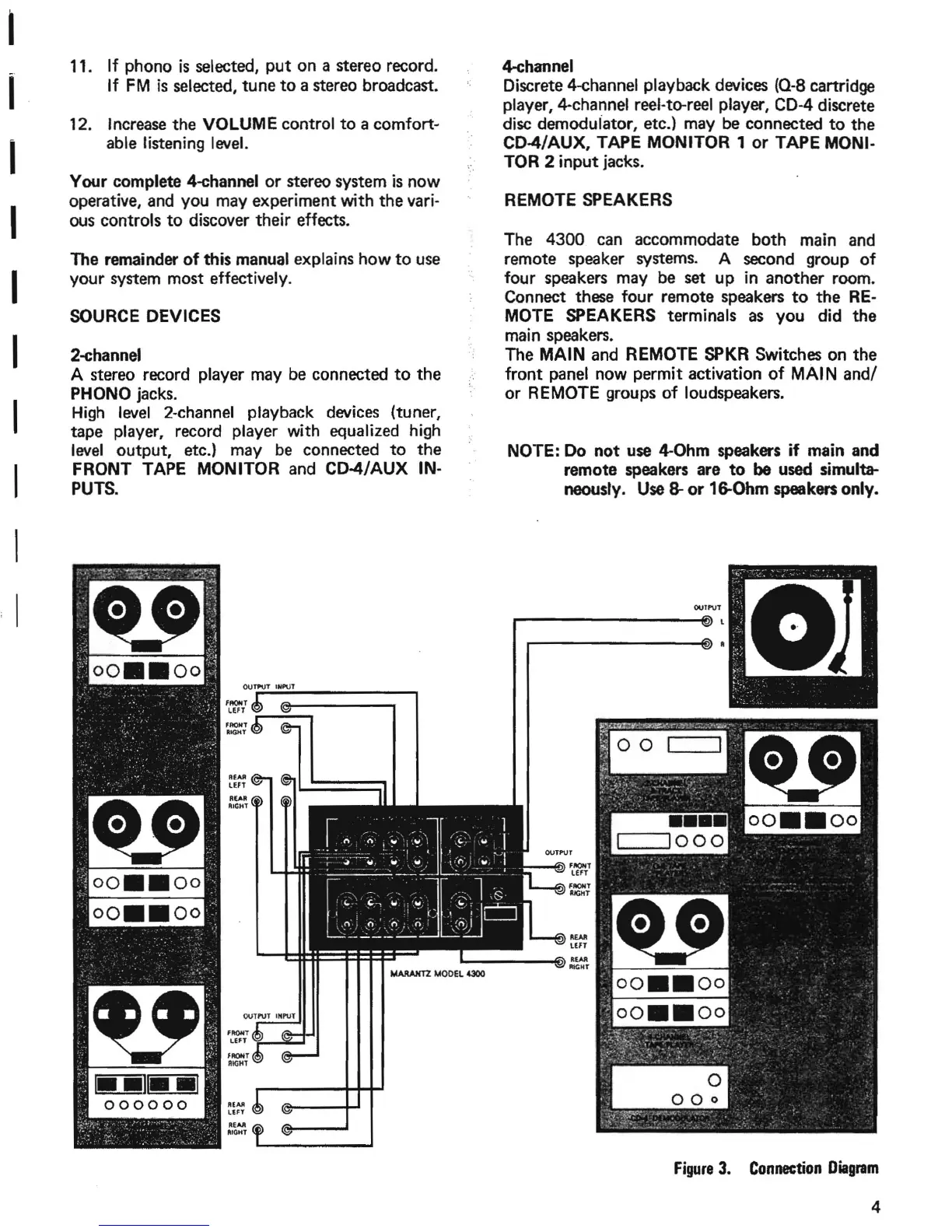
SOURCE DEVICES
00
FIlOIIT
LEfT
FIlONT
lUG"'
NOTE: Do
not
use
~Ohm
speakers if main and
remote speakers are
to
be
used simulta-
neously. Use
8-
or
16-Ohm speakers only.
REMOTE SPEAKERS
ourl'\lT
The 4300 can accommodate
both
main and
remote speaker systems. A second group
of
four speakers may be set
up
in
another
room.
Connect these four remote speakers
to
the
RE-
MOTE SPEAKERS terminals as
you
did
the
main speakers.
The
MAIN
and REMOTE SPKR Switches on
the
front panel now permit activation
of
MAl
Nand!
or
REMOTE groups of loudspeakers.
4-ehannel
Discrete 4-channel playback devices (0-8 cartridge
player,
4-channel reel-to-reel player, CD-4 discrete
disc demoduiator, etc.) may be connected
to
the
CD4!AUX, TAPE MONITOR 1
or
TAPE MONI·
TOR 2
input
jacks.
REAR
LEFT
......
_--~~~
REAlI
LEFT
RUR
RIGHT
FIlOIIT
JUGHT
R!AR
LEFT
REAR
'''CHT
FRONT
LEfT
"'f--"""""-'
FAOHT
LEFT
r--";",,.,
F"""T
RIGHT
1
••
11
••
1
000000
'f'~!"'.~
.
-,
.
~
.t.:n.~.·
..
~.'
.')-
.~.,
•
><
to.
I
2-ehannel
A stereo record player may be connected
to
the
PHONO jacks.
High
level
2-channel playback devices (tuner,
tape player, record player with equalized high
level
output,
etc.) may be connected
to
the
FRONT TAPE MONITOR and CD-4!AUX
IN-
PUTS.
The remainder
of
this manual explains
how
to
use
your
system most effectively.
11.
If
phono
is
selected,
put
on a stereo record.
If
FM
is
selected,
tune
to
a stereo broadcast.
12. Increase
the
VOLUME control
to
a
comfort~
able listening level.
Your complete 4-ehannel
or
stereo system
is
now
operative, and you may experiment with
the
vari-
ous controls
to
discover their effects.
I
I
I
I
I
I
I
I
I
I
Figure
3.
Connection
Diagram
4


 To Next Page