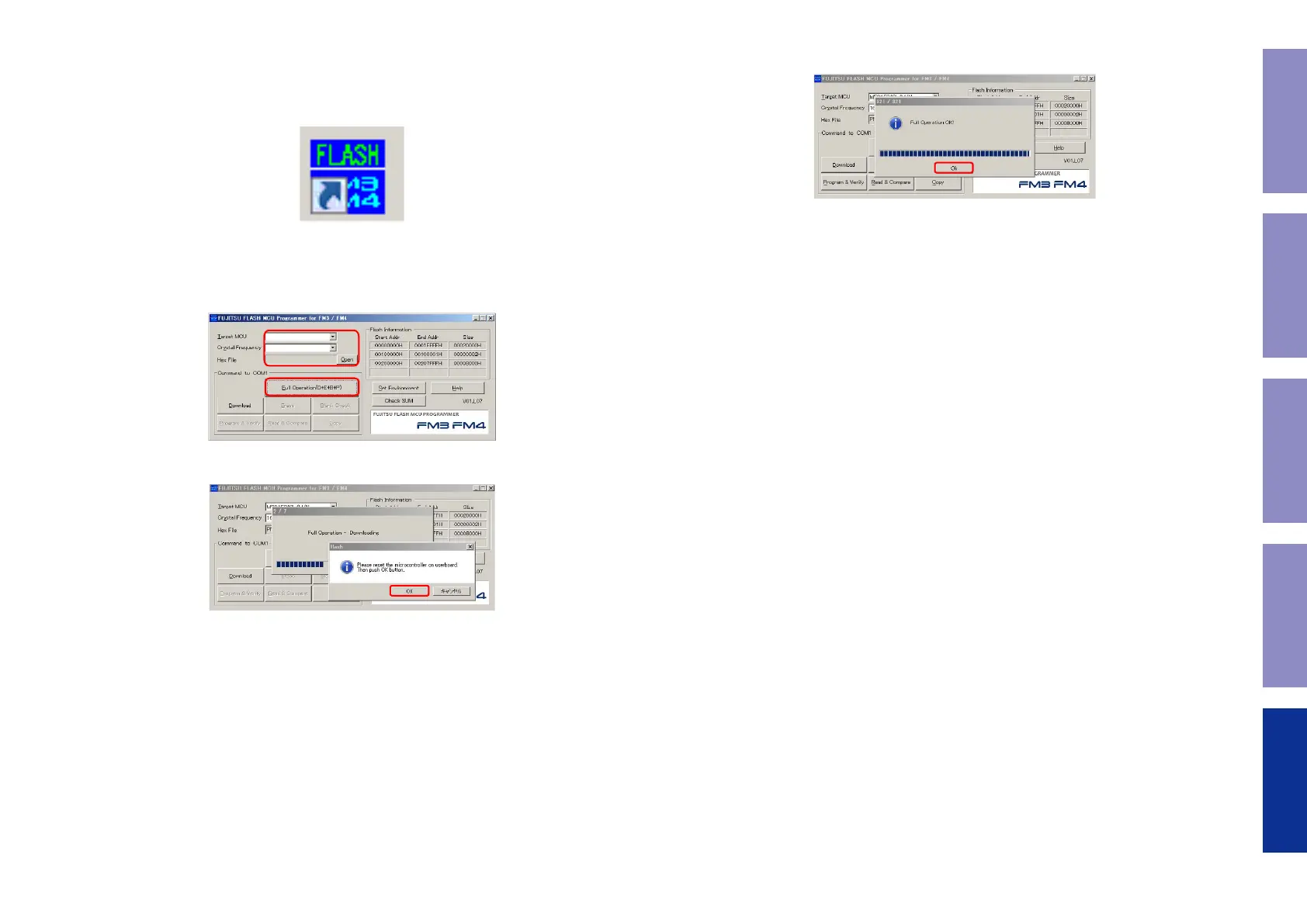
4. Run the FLASH MCU Programmer
(1) Press the power button to turn on the power.
(2) Execute "
FUJITSU FLASH MCU Programmer for FM3/FM4
" after installing it on your computer.
Double-click
FLASH MCU Programmer
to launch
FLASH MCU Programmer
Start.
(3) Target MCU : Select "
MB9AF344L/M/N
"
Crystal Frequency : Select "
4MHz
"
Hex File : Select the le to be "
Update
"(CD6006_XXXXXX-XX.hex)
Click "
Full Operation(D+E+B+P)
"
(4) Click "
OK
".
MB9AF344L/M/N
XXXXXX_XXXXXX-XX.hex
4MHz
(5) The following display appears when the rmware update is complete.
Click "
OK
".
(6) Initialize this unit.
Remove the AC plug.
While holding down buttons the "
DISC/INPUT
" and "
3
" buttons simultaneously, insert the AC plug
to turn the power on.
(7) After updating the rmware, check the version.
See "1. Version Display Mode"
50
Caution in
servicing
Electrical Mechanical Repair Information Updating



 To Next Page