Front panel Rear panel IndexRemote
Q5
w
q
e
r
y
i
u
o
t
Q0
Q1
Q2
Q6
Q8
Q4
Q9
Q7
W0
W1
Q3
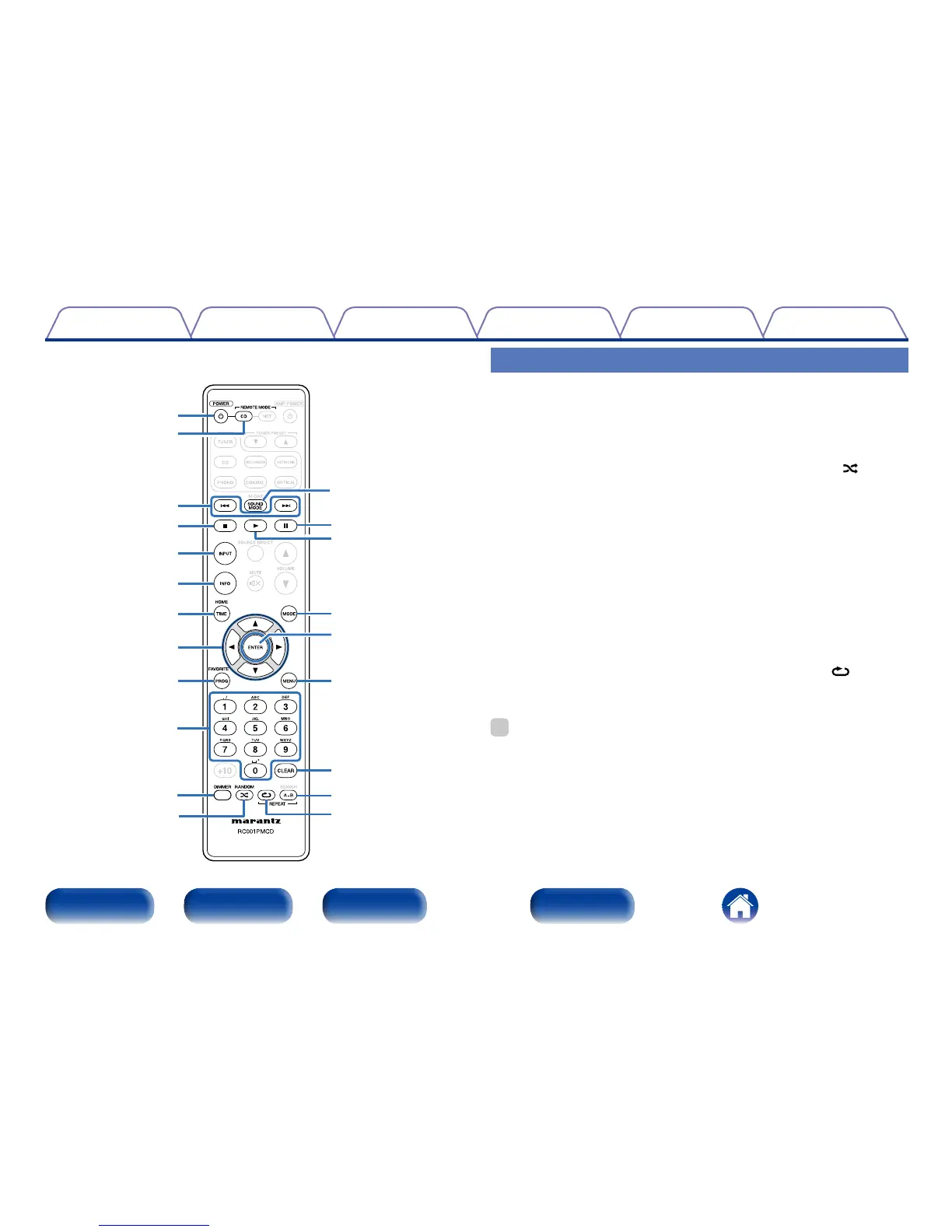
CD player operation
To operate Marantz CD player, press REMOTE MODE CD button to switch
the remote control to the CD operation mode.
• REMOTE MODE CD button lights for approximately two seconds.
q POWER button (X)
w Remote mode select button
(REMOTE MODE CD)
e Reverse-skip/Forward-skip
buttons (8, 9)
r Stop button (2)
t Input source select button
(INPUT)
y Information button (INFO)
u TIME button
i Cursor buttons (uio p)
o Program button (PROG)
Q0 Number buttons (0 – 9)
Q1 DIMMER button
Q2 RANDOM button ( )
Q3 SOUND MODE button
Q4 Pause button (3)
Q5 Play button (1)
Q6 Playback mode switching
button (MODE)
Q7 ENTER button
Q8 MENU button
Q9 CLEAR button
W0 REPEAT A-B button
W1 REPEAT button ( )
%
• The amp and tuner can be operated with the amp operation buttons even when the
remote control operation mode is set to CD.



 To Next Page