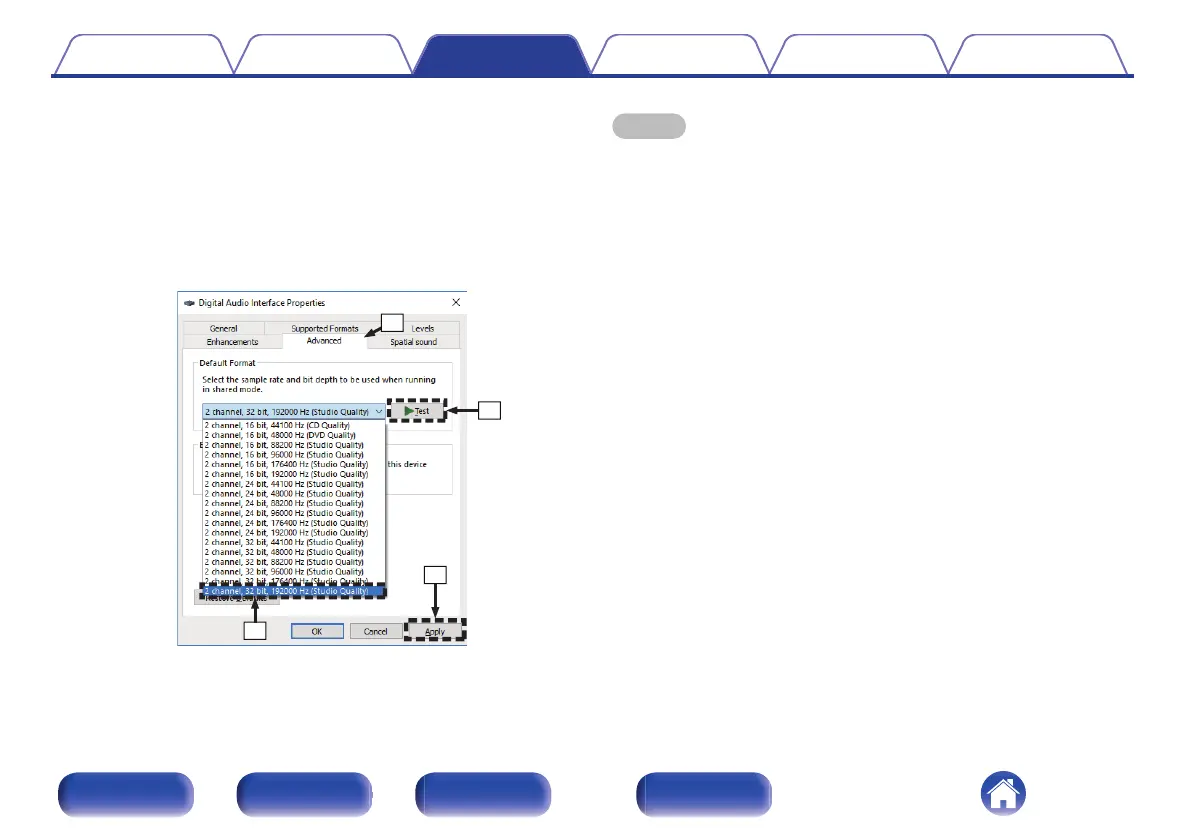
B
Click the “Advanced” tab.
C
Select the sampling rate and bit rate to be applied to the D/A
converter.
0
It is recommended that “2 channel, 32 bit, 192000 Hz (Studio
Quality)” is selected.
D
Click “Apply”.
E
Click “Test”.
0
Check that audio from this unit is output from the PC.
NOTE
0
The dedicated driver must be installed in the PC before this unit is connected to a
PC. Operation will not occur correctly if connected to the PC before the dedicated
driver has been installed.
0
Player software supporting the Audio Stream Input Output (ASIO) driver is
required to play files with a sampling frequency of 352.8 kHz/384 kHz without
downsampling. Check your player software before playing files with the ASIO
driver.
0
Operation may fail in some PC hardware and software configurations.
0
Please see the FAQ at www.marantz.com if you experience any issues getting
audio to play from your computer through the this unit. You may also want to check
the support pages for your audio player application.
Contents Connections Playback Settings Tips Appendix
49
Front panel Rear panel Remote control
unit
Index



 To Next Page