HDMI Switcher1 [U2401] is faulty.
Replace with a new device.
Recheck from check item (3.2.).
If it does not work, replace the PCB.
HDMI Switcher1 [U2401] is faulty.
Replace with a new device.
Check for a short circuit in the TMDS line.
If there is no problem, the HDMI Switch-
er1 [U2401] is faulty.
Replace with a new device.
Check for a short circuit in the DDC line.
If there is no problem, the HDMI Switch-
er1 [U2401] is faulty.
Replace with a new device.
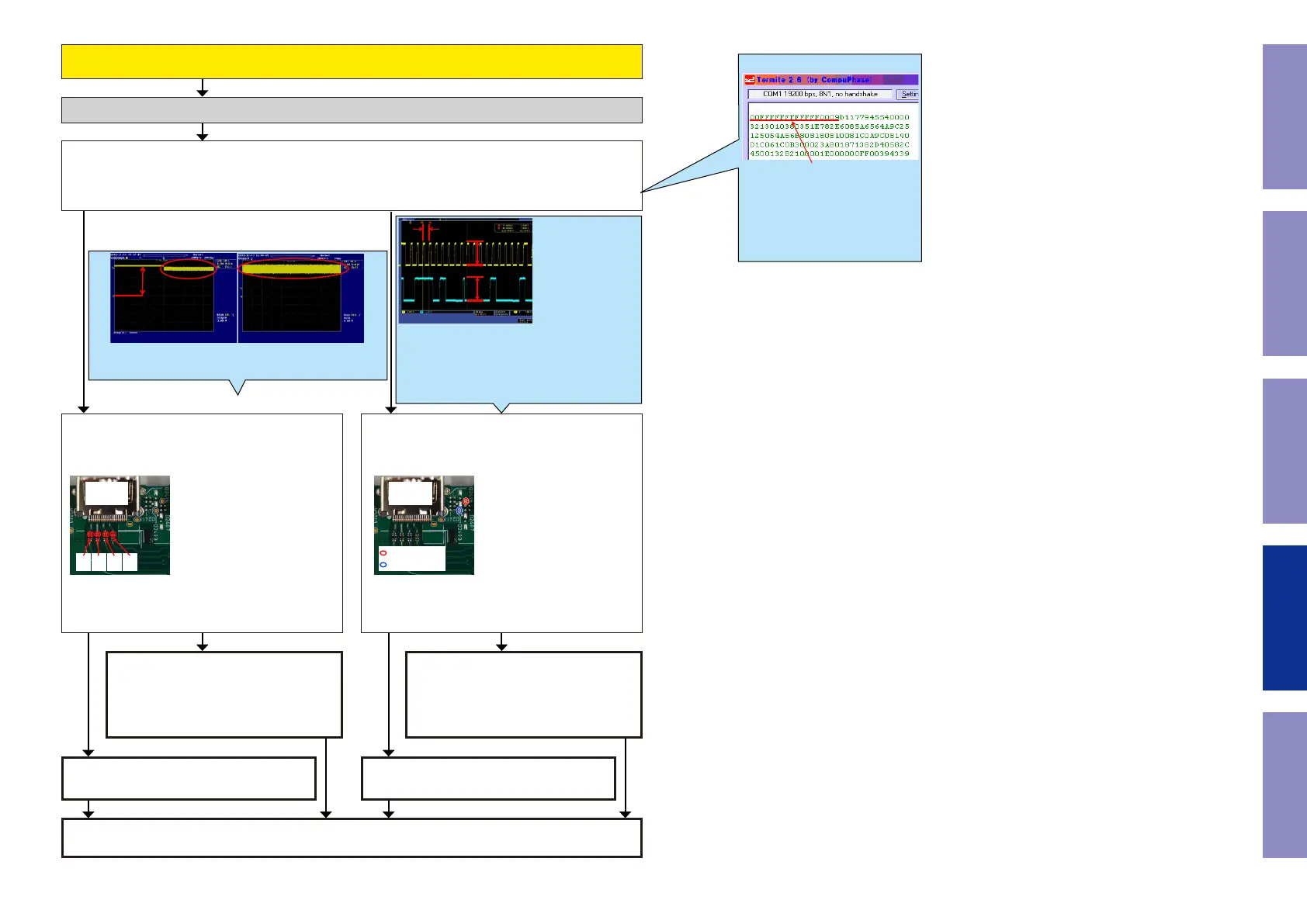
When the results of check item (3-11.6.) are "33 or 23 or 13 or 03"
(Detection of HPD is OK / Detection of RXSENSE is OK )
Check item(3-11.8.). Check the Monitor EDID :
① Unplug the AC cord. Plug the AC cord into a power outlet.
② Send the transmission command "m_3" from Termite.exe.
Are the rst eight bytes of the returned value "00FFFFFFFFFFFF00"?
Check item(3-11.9.). Checking the TMDS :
Check the TMDS waveform at the following test
point.
N5010
HDMI OUT
[4K ZONE2]
D2+
D2-
D1+
D1-
D0+
D0-
CK+
CK-
Check item(3-11.10.). Check the communication :
Do "DDCSCK" and "DDCSDA" indicate (5V) at the
test point near HDMI output connector [N5010]?
N5010
HDMI OUT
[4K ZONE2]
DDCSCK
DDCSDA
Checking the EDID register. (HDMI ZONE2 OUT)
YES
NOYES
NO
NOYES
Example
The rst eight bytes are nor-
mally "00FFFFFFFFFFFF00".
The correct resistor value can-
not be checked if the AVR and
TV are not connected by HDMI.
m_3
less than 100KHz
5V
5V
This diagram shows an example of the DDC communica-
tion waveform.
-The high level voltage is 5V.
-The frequency of the DDC CLK is 100kHz or less.
Check at each test point.
Voltage scale : 2.0V/div
Time scale : 40us/div
TMDS Signal
3.3V
TMDS
Example of waveform in check ① Example of waveform in check ②
Voltage scale : 1.0V/div Voltage scale : 1.0V/div
Time scale : 20ms/div Time scale : 1s/div
128
Before Servicing
This Unit
Electrical Mechanical Repair Information Updating



 To Next Page