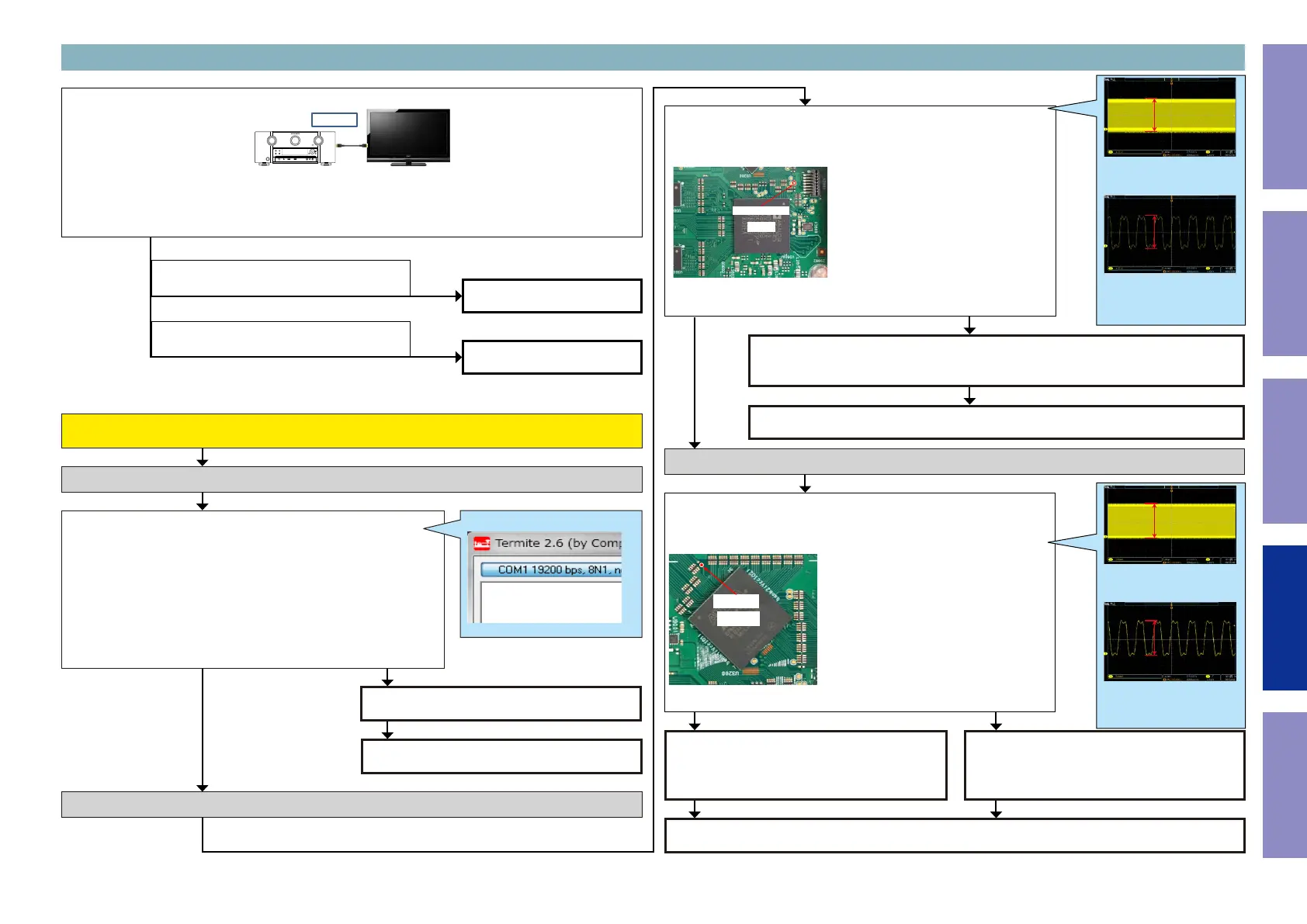
Check item(3-15.1.). Does a video signal come from HDMI OUT to TV correctly? :
Turn Video Conversion "ON" on the setup menu.
(SETUP MENU-> Video-> Output Settings-> Video Conversion = On)
When the "SETUP" button on a remote control is pressed, is "MENU" displayed on TV which is connect-
ed to the HDMI output terminal on the AVR?
HDMI OUT
NO
YES
Go to check item (3-15.2.).
Go to check item (3-15.5.).
3-15. GUI and PLD failure detection procedure
When the results of check item (3-15.1.) are "NO"
(When the menu display is not OK)
Check item(3-15.2.). Check the format of the resistor video signal :
Send the following command from Termite.exe.
Send the command "i 00ED 0044 0001".
When the following value is returned, go to YES.
"Other than 00"
When the following value is returned, go to NO.
"00"
Check the Video signal line. (GUI -> HDMI Tx)
Example
i 0020 0070 0001
22
NO
Check item(3-15.3.). Check the PLD video signal line from the GUI :
Check the video signal waveform at the following test point.
Is the waveform like the sample?
U2800
8KOPI_PCK
Check item(3-15.4.). Check the HDMI Tx video signal line from the
PLD :
Check the video signal waveform at the following test point.
Is the waveform like the sample?
U3200
R3224
NO
HDMI Tx [U9101] is faulty.
Replace with a new device.
Check the peripheral pattern between the GUI [U2800] and PLD [U3200].
If there is no problem, the GUI [U2800] is faulty.
Replace with a new device.
Check the peripheral pattern between the PLD
[U3200] and HDMI Tx [U9101].
If there is no problem, the PLD [U3200] is faulty.
Replace with a new device.
Check the Video signal line. (GUI -> PLD)
Check the Video signal line. (PLD -> HDMI Tx)
HDMI Tx [U9101] is faulty.
Replace with a new device.
Recheck from check item (3.5.).
If it does not work, replace the PCB.
Recheck from check item (3.5.).
If it does not work, replace the PCB.
NO
YES
YES
Recheck from check item (3.5.).
If it does not work, replace the PCB.
3.3V
Example of waveform in check ①
Voltage scale : 1.0V/div
Time scale : 100ms/div
3.3V
Example of waveform in check ②
Voltage scale : 1.0V/div
Time scale : 10ns/div
1.8V
Example of waveform in check ①
Voltage scale : 500mV/div
Time scale : 100us/div
1.8V
Example of waveform in check ②
Voltage scale : 500mV/div
Time scale : 10ns/div
144
Before Servicing
This Unit
Electrical Mechanical Repair Information Updating



 To Next Page