EasyManua.ls Logo

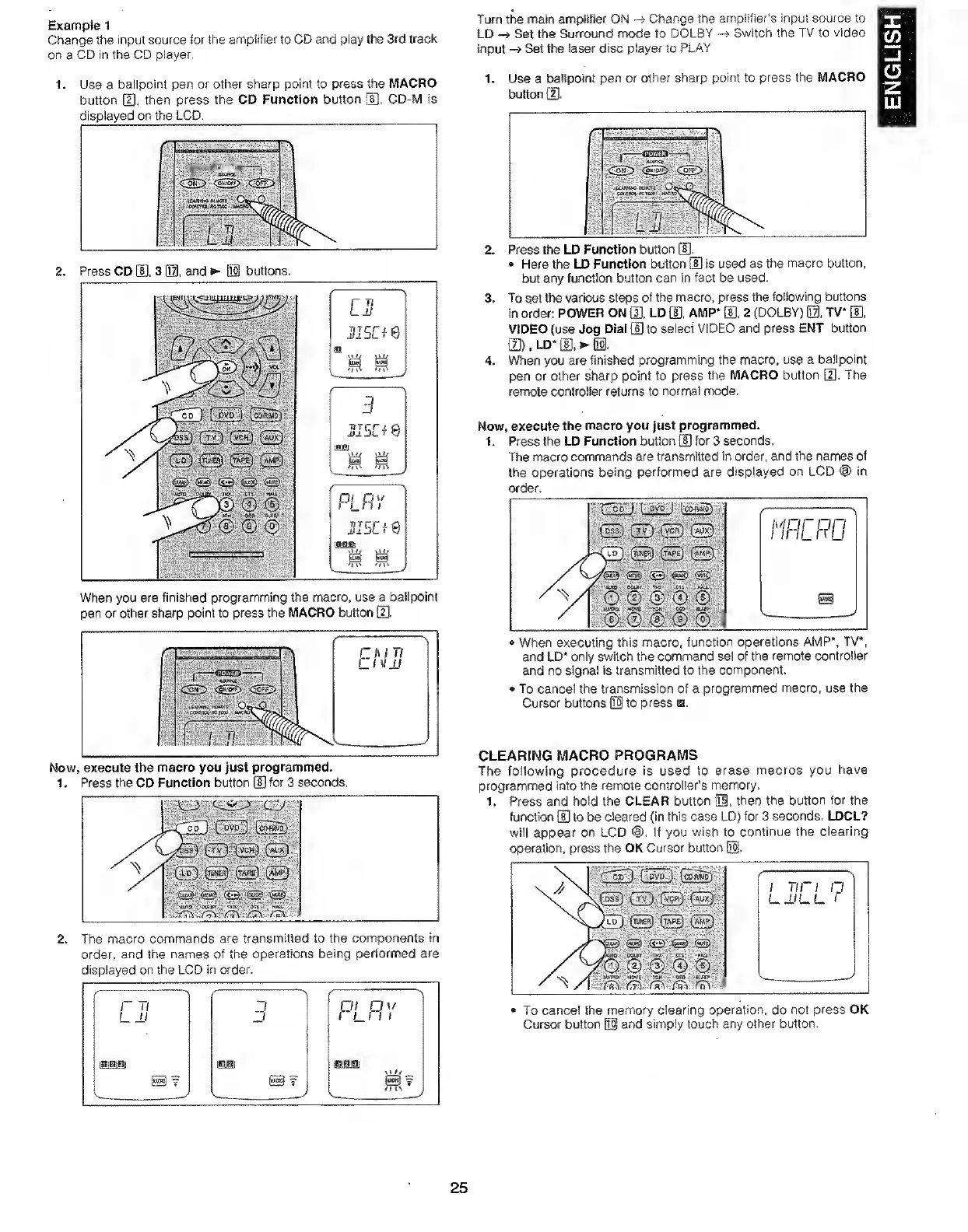
Marantz SR7000 - Example Macro Programming; Programming a Macro Sequence; Clearing Macro Programs; Erasing Programmed Macros

Marantz SR7000
40 pages
Print Icon
To Next Page IconTo Next Page
To Previous Page IconTo Previous Page
Loading...
Exampte
1
Change
the
input
source
for
the
amplifier
to
CD
and
play
the
3rd
track
on
a
CD
in
the
CD
player.
Turn
the
main
amplifier
ON
Change
the
amplifier's
input
source
to
LD
Set
the
Surround
mode
to
DOLBY
Switch
the
TV
to
video
input
Set
the
laser
disc
player
to
PLAY
1.
Use
a
ballpoint
pen
or
other
sharp
point
to
press
the
MACRO
button
m,
then
press
the
CD
Function
button
(S.
CD-M
is
displayed
on
the
LCD,
When
you
are
finished
programming
the
macro,
use
a
ballpoint
pen
or
other
sharp
point
to
press
the
MACRO
button
H).
Now,
execute
the
macro
you
Just
programmed.
1
.
Press
the
CD
Function
button
d]
for
3
seconds.
2.
The
macro
commands
are
transmitted
to
the
components
in
order,
and
the
names
of
the
operations
being
performed
are
displayed
on
the
LCD
in
order.
1
.
2.
3.
4.
Use
a
ballpoint
pen
or
other
sharp
point
to
press
button
H].
the
MACRO
Here
the
LD
Function
button
[S
is
used
as
the
macro
button,
but
any
function
button
can
in
fact
be
used.
To
set
the
various
steps
of
the
macro,
press
the
following
buttons
in
order;
POWER
ON
[J],
LD
m.
AMP*
S.
2
(DOLBY)
m.
TV*
0,
VIDEO
{use
Jog
Dial
[U
to
select
VIDEO
and
press
ENT
button
13)
.
LD*
0.
S3,
Vt/hen
you
are
finished
programming
the
macro,
use
a
ballpoint
pen
or
other
sharp
point
to
press
the
MACRO
button
0.
The
remote
controlier
returns
to
normal
mode.
Now,
execute
the
macro
you
just
programmed.
1.
Press
the
LD
Function
button
0
for
3
seconds.
The
macro
commands
are
transmitted
in
order,
and
the
names
of
the
operations
being
performed
are
displayed
on
LCD
©
in
order.
When
executing
this
macro,
function
operations
AMP’,
TV*,
and
LD*
only
switch
the
command
set
of
the
remote
controller
and
no
signal
is
transmitted
to
the
component.
To
cancel
the
transmission
of
a
programmed
macro,
use
the
Cursor
buttons
03
to
press
a.
CLEARING
MACRO
PROGRAMS
The
following
procedure
is
used
to
erase
macros
you
have
programmed
into
the
remote
controller’s
memory.
1.
Press
and
hold
the
CLEAR
button
01,
then
the
button
for
the
function
0
to
be
cleared
(in
this
case
LD)
for
3
seconds,
LDCL?
will
appear
on
LCD
If
you
wish
to
continue
the
clearing
operation,
press
the
OK
Cursor
button
03.
To
cancel
the
memory
clearing
operation,
do
not
press
OK
Cursor
button
03
and
simply
touch
any
other
button.
25
ENGLISH

Other manuals for Marantz SR7000

Related product manuals