5 PREFERENCE
•
MULTI ROOM SETUP :
“5-1 MULTI ROOM SETUP”
(see page 44)
•
DC TRIGGER SETUP :
“5-2 DC TRIGGER SETUP”
(see page 45)
1.
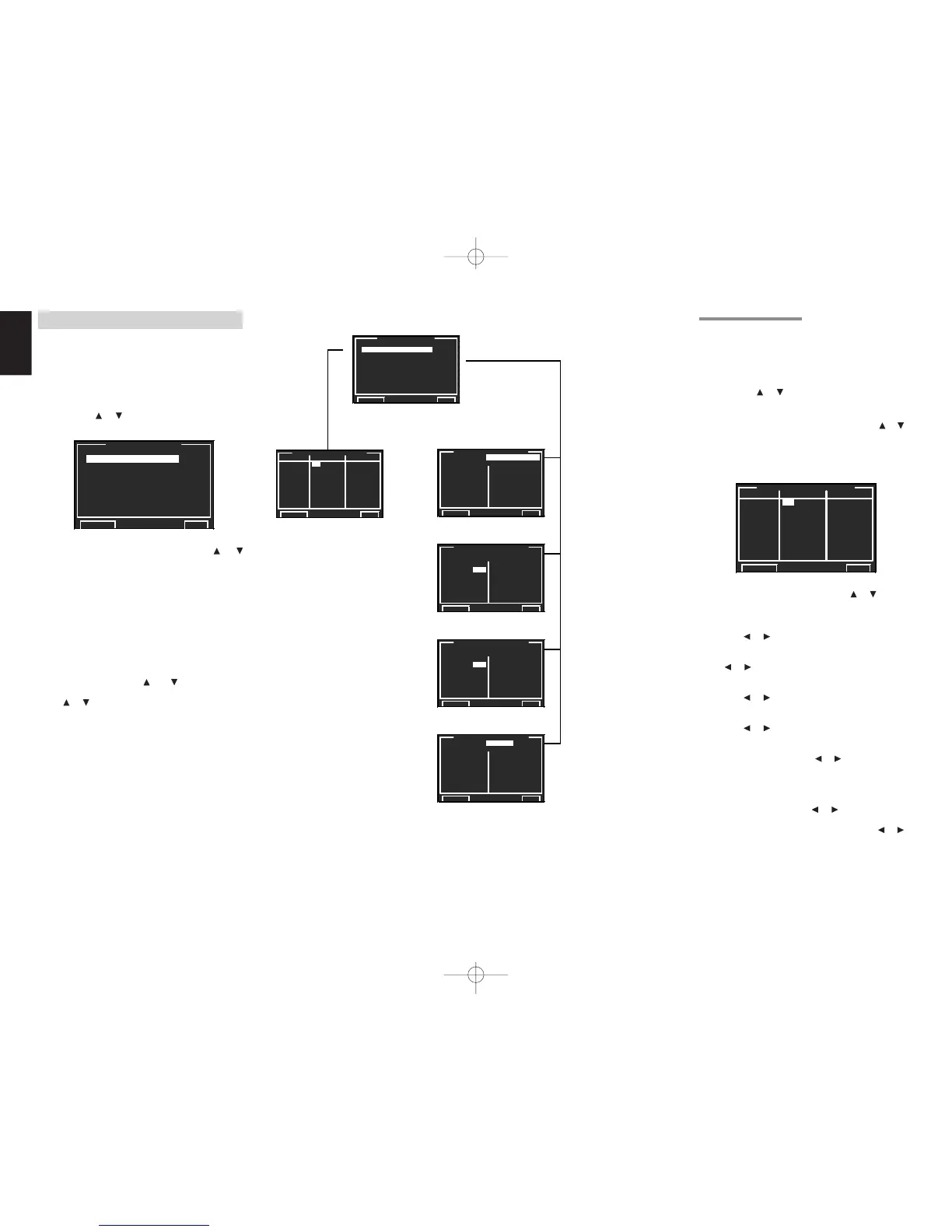
Select “5. PREFERENCE” from MAIN MENU
with the
or cursor buttons and press the
OK/ENTER button.
2.
Select the desired menu with the
or
cursor buttons and press the OK/ENTER
button.
STAND BY:
When this is set to “ECONOMY”, you can
reduce the power consumption when the unit is
in the Standby mode. When “ECONOMY” is
selected, “Video Auto On” and “RS-232C” are
disabled when the unit is in the Standby mode.
BILINGUAL:
In the Bilingual mode, Dolby Digital and DTS
output is set to either “MAIN” or “SUB”. Select
“BILINGUAL” with the
and
cursor buttons,
then select MAIN
↔↔
↔↔
↔ SUB
↔↔
↔↔
↔ MAIN+SUB with
the
or
cursor buttons.
HDMI AUDIO:
This setting determines whether to play back
audio input to the HDMI jacks through the
SR9600 or output it through the receiver to a TV
or projector.
ENABLE: The audio input to the HDMI jacks
can be played back by this receiver.
In such case, audio signals are not
output to the TV or projector.
THROUGH: The audio input to the HDMI jacks
is not output from the speaker
terminals of the SR9600. Audio
data is output directly to the TV or
projector. This setting is used to
listen to audio on a multi channel
TV, etc. When this mode has been
selected, “HDMI THR” appears on
the FL display.
☞
p.44
☞
p.45
5-1 MULTI ROOM SETUP
SR9600 has features for 2 multiroom systems
such as source selector, sleep timer, multiroom
speaker output and remote control.
You can set these features in this menu.
1.
Select “5. PREFERENCE” from MAIN MENU
with the or cursor buttons and press the
OK/ENTER button.
2.
Select “MULTI ROOM SETUP” with the or
cursor buttons.
3.
Press the OK/ENTER button to enter the
selection.
4.
Select the desired item with the or cursor
button.
MULTI (MULTI ROOM):
To switch the multiroom output “ON” or “OFF”
with the
or cursor buttons.
SPKR (SPEAKER):
To switch the speaker output “ON” or “OFF” with
the or cursor buttons.
VIDEO:
Select the video source of the multiroom output
with the or cursor buttons.
AUDIO:
Select the audio source of the multiroom output
with the or cursor buttons.
SLEEP:
The sleep mode is available when the multiroom
is active, set the time with or cursor buttons.
The sleep timer can be set to a maximum 90
minutes in 10 minute increments.
VOL (VOLUME SETUP):
Select whether the multiroom output level is
variable or fixed with the or cursor buttons.
LEVEL (VOLUME LEVEL):
Adjust the multiroom output level with the or
cursor buttons. The volume can be set between
-90 dB and 0 dB in 1 dB increments.
Note:
• After you complete this portion of the setup, press
the OK/ENTER button to move the cursor to
“RETURN” and press the OK/ENTER button to
go to the sub menu.


 To Next Page