30
ENGLISH
The icons show the category of
content applicable to each operation.
Video Audio Photo
For details of the media corresponding to each icon, see “Playable Media”
(vpage45).
Home menu screen
n Playing playlist
Favorite files on a USB memory device, disc are played using the
playlist.
1
with
ui
, then press
p
.
5ZQF+QH
4J[F.
3FTPMVUJPO
$JUZ
*UFN
.FEJB1MBZFS
$JUZ
64#1IPUP#JH$JUZ
$JUZ
10161
&EJU.FOV
3&563/
&YJU
$JUZ
$JUZ
2
Press POP UP MENU.
The menu of playlist is displayed.
3
Press ENTER.
File is added to playlist.
4
with
ui
o
.
64#
*UFN
.FEJB1MBZFS
%-/"4FBSDI
5ZQF64#
4J[F.
'4'"5
10161
&EJU.FOV
3&563/
&YJU
1MBZMJTU
5
See “Playing files(MEDIA PLAYER)” (vpage29)
tIf the unit is set to standby, the playlist is cleared.
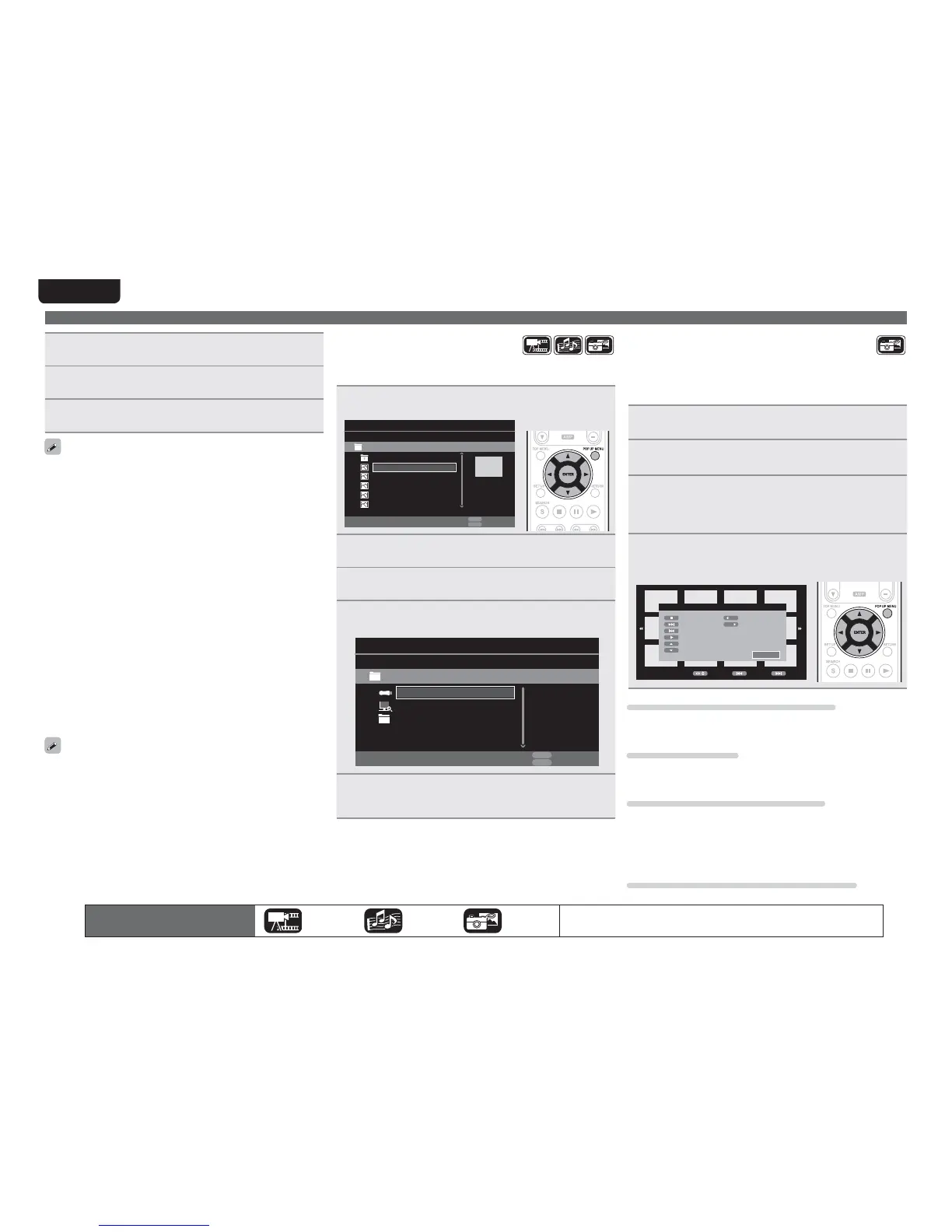
n Playing Kodak Picture CD
This unit can also run JPEG files stored on Kodak Picture CD. You
can enjoy picture images on the display device set by playing back
the picture CD. For details of Kodak picture CD, contact a shop that
provides developing service of Kodak Inc.
1
If a Kodak Picture CD is inserted in the disc tray of
the unit, a slide show begins on the screen.
2
Pressing 2 stops the slide show, and the thumbnail
screen is displayed.
3
Use uiop to select a desired picture to be played
back, then press
ENTER.
An image will be played back from the selected track and go to
the next one in turn.
4
Pressing POP UP MENU with the thumbnail screen
displayed shows the screen for describing the
playback operations.
.PWF 1SFWJPVT /FYU
3FNPUF,FZ'VODUJPO
5IVNCOBJM.PEF
/FYU1JDUVSF
1SFWJPVT1JDUVSF
1JDUVSF.PEF
*OWFSU
.JSSPS
$POUSBSPUBUF
3PUBUF$MPDLXJTF
&YJU
Changing the still image being played
Press 8, 9.
tBefore playback or display of next image.
Pausing the display
Press 3.
tTo cancel pause, press
1.
Changing the still image orientation
Press uio p.
u ························································· Invert
i ························································ Mirror
o ·············································· Contrarotate
p ······································· Rotate clockwise
Returning to the thumbnail display screen
Press 2.
1
Press■.
Playback of a file from a USB memory device or server stops.
2
Press
USB/DISC
.
The playback mode of the unit is changed to disc mode.
3
Press1.
Playback begins.
The playback media mode setting remains in the memory, even when
the power is set to standby.
n About playback information (vpage13)
n Pausing (vpage17)
n Stopping (vpage17)
n Skipping to a desired chapter/track/file (vpage17)
n Fast-forward/fast-reverse (vpage17)
n Finding specific sections with search modes (vpage18)
n Memorizing locations to replay (Marker function)
(vpage18)
n Playing repeatedly (Repeat playback) (vpage19)
n Playing repeatedly between specified points (A-B repeat)
(vpage19)
n Playing images frame by frame (vpage19)
n Slow-forward/slow-reverse (vpage19)
n Switching primary audio (vpage19)
n Changing the primary subtitle (vpage20)
n Switching the angle (vpage20)
tPlayback Video or audio may be interrupted or playback may be
disabled, depending on the connection environment of devices
connected via the network.
tIf a file cannot be played on the unit, it may be played by converting
the format on the connected device.
tThe connected device cannot play data from the unit.
tIt may require a little time to start playback, depending on the size
of a file to be played.
tFor the file types that can be played, see “Files” (vpage46).



 To Next Page