42
ENGLISH
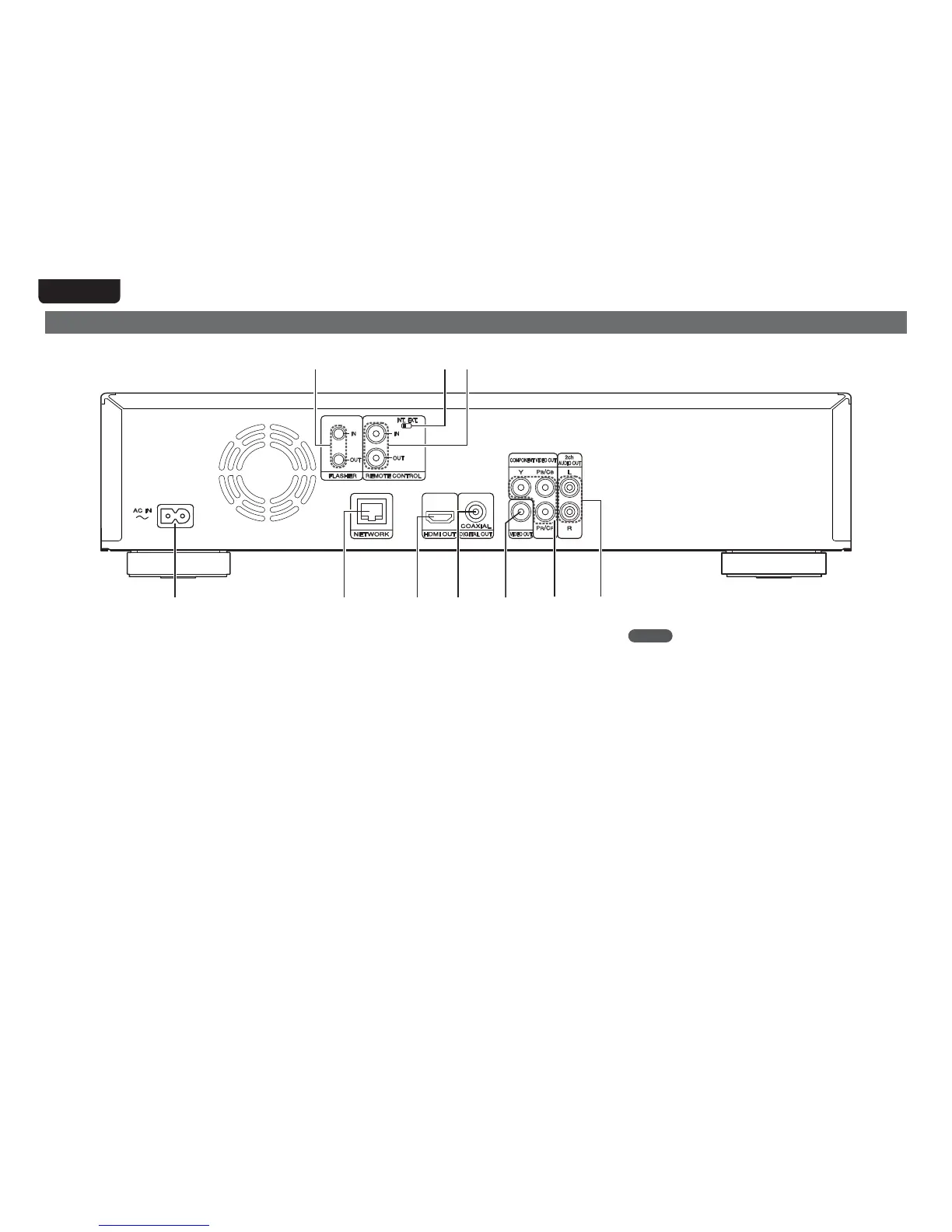
Rear panel
For buttons not explained here, see the page indicated in parentheses ( ).
q
Q0 i
o
u
w
e
t
y
r
q AC inlet (AC IN) ·········································································· (5)
w NETWORK connector ······························································ (27)
e HDMI OUT connector ································································ (4)
r DIGITAL OUT COAXIAL connector ·································· (10, 12)
t VIDEO OUT connector ·················································· (9, 10, 11)
y COMPONENT VIDEO OUT connectors ························ (9, 10, 11)
u 2ch AUDIO OUT connectors ··················································· (11)
For software recorded in multi-channel, analog signals that have
been down-mixed into 2 channels are output.
i REMOTE CONTROL IN/OUT connectors ······························· (28)
o REMOTE CONTROL INT./EXT. switch ··································· (28)
Q0 FLASHER IN/OUT connectors ················································ (28)
Connect an external control device or other device for servicing.
(Use a straight cable for the connection.)
NOTE
tDo not touch the inner pins of the connectors on the rear panel.
Electrostatic discharge may cause permanent damage to the unit.
tDo not put your finger or foreign object in the fan opening. Doing so
could cause injury or unit failure.



 To Next Page