11
Advanced versionSimple version Information
ENGLISH
Basic version
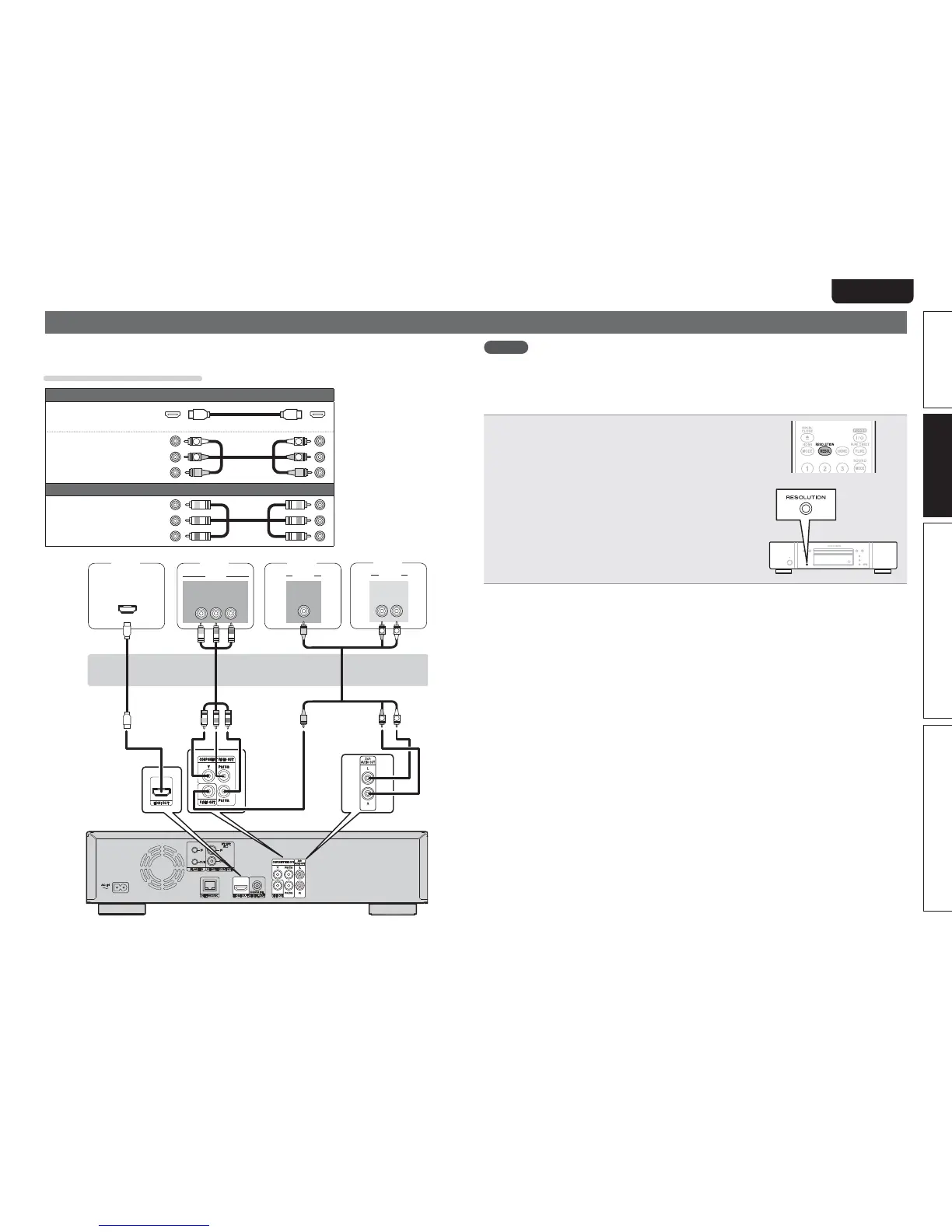
Connecting a TV
tThis connection is to connect the unit and a television directly.
tCheck the television’s audio and video terminals and connect to one of them.
Cables used for connections
Audio and video cable
HDMI cable
(Sold separately)
Audio and Video
cable
R
L
R
L
(White)
(Red)
(Yellow)
Video cables
Component video
cable
(Sold separately)
(Green)
(Blue)
(Red)
"6%*0
"6%*0
*/
-3
7*%&0
*/
7*%&0
7*%&0
$0.10/&/57*%&0
:1
# 13
*/
*/
)%.*
RR
L
L
TV TV
TV
TV
NOTE
tDo not connect this unit’s video output via a VCR (Video Cassette Recorder). Some media contain copy
prohibiting signals, which will disturb the screen image.
tThe unit can play both NTSC and PAL discs.
n When connected to the television’s component video input terminal
Press
RESOLUTION
on the unit or remote control
according to the resolution of the connected television
(vpage 22).
tThis unit’s component video output supports
480i/576i/480p/576p/720p/1080i output .
tImages will not be projected normally if the television resolution
and this unit’s output resolution do not match.
tCopyright protected DVD is output in 480i/576i or 480p/576p.
n Connecting to a device equipped with a DVI-D connector
Use an HDMI DVI-D conversion cable.
tThe audio signal is not output. Make the appropriate audio connections for your devices.
tThe video signal will be in RGB format.
tYou cannot output to a DVI-D device that does not support HDCP (high-bandwidth digital content
copyright protection system).
tVideo may not be output depending on the combination of devices.



 To Next Page