33
Basic versionSimple version Information
ENGLISH
Advanced version
GUI menu operation
1
Press SETUP.
The GUI menu is displayed on the TV
screen.
tThe GUI menu is also displayed when you
press
SETUP of the Home menu.
2
Press ui o p to select the
menu to be set or operated.
tTo return to the previous item, press o.
3
Press ENTER to enter a setting.
Text colors of selected items of the GUI menu are as follows:
tWhite : These items can be selected.
tGray : These items cannot be selected.
NOTE
You must use the GUI menu to make settings or operate while a disc
or USB memory device is not inserted. In cases in which the resume
function is activated, you may not make correct settings.
Exiting the GUI menu
Press SETUPwhile the GUI menu is displayed.
tThe GUI menu display disappears.
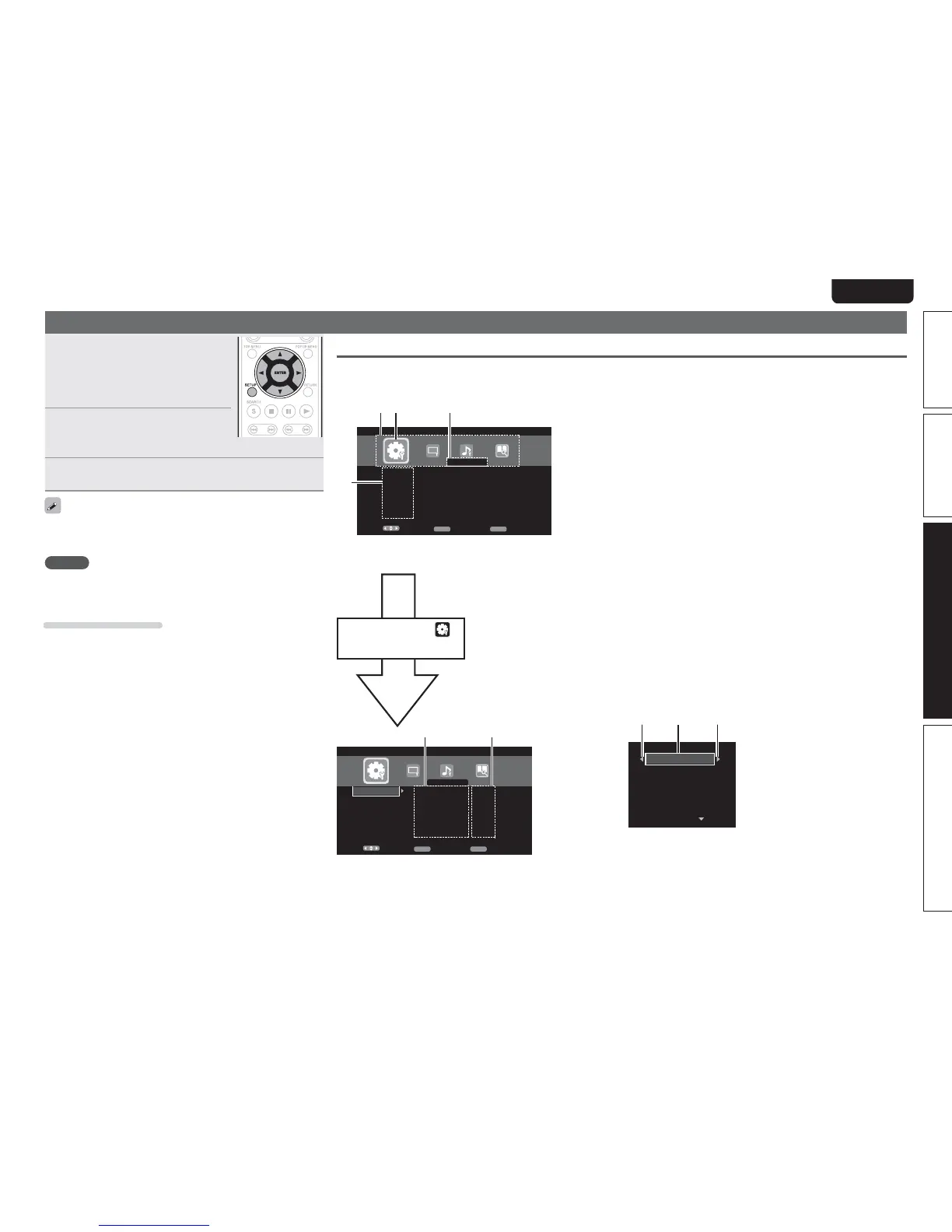
Examples of GUI menu screen displays
Typical examples are described below.
n Menu selection screen (Top menu)
4FMFDU
$POGJSN
&/5&3
&YJU
4&561
4ZTUFN
(FOFSBM4FUUJOH
-BOHVBHF
3BUJOHT
/FUXPSL
0UIFST
4DSFFO4BWFS
"VUPQPXFSNPEF
1PXFS4BWJOH
)%.*$POUSPM
)%.*1PXFS0GG$
0O
0O
0O
0GG
0O
t y
4FMFDU
$POGJSN
&/5&3
&YJU
4&561
4ZTUFN
(FOFSBM4FUUJOH
-BOHVBHF
3BUJOHT
/FUXPSL
0UIFST
r
w eq
q List of GUI menu setup icons
w Currently selected setup icon
e Currently selected setup item
r List of currently selected setup items
t List of items of currently selected advanced settings
y Currently selected advanced settings
Press op to select “ ”
and then press
i.
(Or press
ENTER.)
n List of items
"VUPQPXFSNPEF
1PXFS4BWJOH
)%.*$POUSPM
)%.*1PXFS0GG$
4DSFFO4BWFS
u io
u Returns to the previous item. Use o to switch.
i Switch to the next item. Use p to switch.
o Selected item. Switch the selected item using ui.



 To Next Page