6
ENGLISH
1
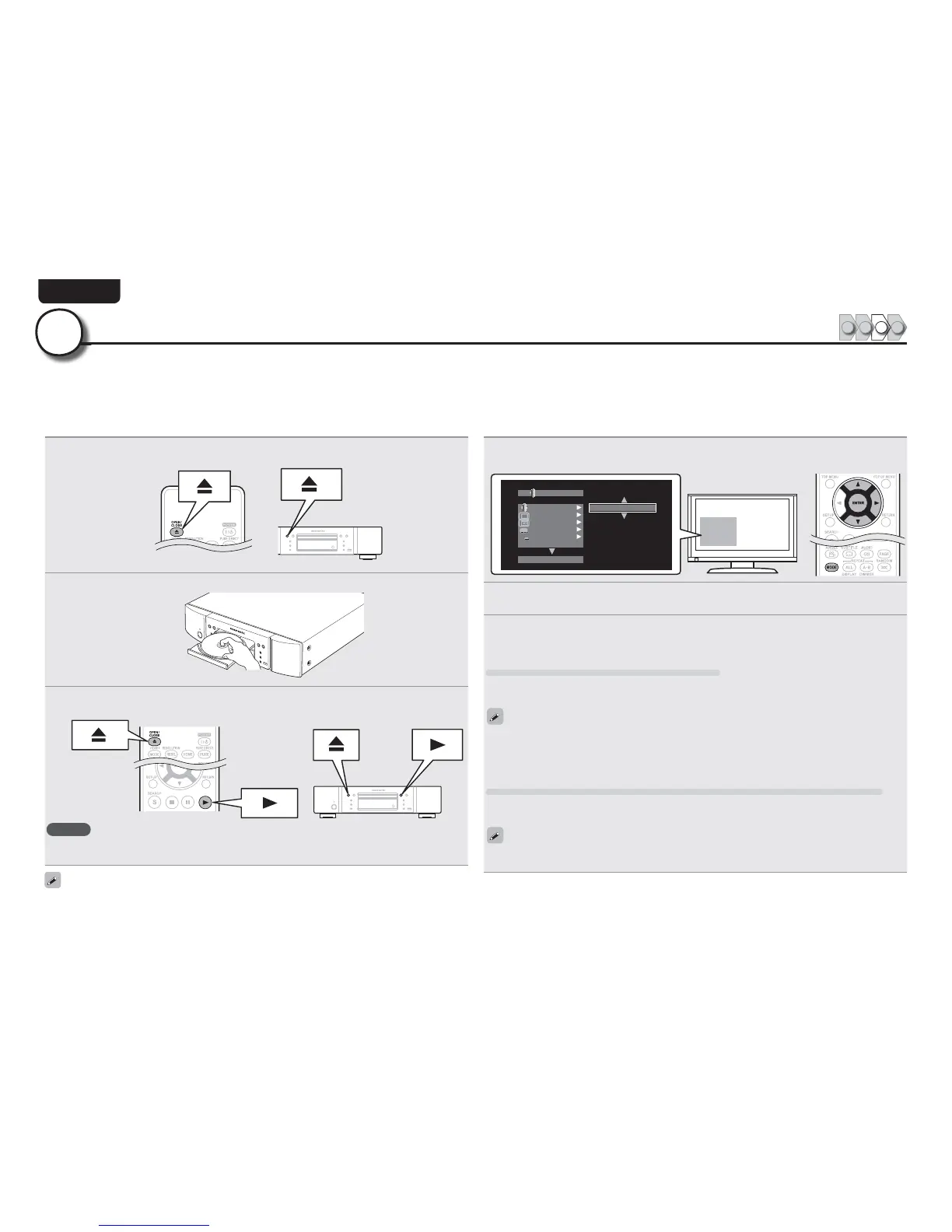
Press 5.
The disc tray opens.
2
Place the disc on the disc tray with the label side up.
3
Press 5.
tThe disc tray closes, and playback of the disc begins.
NOTE
tDo not push the disc tray in by hand. It may damage the player.
tSome discs require pressing 1 to start playback. In this case, press 1 to start playback.
Setting the audio during playback.
4
Press MODE.
Displays a menu of items that can be set.
1*1
"
)%"VEJP0VUQVU
#%.7
)%"VEJP0VUQVU
0GG
0GG
0GG
0GG
#%"VEJP.PEF
5
Use u i to select “BD Audio Mode”, then press ENTER or p.
6
Use u i to select “HD Audio Output” or “Mix Audio Output”, then press ENTER.
For listening to a BD disc with high quality
Set “BD Audio Mode” to “HD Audio Output”.
tHD audio of a BD disc is output from the unit.
tOnly main audio of HD audio is output.
tBefore connecting the unit to an AV receiver, check that the receiver supports HD audio playback. If it
does not, the unit outputs the signal converted to LPCM from the HDMI output terminal. HD audio is
not output.
For listening to subaudio of a BD disc (interactive audio or second audio)
Set “BD Audio Mode” to ”Mix Audio Output”.
tWhen the unit plays a BD, HD Audio of the BD is converted to normal digital audio and output.
Specifi cations of interactive audio or second audio differ depending on the Blu-ray Disc. For details, refer
to the package or operation manual supplied with the Blu-ray Disc.
An audio format recorded on a Blu-ray Disc is an HD Audio (High Defi nition Audio) format, such as Dolby TrueHD, Dolby Digital Plus, DTS-HD, etc.
For playing back audio of an HD Audio format, the AV receiver to which the unit is to be connected must support HD Audio playback.
This section describes the setting for audio output depending on the AV receiver to be connected, outputting the Audio format as-is or converting
to normal digital audio.
Set up the audio (HD Audio Setup)
123 4
3



 To Next Page