16
Playback (Basic operation)
This section describes the display screen for each media and the
procedures for playback.
The icons show the category of content applicable to each operation.
Video : Blu-ray Disc, DVD-Video, DivX plus HD,
MPEG, AVI, WMV, AVCHD
Audio : Super Audio CD, CD, DVD-Audio, MP3,
WMA, AAC, LPCM
Photo : JPEG
Basic settings (vpage24)
n About playback information (vpage16)
n Playing BD and DVD-Video (vpage17)
n Playing Super Audio CD (vpage18)
n Playing CD (vpage19)
n Playing DVD-Audio (vpage19)
Operations enabled during playback (vpage20)
NOTE
• The symbol (prohibited mark) may appear on the top left of the
TV screen during an operation. This means that the operation being
conducted is prohibited.
• Depending on the disc, certain operations may not be as described
in this manual. Check each disc user guide for more information.
• During playback of a 2-layered disc, pictures may stop momentarily.
This happens when the 1st layer switches to the 2nd layer. This is
not a malfunction.
About playback information
3UHVVDISPLAYWRGLVSOD\WKHLQIRUPDWLRQEDUGLVSOD\RUPHGLDSOD\HUGLVSOD\
• To close the display, press DISPLAY until it goes away.
• Displayed content differs depending on the media being played.
Also, the information displayed while playing and stopped differs.
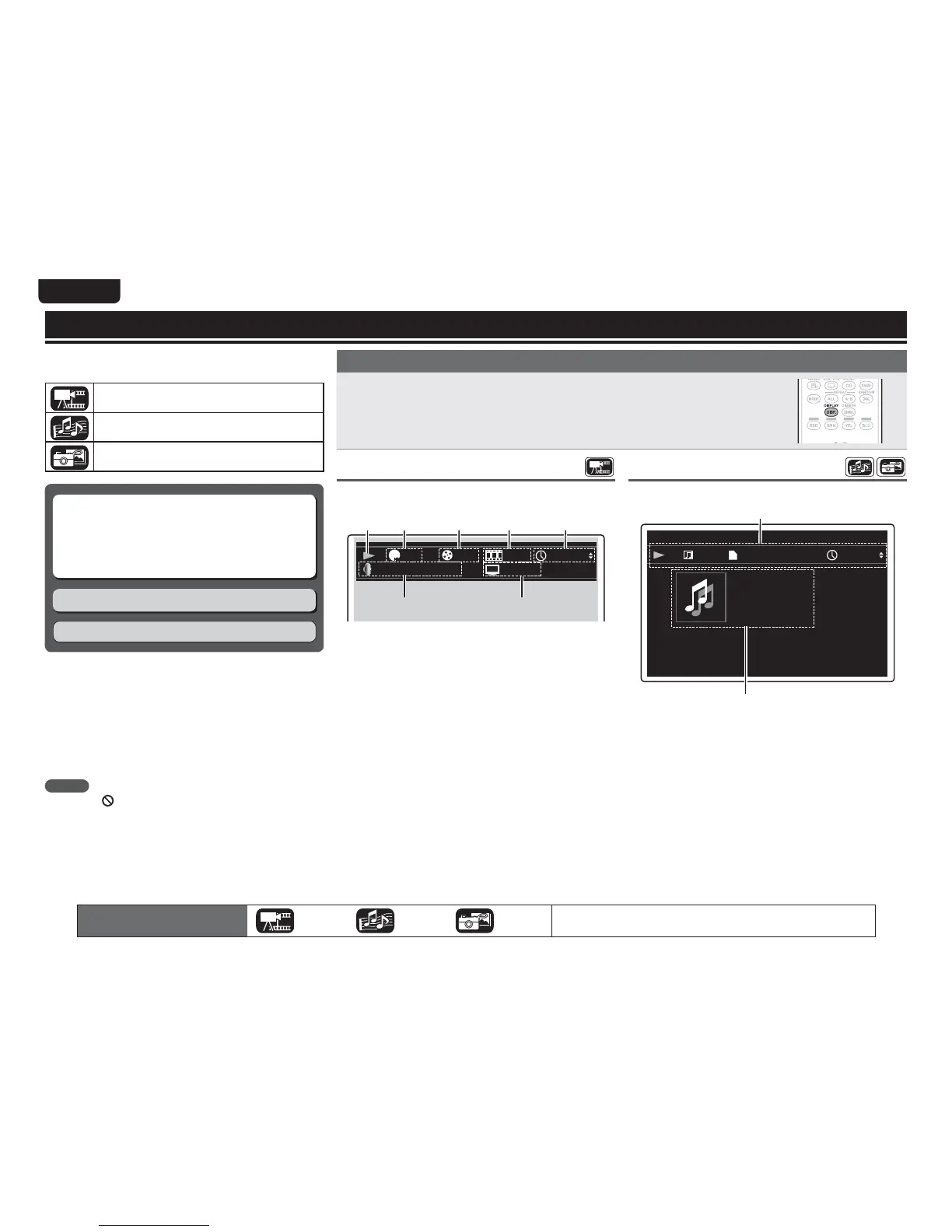
Information bar display
This screen is displayed when video data such as on a Blu-ray Disc,
DVD-Video, etc. are played.
&OHMJTI
7$
%54)%." :$C$SJ
)%.7)%.7
q w e r t
uy
q Playback information
• Play (1)
• Stop (
2)
• Pause (
3)
• Reverse Skip (
8) / Forward Skip (9)
• Fast Reverse (
6) / Fast Forward (7)
• Slow Reverse (
0
2
) / Slow Forward (
2
1
)
w Video format display
e Title / Group display
r Chapter / Track display
t Time display
• Title Elapsed / Remain time
• Chapter Elapsed / Remain time
• Group Elapsed / Remain time
• Track Elapsed / Remain time
y Audio format display
u HDMI output signal display
(When the connected HDMI device)
The icons show the category of
content applicable to each operation.
Video Audio Photo
For details of the media corresponding to each icon, see “Playable media”
(vpage48).
Media player display
This screen is displayed when audio data is played.
5ZQF
5PUBM5JNF
5JUMF
"SUJTU
"MCVN
(FOSF
.1
"#"$"#
(&/&4*4
q
w
q Playback information
• Play (
1)
• Stop (
2)
• Pause (
3)
• Reverse Skip (
8) / Forward Skip (9)
• Fast Reverse (
6) / Fast Forward (7)
• Slow Reverse (
0
2
) / Slow Forward (
2
1
)
w Media information
• Type
• Total Time
• Title
• Artist
• Album
• Genre
• Artwork



 To Next Page