45
Basic version Advanced versionSimple version
Information
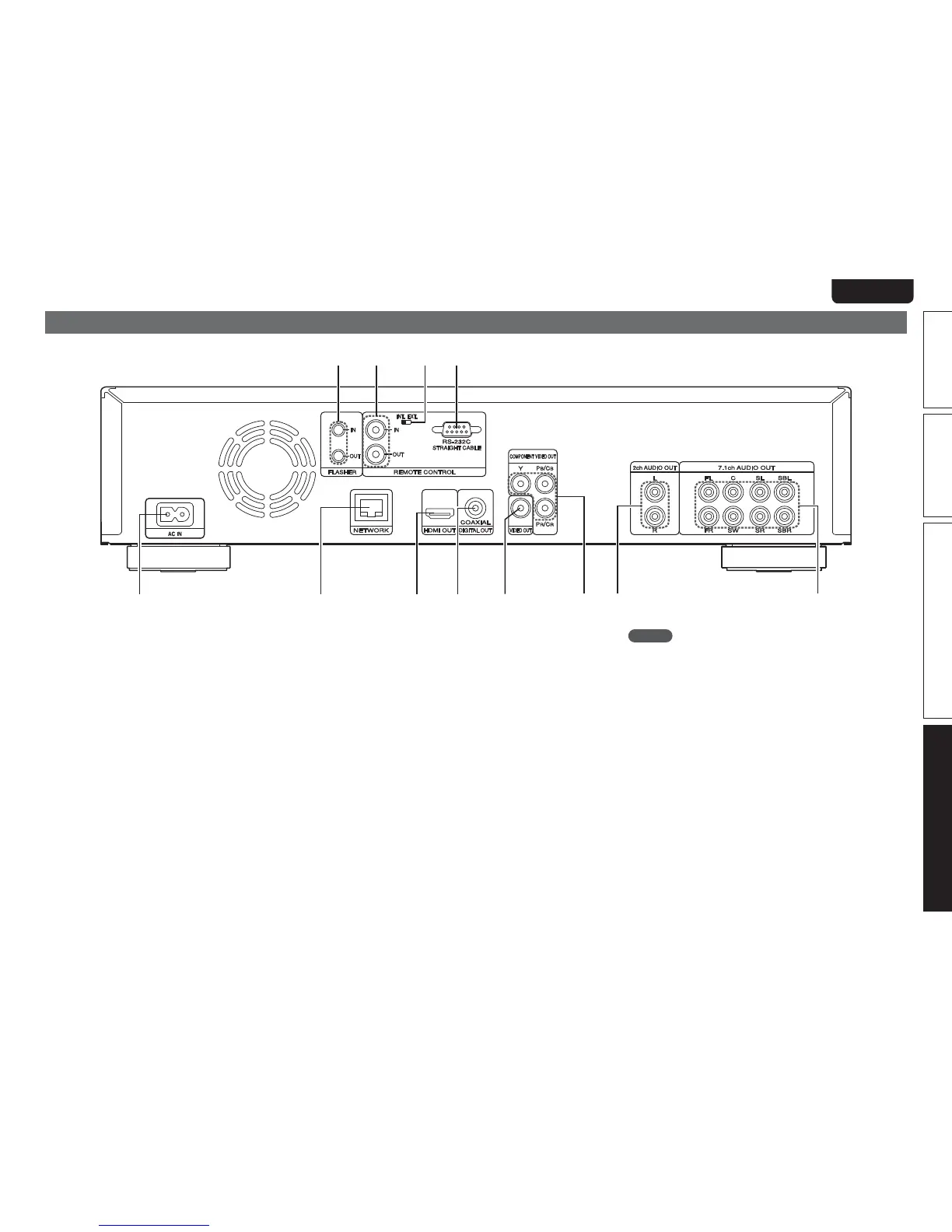
Rear panel
For buttons not explained here, see the page indicated in parentheses ( ).
Q2 Q0 oQ1
i
w
e
t
yu
r
q
q AC inlet (AC IN) ·········································································· (6)
w NETWORK connector ······························································ (30)
e HDMI OUT connector ································································ (5)
r DIGITAL OUT COAXIAL connector ·································· (12, 15)
t VIDEO OUT connector ·····················································(10 – 13)
y COMPONENT VIDEO OUT connectors ···························(10 – 13)
u 2ch AUDIO OUT connectors ············································· (13, 14)
For software recorded in multi-channel, analog signals that have
been down-mixed into 2 channels are output.
i 7.1ch AUDIO OUT connectors ·········································· (10, 14)
o RC-232C connector
Extension connector for future use.
Q0 REMOTE CONTROL IN/OUT connectors ······························· (31)
Q1 REMOTE CONTROL INT./EXT. switch ··································· (31)
Q2 FLASHER IN/OUT connectors ················································ (31)
Connect an external control device or other device for servicing.
NOTE
• Do not touch the inner pins of the connectors on the rear panel.
Electrostatic discharge may cause permanent damage to the unit.
• Do not put your finger or foreign object in the fan opening. Doing so
could cause injury or unit failure.



 To Next Page