44
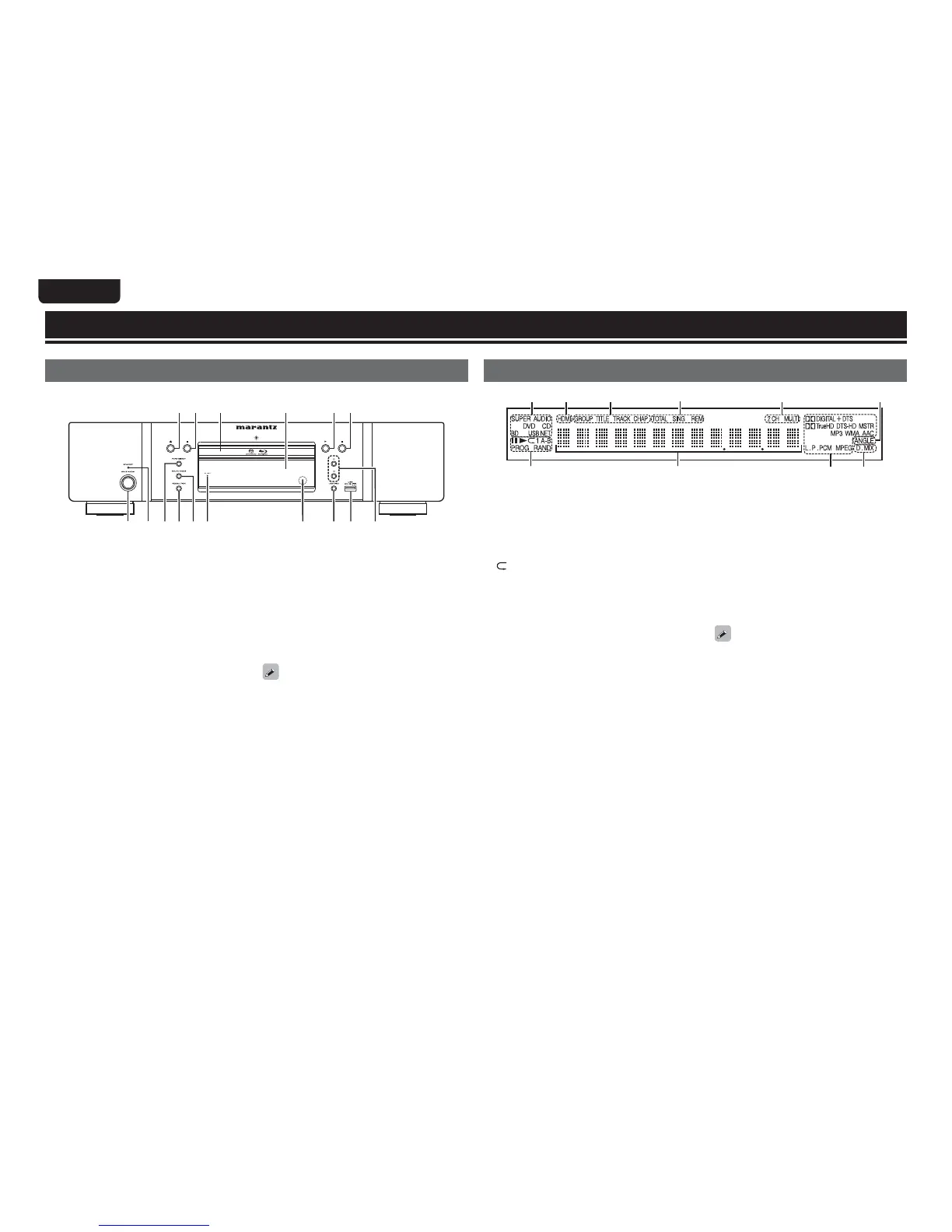
Front panel
For buttons not explained here, see the page indicated in parentheses ( ).
Q1Q2Q5Q6 Q3Q4
wq
r
te i ou Q0y
q Power operation button
(ON/STANDBY) ········································ (6, 8)
Turns power to this unit on and off (standby).
w STANDBY indicator ·································· (6, 8)
e PURE DIRECT button ································· (24)
r RESOLUTION button ··························· (13, 25)
t SOUND MODE button ······················· (17 – 19)
y FL OFF indicator ········································· (24)
u Remote control sensor ······························ (47)
i USB/DISC button ······································· (33)
o USB port ······················································ (29)
Q0 Reverse-skip/Forward-skip buttons
(8, 9) ················································· (20)
Q1 Stop button (2) ·········································· (20)
Q2 Play button (1) ······························· (7, 17 – 19)
Q3 Display ························································· (44)
Q4 Disc tray ························································ (7)
Q5 Pause/Still button (3) ································ (20)
Q6 Disc tray open/close button
(5) ···················································· (7, 17 – 19)
If Q2 or Q6 is pressed when the power is in standby,
the power is turned on.
Part names and functions
Display
wqer
tyuioQ0
q Playback mode indicators
1 : During Playback
3 : During pause and frame by frame playback
PROG : During program playback
RAND : During random playback
1 A-B : During repeat playback
w Information display
Displays various information or playback elapsed
time and so on of the disc.
e Playback format indicators
r Downmix indicator
Displayed when playing back downmix
permitted audio.
t Angle information indicator
Displayed when a scene on the currently playing
disc has been shot at various angles.
y Audio channel indicators
Displays the number of audio signal channels
during playback.
2CH : 2-channel playback
MULTI : Multi-channel playback
u Time mode indicators
TOTAL : Total time of Super Audio CD and CD
SING : Elapsed time of title/chapter/track/file
being played
REM : Remaining time of title/chapter/track/file
being played
i Group/Title/Track/Chapter indicators
o HDMI output indicator
Display when HDMI video or audio signals are
being output.
Does not display when the HDMI cable is
not correctly connected or when the HDMI
connection is not verified.
Q0 Media indicators
BD : BD
DVD : DVD-Video, DVD-R/+R/-RW/+RW
DVD AUDIO
: DVD-Audio
SUPER AUDIO CD : Super Audio CD
CD : CD
USB : USB memory device
NET : NETWORK
Displays the inserted media and contents via
Network.



 To Next Page