5
Basic version Advanced version Information
Simple version
Connect
1 234
1
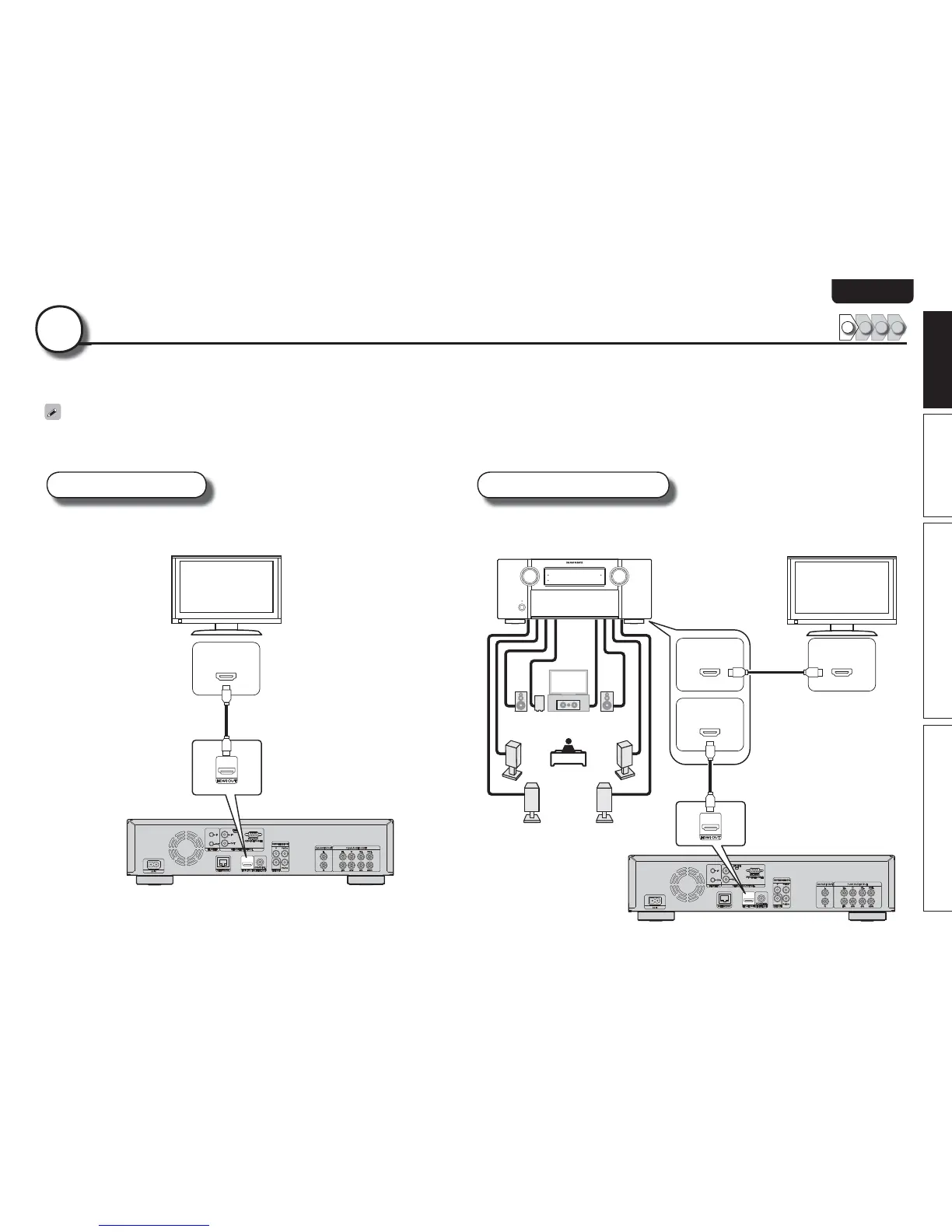
This section describes two methods for connecting this unit and a television, connecting directly or via an AV receiver.
Use an appropriate method depending on the television to be used. For the connection, use an HDMI cable (sold separately).
• If the device to be connected to the unit does not support the HDMI connection, see “Basic connections” (vpage10), and make connections depending upon the conditions.
• Use only HDMI (High Definition Multimedia Interface) cable that bears the HDMI logo (genuine HDMI product). Using cable without the HDMI logo (non-genuine HDMI product) may result in abnormal playback.
• When outputting Deep Color or 1080p, etc., we recommend you use “High Speed HDMI cable” or “High Speed HDMI cable with Ethernet” for enhanced high-quality playback.
TV AV receiver and TV
This method is for connecting the unit and a television directly. This method is for connecting the unit to an AV receiver.
*/
)%.*
TV
HDMI cable
(sold separately)
*/
)%.*
*/
)%.*
065
)%.*
FL FR
C
SL
SR
SW
SBL SBR
AV receiver
TV
HDMI cable
(sold separately)
HDMI cable
(sold separately)
FL Front speaker (L)
FR Front speaker (R)
C Center speaker
SW Subwoofer
SL Surround speaker (L)
SR Surround speaker (R)
SBL Surround back speaker (L)
SBR Surround back speaker (R)



 To Next Page