42
7
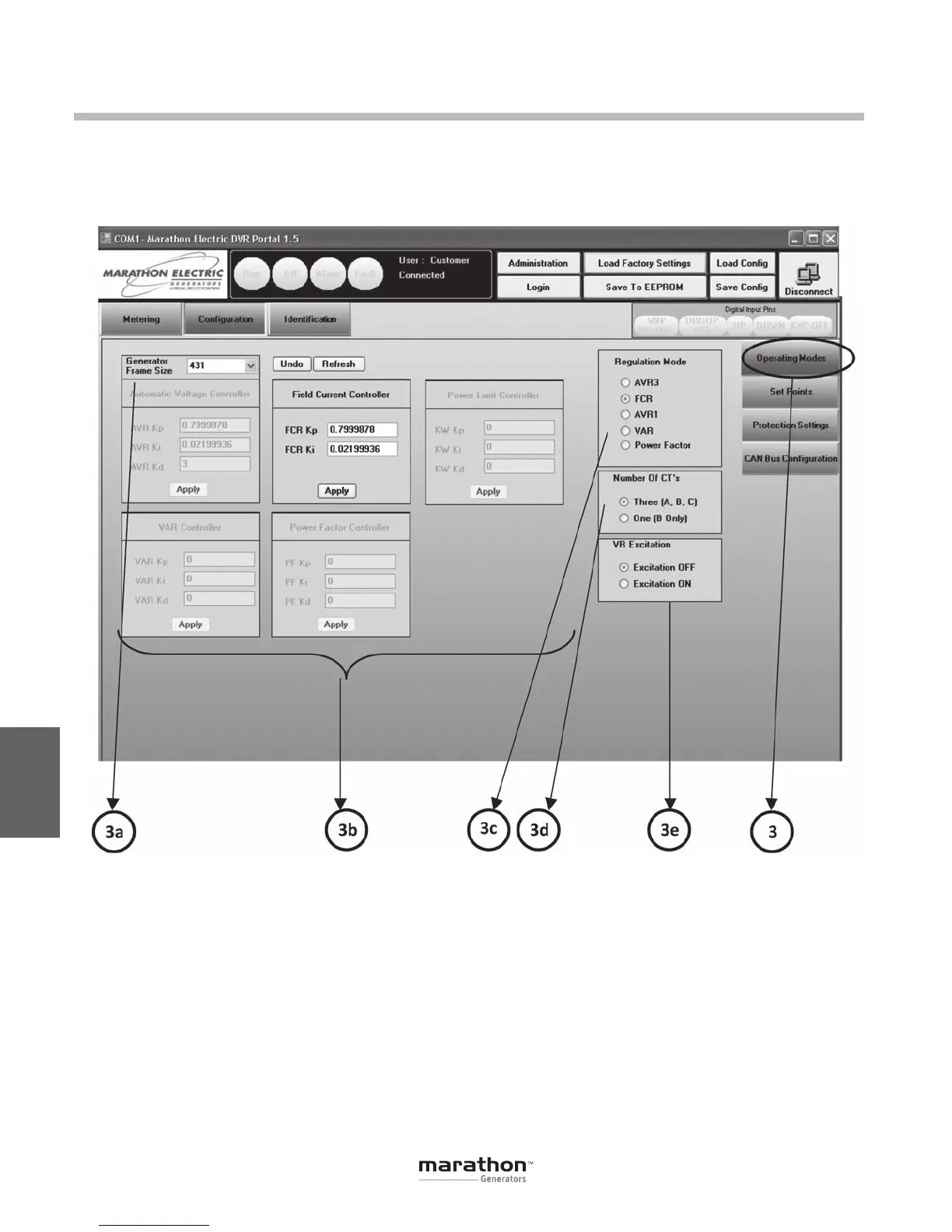
OPERATING MODES (3)
This panel contains controls for altering the
operating mode of the DVR
®
including dynamic
response and regulation.
DVRPortal
™
Graphical User Interface (GUI)
Generator Frame Size (3a)
This pull down menu selects stability settings for
the chosen frame size in AVR1 or AVR3 regulation
modes. Gains for the controller are displayed with
gray numbers in the panel below the pull-down
menu. Selecting the appropriate frame size chooses
appropriate proportional, integral and derivative gain
values. These gain values are not editable. For edit-
able custom gains, Generator Frame Size “CUST”
shouldbeselected.Choosing“CUST”willcopythe
gains from the previous selected frame size. The
grayed gains will then become active for editing.
Saving to EEPROM will store the edited gains to the
user settings.
PID Controller Gains (3b)
ThereisaseparatepanelforadjustingthePIDcon-
troller gains for each regulation mode as well as
for power limiting, if that feature is enabled. The
PID gains for AVR3 and AVR1 are described above
in “Generator Frame Size.”For FCR and Power
Limiting, gains are editable when the correspond-
ing regulation mode is selected. For the EC+, this
GPN046 04-13.indd 42 4/5/13 10:24 AM



 To Next Page