38
7
DVRPortal™ offers a means of programming the
regulator and monitoring generator performance.
This Windows
®
application software is available as
a free download from the Marathon Electric website,
www.marathonelectric.com.Withthissoftware,the
user will be able to change all of the programmable
parameters.
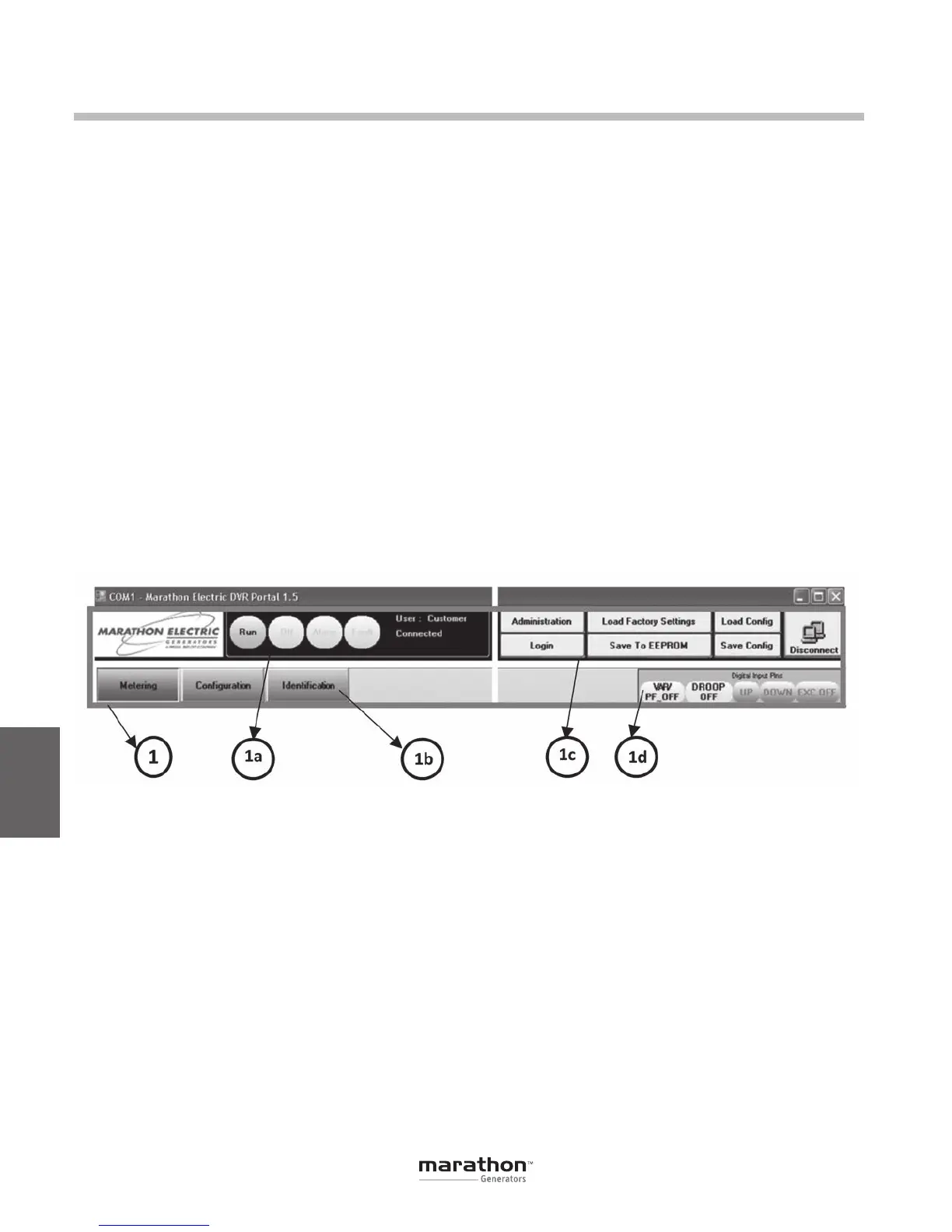
DVRPortal™ consists of a header, and three panels
(Metering, Configuration and Identification). The
header displays regulator status and basic adminis-
tration functions. The Metering tab displays metered
quantities and fault information.The Configuration
tab permits editing of all programmable parameters.
The Identification tab contains information specific
to the regulator and allows for custom identification
tags.
PARAMETER EDIT BUTTONS
On some of the parameter selection screens, you will
find the following buttons:
Apply – Pressing this button sends the values in
the currently active tab of DVRPortal™ to the DVR
®
RAM.
Undo–Pressingthisbuttondisplaysthevaluesjust
prior to the last edit in the currently active tab of
DVRPortal™. These values can then be sent to the
DVR
®
RAM by clicking on the Apply button.
Refresh – Pressing this button loads the values that
are presently in the DVR
®
RAM into the currently
active tab of DVRPortal™.
DVRPortal
™
Graphical User Interface (GUI)
HEADER (1)
This is the main panel in DVRPortal. It is present on all screens.
DVR
®
Status (1a)
The header panel includes four indicators that enun-
ciate the DVR
®
status:
• Run State: If the DVR
®
is in a run state, the
header will display a green run indicator.
• Off State: If the DVR
®
is in an excitation
off state, the header will display a gray off
indicator.
• Alarm State: If the DVR
®
is in an alarm
state, the header will display a yellow alarm
indicator.
• FaultState:IftheDVR
®
is in a fault state, the
header will display a red fault indicator.
Configuration tabs (1b)
The configuration tabs are buttons that access the
Metering, Configuration and Identification panels.
Administrative Buttons (1c)
The administrative buttons provide communication
port settings, user access, file manipulation and
storing to DVR
®
non-volatile memory.
Administration
This button allows the user to change serial port
communication settings and modify passwords.
Login
The default user type is Customer. The type of
user logged in is displayed in the header area. The
GPN046 04-13.indd 38 4/5/13 10:24 AM



 To Next Page